 ASPNetWorld
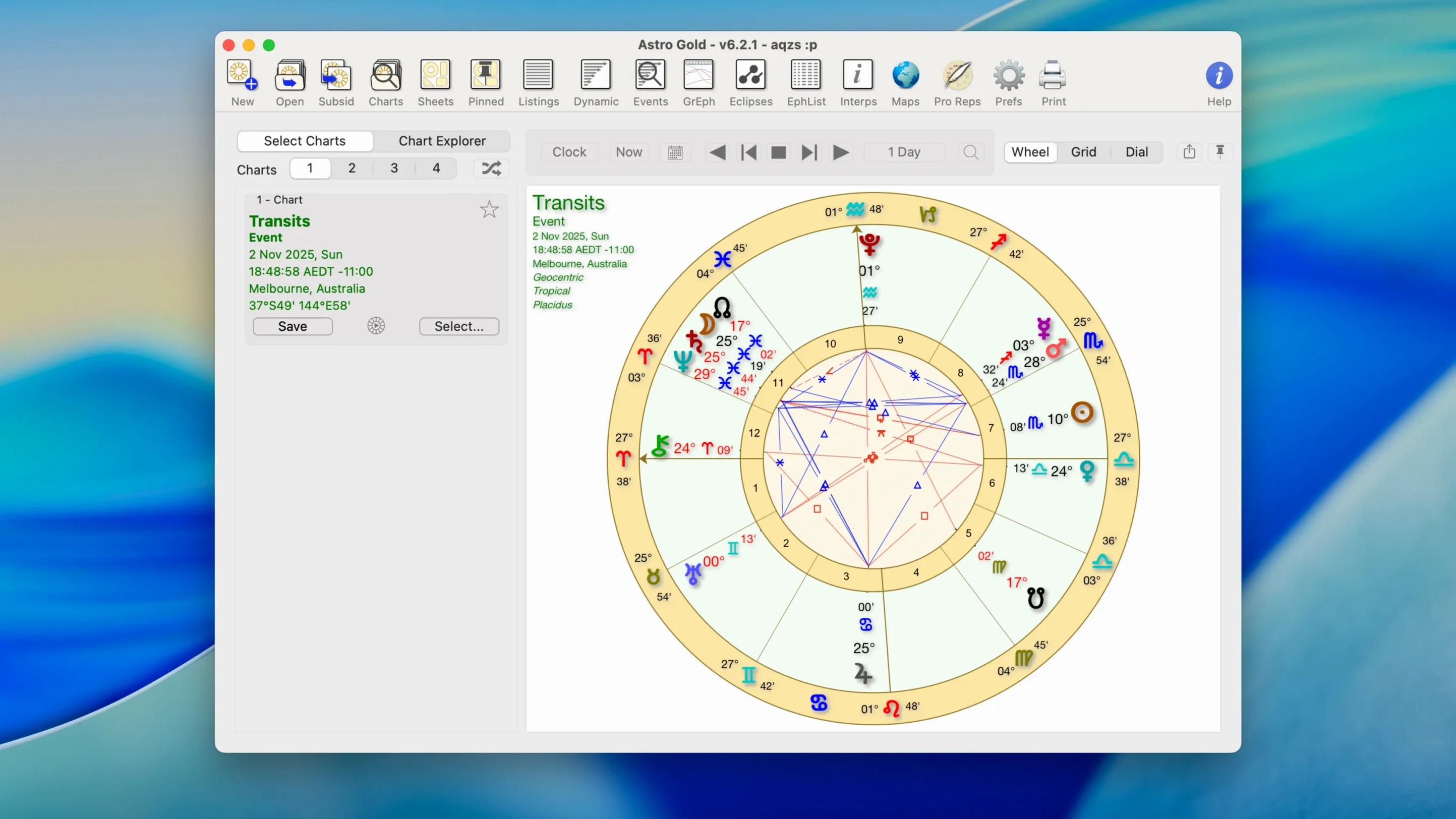
Over two dozen adjustable orb, aspect and planet filters sit at the heart of Astro Gold — enough to satisfy a detail-oriented traditionalist without overwhelming someone still learning which house system they prefer. The app opens with a clean, single-window workspace where you build a natal chart from a name, birth date and place, then switch between round and square chart styles with a click. Each chart redraws instantly as you tighten an orb or toggle a fixed star catalogue on and off.
Compatibility is straightforward: Astro Gold is a universal binary that runs natively on both ARM (Apple Silicon) and x86 64-bit Macs, so your M1, M2 or Intel machine is covered. The only requirement is macOS 10.13 or later, which means even a well-kept 2015 MacBook Pro can handle it. The interface is English throughout, and installation is the usual drag-and-drop affair from a disk image to your Applications folder.
Once a chart is on screen, the techniques stack up sensibly. You can pull up a synastry overlay for two charts, cast a relocation chart for a new city, or explore planetary lines in the astrocartography module. On the predictive side, symbolic directions and solar arc directions sit alongside medieval and modern methods, so you are not locked into one school of thought. The fixed star catalogue is a nice touch for horary and electional work — it includes the major stars with their traditional meanings, ready to layer onto any chart you have open.
A morning consultation with a relocation client
Imagine a consulting astrologer whose client is weighing up a job offer in Lisbon against staying put in Glasgow. She opens Astro Gold at half past eight, pulls up the client's natal chart — already saved from an earlier session — and clicks the relocation tab. Typing "Lisbon" into the place field snaps the angles to the new coordinates. Within seconds she is comparing the shifted Ascendant and Midheaven, noticing how Jupiter moves closer to the relocated MC. She toggles the planetary lines overlay to check which astrocartography curves run through Portugal, then emails a quick screenshot to the client before her first coffee. The whole sequence, from launching the app to hitting send, takes under four minutes. That kind of speed matters when a client is waiting for an answer before a recruitment deadline.
Progressions module stays blank until you set a target date
New users often open Astro Gold, cast their first chart and immediately hunt for the progressed Moon — only to find they have not set a secondary progression date. The progressions module needs a target date; without one it shows nothing, which can feel like a bug if you skip the manual. A second mistake is ignoring the orb and planet filter panels entirely. A beginner will leave everything at the default wide orbs, print a synastry chart with forty aspect lines criss-crossing it, and conclude the relationship looks chaotic when really the chart is just too crowded to read. Tightening the orbs for synastry to something like three degrees for conjunctions and oppositions makes a dramatic difference. A third trap is forgetting to save the chart file. Astro Gold does not auto-save a freshly cast chart, so if the app quits or the Mac restarts, that carefully entered birth data is gone. Getting into the habit of hitting Save As right after entering the birth details saves a lot of quiet swearing.
From a blank screen to a solar return forecast
Let's walk through a complete solar return workflow. Start by launching the app and choosing New Natal Chart from the File menu. Enter the client's full name, birth date, birth time and birthplace. The app geocodes the city automatically, pulling coordinates from its internal atlas. Click OK and the natal chart appears in the default round style, aspect lines drawn according to your current orb settings.
Now save the chart immediately — File > Save As, give it a clear filename like "Emma_Natal_1992.astrogold". With the natal chart still open, go to the Returns menu and select Solar Return. A dialogue asks for the year you want to cast; pick the current year and confirm. Astro Gold calculates the exact moment the Sun returns to its natal position and draws a second chart. The default view shows the return chart alone, but switching to a bi-wheel display overlays it on the natal, so you can see at a glance which house the return Ascendant falls into and where the return Sun sits. Toggle the fixed star catalogue on to check whether any return angles conjoin Regulus or Spica — useful for weighing up the tone of the year ahead. From there you can print the bi-wheel, export it as a PDF, or save the return as a separate file for later comparison with transits.
Living with Astro Gold day to day
On a 2020 Intel MacBook Air with 8 GB of RAM, the app launches cold in about three seconds and sits at around 180 MB of memory with three charts open. Scrolling through an ephemeris table is smooth, and switching between tropical and sidereal zodiacs redraws the chart before your finger leaves the mouse button. I have left it running alongside Safari, Mail and a bloated Notes database without the fan spinning up — it is genuinely light on resources for what it does.
Stability has been uneventful in the best way. Across dozens of sessions building composite charts, layering Davison midpoints onto synastry wheels and flicking through solar arc progressions, the app has not crashed once. The only quirk worth mentioning is that the astrocartography map can take a beat longer to render if you have ten planetary lines visible and scroll rapidly across the globe, but that is more a graphical redraw pause than a freeze. For an app that juggles medieval techniques beside modern predictive methods and a full fixed star catalogue, the daily experience is remarkably quiet and predictable — exactly what you want when a client is watching you work.
- macOS 10.13 or later
- Apple Silicon (ARM) or Intel (x86 64-bit) Mac
- Interface language: English
Questions I keep hearing
Does Astro Gold run on Apple Silicon Macs?
Yes. Version 6.2.1 is a universal binary that runs natively on both ARM (Apple Silicon) and x86 64-bit Intel Macs, with macOS 10.13 as the minimum system requirement.
What chart types and techniques does Astro Gold include?
It covers natal charts, synastry, relocation charts and astrocartography. Techniques range from medieval to modern, with symbolic directions, solar arc directions and a built-in fixed star catalogue.
Questions from the class 0
Sign in or join the class to ask a question.
Nobody has asked anything yet. If you have used it on a real job, say what the file did.
Also on the Mac Apps shelf
The whole Mac Apps shelf attn LED
Flashes your MacBook camera LED silently so you can spot urgent notifications during deep work.
attn LED
Flashes your MacBook camera LED silently so you can spot urgent notifications during deep work.
 AutoCAD
Drafts precise 2D and 3D technical drawings inside a workspace rebuilt around Apple's Metal engine.
AutoCAD
Drafts precise 2D and 3D technical drawings inside a workspace rebuilt around Apple's Metal engine.
 Aspect Ratio
Lives in your menu bar and calculates precise, locked proportional dimensions for any layout task.
Aspect Ratio
Lives in your menu bar and calculates precise, locked proportional dimensions for any layout task.
 Bandizip
Browses inside archives before extraction and handles a wide range of compression formats in one window.
Bandizip
Browses inside archives before extraction and handles a wide range of compression formats in one window.
 BAO Mask Avenger
Builds complex, animated After Effects masks from a series of simple spline strokes.
BAO Mask Avenger
Builds complex, animated After Effects masks from a series of simple spline strokes.
 Bartender
Hides, rearranges, and tidies your menu bar icons so only the essentials remain visible.
Bartender
Hides, rearranges, and tidies your menu bar icons so only the essentials remain visible.
 Beauty Box Photo
Smooths skin and reduces shine in portraits automatically, saving you from manual retouching.
Beauty Box Photo
Smooths skin and reduces shine in portraits automatically, saving you from manual retouching.
 BetterDisplay Pro
Unlocks full resolution, brightness, and colour control for any display attached to your Mac.
BetterDisplay Pro
Unlocks full resolution, brightness, and colour control for any display attached to your Mac.