 ASPNetWorld

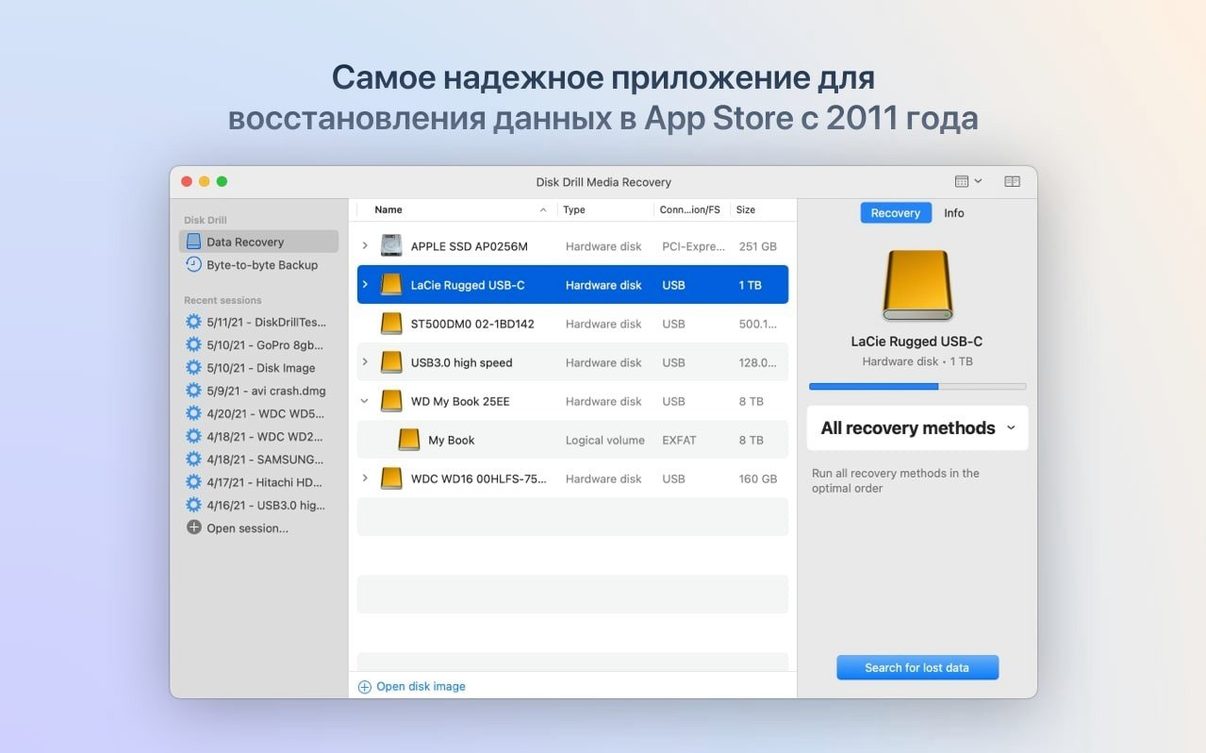
If you have ever stared at your Mac's empty Trash icon with regret, you already understand what Disk Drill 6.3.2326 sets out to fix. Think of it less as an undo button and more as a careful archaeologist for your storage. It digs through the raw data that your Mac swears is gone, piecing together fragments of documents, photos, and media from internal drives, external disks, USB sticks, and even memory cards from cameras or Kindle devices.
But will it run on your setup? The current release is happy on any Mac from the last decade or so, requiring macOS 10.15.7 Catalina or newer, and it runs natively on both Apple Silicon and 64-bit Intel processors. There is no architectural asterisk to worry about—it simply works. Once installed, its reach extends well beyond your Mac's own drive. You can plug in an Android phone, an iPhone, or an iPad and recover call history, contacts, and messages, alongside the usual media files.
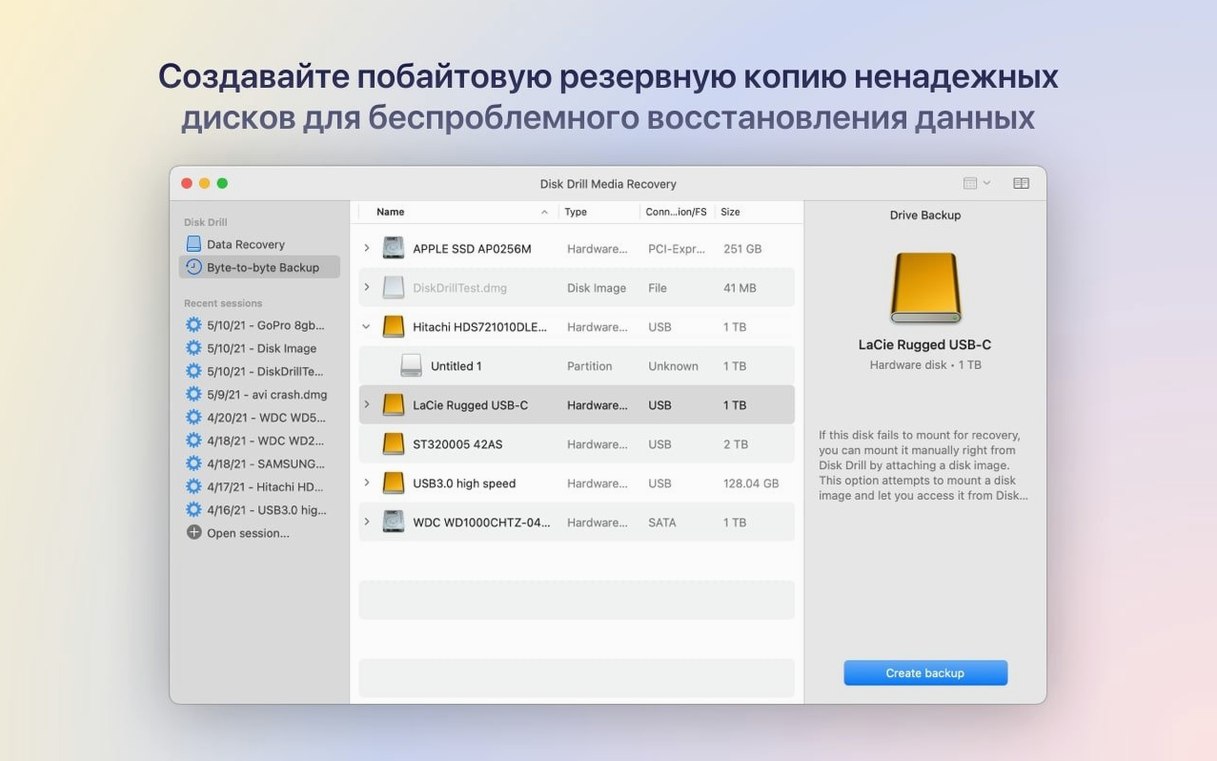
Beyond straightforward recovery of a deleted file, the software includes genuinely useful extras that live alongside the scanning engine. A disk cleanup tool keeps clutter in check, a duplicate finder reclaims wasted space, and a disk health monitor watches for signs of trouble before they become catastrophes. You can even create byte-to-byte backups of a failing drive to give yourself a safe playground for recovery attempts, or restore data from a device you accidentally formatted.
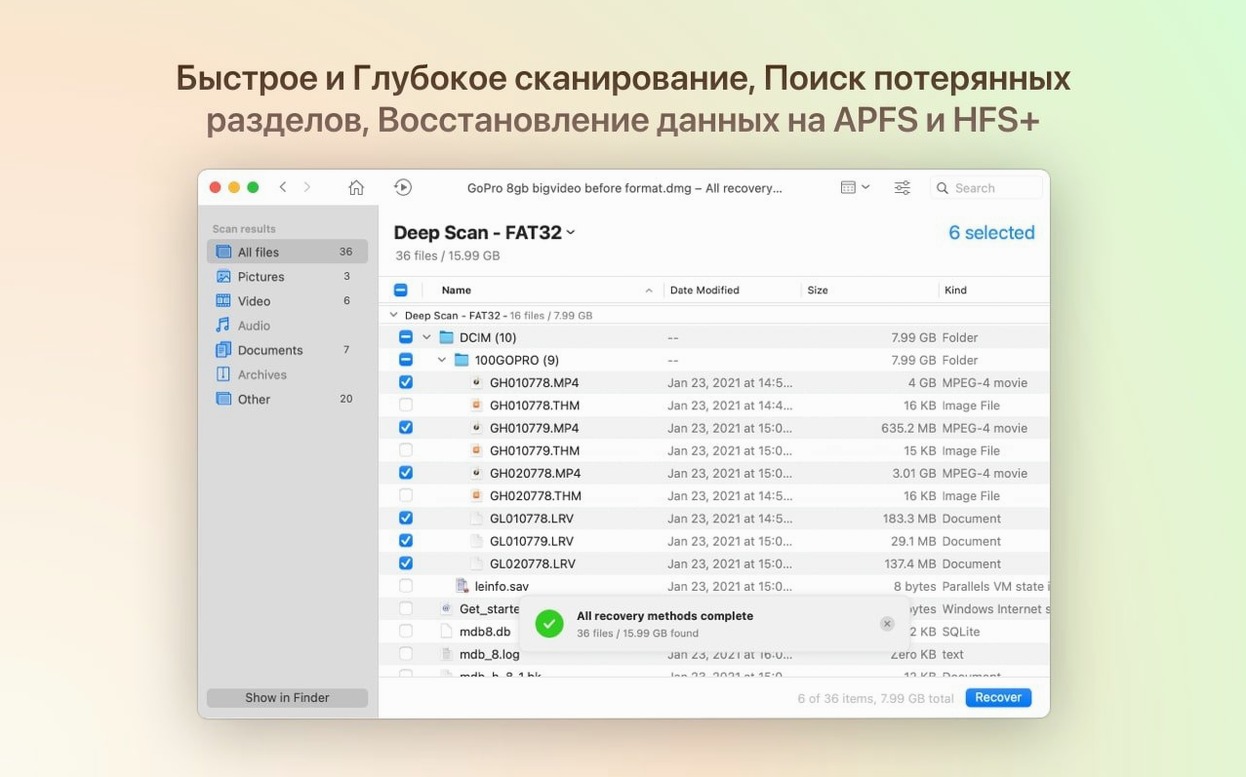
And that scanning engine has had a quiet polish recently. The core recovery algorithms now handle encrypted APFS partitions more gracefully and can detect lost BitLocker volumes. For audio and document nerds, the file signature recognition has learned to spot .m4a, .p8, and .pfx files, and a nasty bug that ignored .dng raw photos has been squashed. It is a recovery toolkit that feels less like a forensic utility and more like a well-stocked desktop organiser for your data.
Disk Drill sits in a crowded little corner of the Mac utility market, and the name most people mention in the same breath is EaseUS Data Recovery Wizard for Mac. Both applications scan quickly and recover from the same broad family of storage media, and both offer a preview panel so you can confirm a file is intact before you commit to restoring it. Where the two drift apart is breadth. EaseUS tends to focus tightly on the core recovery job and does it with a clean, single-purpose interface. Disk Drill, by contrast, bundles the duplicate finder, the disk health monitor, and the cleanup tool right into the same window. If you only want to pull back a handful of accidentally deleted spreadsheets once a year, the leaner approach may feel refreshing. If you would rather keep a Swiss Army knife sitting in your menu bar for the day a drive starts clicking, Disk Drill’s extras earn their keep.
Another comparison worth making is with R‑Studio for Mac, which has a long pedigree among IT technicians and forensic examiners. R‑Studio is extraordinarily capable with RAID arrays, exotic file systems, and deeply damaged partition tables, and it gives you fine‑grained control over scanning parameters that Disk Drill deliberately hides behind a friendlier face. The trade‑off is approachability. R‑Studio’s interface can feel like staring at the dashboard of an airliner, whereas Disk Drill is built for someone who just wants to recover their holiday photos without first learning what an inode is. Professionals who need hex‑level access will gravitate toward R‑Studio; everyone else will find Disk Drill the more comfortable ride.
A third cousin, PhotoRec, deserves a mention because it is open‑source and immensely capable at signature‑based carving. But it runs inside Terminal and offers no previews, no filtering by file type, and no hand‑holding of any kind. Disk Drill essentially wraps that raw carving power inside a graphical workflow, adds live previews, and extends the reach to iOS and Android devices. The gap is less about recovery depth—both can find files the operating system has disowned—and more about whether you want to type command‑line flags or click a big “Search for lost data” button.
A stuck scan is usually a failing drive fighting back
A scan that seems to hang forever is usually not frozen; it is wrestling with a physically failing drive. When Disk Drill encounters a sector it cannot read, it retries, and on a mechanical disk with a dying head stack that can slow progress to a crawl. The sensible move is to stop the scan, create a byte‑to‑byte DMG backup of the drive using the built‑in tool, and run the scan against the image instead. You spare the original hardware from further stress and often get a faster, more complete result.
Another common frustration is the discovery that recovered files have lost their original names. This happens when the file system’s directory records have been overwritten and Disk Drill has to fall back on raw carving—it finds the data by recognising file signatures, but the metadata that held the name and folder structure is gone. Files come back with generic labels like “file001.jpg.” The best defence is to recover as soon as you realise something is missing, before macOS writes new data over those directory entries.
On Apple Silicon Macs, a few users find the deep scan cannot see their internal drive at all unless they grant the extension Full Disk Access in System Settings. The prompt does not always appear reliably after installation. If you launch the app and the internal SSD seems invisible, head to System Settings > Privacy & Security > Full Disk Access, unlock the padlock, and toggle the switch for Disk Drill. Restart the app and the drive should appear.
How Disk Drill fits into the wider macOS ecosystem
Disk Drill does not live in isolation. The byte‑to‑byte backup feature writes DMG images that mount natively in the Finder, so you can browse the backed‑up file structure with any Mac tool, not just the one that created it. The recovery engine also understands Time Machine local snapshots; if you have a file that vanished between backup runs, you can sometimes point Disk Drill at the snapshot volume and find a version Time Machine never catalogued.
For photographers, the software slots neatly between the card reader and Lightroom. You can set Disk Drill to auto‑mount and scan memory cards the moment they appear, recover missing DNG or RAW files, and drop them straight into a watched folder that Lightroom picks up automatically. The fix for the .dng detection bug in this release makes that pipeline reliable again, so you are no longer left wondering why the tool sees JPEGs but ignores the raw files sitting right next to them.
And there is a subtle harmony with Spotlight. Disk Drill’s quick scan reads Spotlight index residues, which means files you deleted recently often reappear with their original names and folder paths intact. The longer you wait—and the more macOS re‑indexes the drive—the thinner that trail becomes, so the recovery window is really a partnership between Disk Drill and the system metadata that Spotlight maintains.
Recovering a deleted project folder before a tight deadline
Imagine a freelance video editor, late on a Thursday evening, who has just emptied a project folder by mistake. She grabs a disk drill dmg from her utilities archive, mounts it, and drags the app into Applications. On first launch the helper asks for Full Disk Access; she grants it, and the main window opens with a clear list of attached volumes.
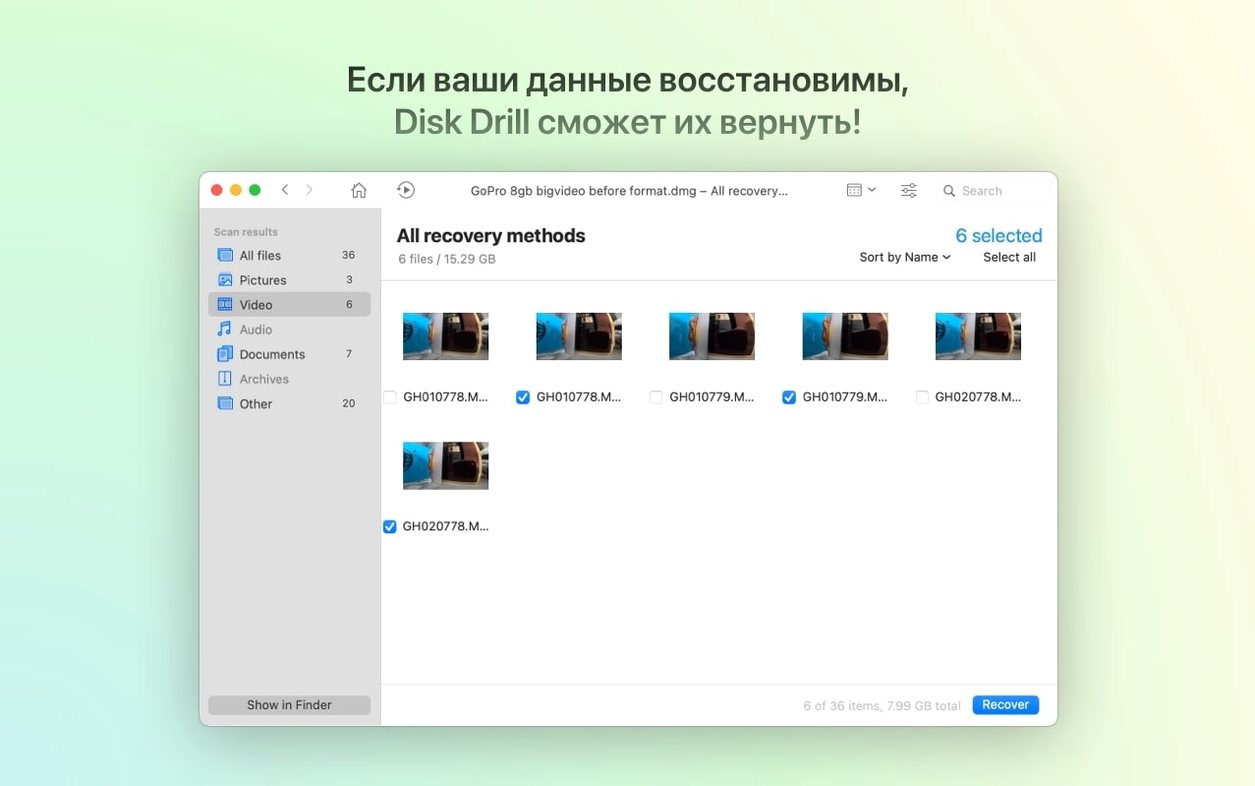
She selects the external SSD where the project lived and clicks “Search for lost data.” Disk Drill runs a quick scan first—essentially a polite conversation with what remains of the file system—and within a minute she can see a folder tree that still carries the project name and a list of .prproj and .mov files. She ticks the ones that matter, hits Recover, and chooses a folder on her desktop. Most files arrive with their names intact and open without complaint in Premiere Pro.
Not quite satisfied—she is missing one audio stem—she clicks “Deep scan” and lets it run while she makes a cup of tea. The deep scan ignores the directory and hunts for raw file signatures across every block. When she returns, the results are sorted by type, and under “Audio” she finds the missing .m4a file with a generic name. She previews it straight from the results table, confirms it is the right take, and recovers it. Total elapsed time, under twenty minutes. The session ends with her enabling the Recovery Vault feature for that SSD, so next time the file system has a much longer memory.
Three distinct types of Mac user who lean on it daily
Disk Drill is not really aimed at a single niche. It is broad enough that three quite different kinds of Mac user find it indispensable. The first is the accidental minimalist—someone who periodically spring‑cleans their drive, empties the Trash with a flourish, and then realises they deleted the only copy of a tax return or a client invoice. For them, the quick scan and the Recovery Vault are the stars of the show, because they make the recovery feel less like a forensic operation and more like pulling a file out of a well‑labelled drawer.
The second group is photographers and videographers who juggle dozens of memory cards. They appreciate that Disk Drill recognises camera card file systems and can recover not just JPEGs but proprietary RAW formats, including .rwl files from Panasonic cameras and the previously tricky .dng format now fixed in this release. The ability to mount an iPhone or Android device and pull off lost media without a separate phone‑recovery tool keeps their kit bag lighter.
The third audience is IT support staff and the kind of person who gets called when a friend’s Mac “makes a funny noise and won’t start.” The enterprise‑grade tools—byte‑to‑byte imaging, partition recovery, BitLocker detection, and the S.M.A.R.T.‑based disk health monitor—turn Disk Drill into a portable triage kit. It is the sort of tool you keep on a bootable USB stick, ready to scan a machine that will not even reach the login screen. That versatility is what makes a disk drill enterprise search a logical move for teams managing fleets of Macs, because a single utility can handle everything from a corrupted APFS container to a photographer’s formatted SD card without reaching for separate, specialist tools.
Version 6.3.2326 sharpens the scanning tools and fills a few notable gaps in file support.
- Detects and recovers lost BitLocker partitions.
- Adds recognition for .p8 and .pfx certificate and key files.
- Teaches the ACR module to identify and recover .m4a audio.
- Improves the handling of encrypted APFS volumes.
- Fixes a bug where byte-to-byte DMG scans would fail.
- macOS 10.15.7 or newer
- Apple Silicon or 64-bit Intel processor
Questions I keep hearing
Can Disk Drill recover data from a formatted USB drive?
Yes, it scans formatted devices to find the raw file structures left behind and can rebuild your data from them.
Questions from the class 0
Sign in or join the class to ask a question.
Nobody has asked anything yet. If you have used it on a real job, say what the file did.
Also on the Mac Apps shelf
The whole Mac Apps shelf DisplayBuddy
Lets you control every external display’s brightness and colour straight from the menu bar.
DisplayBuddy
Lets you control every external display’s brightness and colour straight from the menu bar.
 Depth Scanner
Generates a true depth map from a single photo so you can refocus after the shot.
Depth Scanner
Generates a true depth map from a single photo so you can refocus after the shot.
 Dehancer Pro
Rebuilds the colour and grain of sixty-two real film stocks on your digital images.
Dehancer Pro
Rebuilds the colour and grain of sixty-two real film stocks on your digital images.
 DMG Canvas
Builds polished disk-image installers with a custom background and licence window.
DMG Canvas
Builds polished disk-image installers with a custom background and licence window.
 Default Folder
Adds a toolbar of favourite folders to every Open and Save dialog.
Default Folder
Adds a toolbar of favourite folders to every Open and Save dialog.
 DockView
Shows a live preview of any app’s open windows when you hover over its Dock icon.
DockView
Shows a live preview of any app’s open windows when you hover over its Dock icon.
 Deep Glow
Generates a physically plausible, spill-friendly glow right on your timeline.
Deep Glow
Generates a physically plausible, spill-friendly glow right on your timeline.
 dBpoweramp Music Converter
Converts batches of audio files between formats while keeping your metadata intact.
dBpoweramp Music Converter
Converts batches of audio files between formats while keeping your metadata intact.