 ASPNetWorld

Which Macs run DMG Canvas?
DMG Canvas 4.2.3 requires macOS 11 (Big Sur) or newer, and it runs natively on both Intel and Apple Silicon machines. If your Mac can open the latest Xcode, it can almost certainly open this. There is no iPad or Windows version — it stays firmly on the desktop where disk images live.
A polished disk image turns a first install into a confident moment
Disk images are the .dmg files you double-click to install software, and their design says more about an app than most developers realise. DMG Canvas turns that moment into something polished and repeatable. Before you install, here is how the workflow feels.
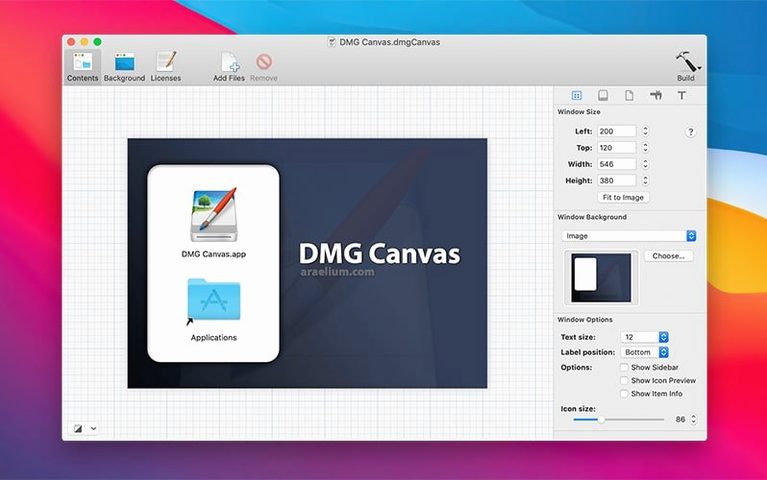
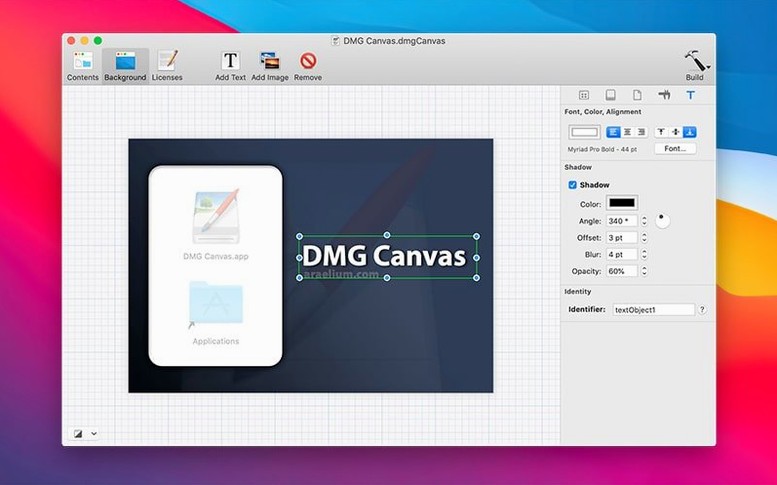
- Design the window. Drop a background picture in, set the volume name, and choose the icon size and layout. You drag icons exactly where you want them — the app remembers the positions so the finished image opens looking neat every time.
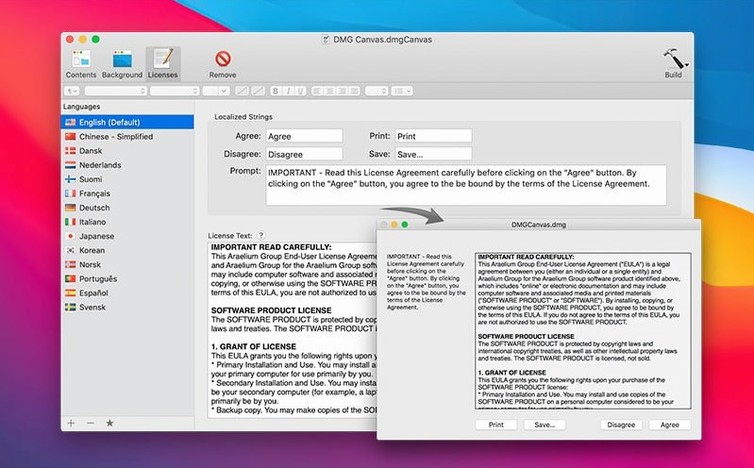
- Add the payload. Point DMG Canvas at your .app bundle and any extras, like a Read Me file or a custom EULA. You can set a licence agreement that the Finder shows before the user copies anything.
- Choose the options. Tick a box for compression to shrink the download, or enable encryption if you need to protect the contents with a password.
- Build it. Hit build and you get a ready-to-ship disk image. Because the settings are saved in a project file, you can hand the job to a script and let Xcode call it during build automation — no clicking required the second time.
The interface is in English, and the whole thing feels like a quiet utility that does one job without fuss. Once you have a project tuned, it slots into a normal build workflow and stays out of the way.
Where DMG Canvas sits in a Mac developer’s toolkit
DMG Canvas isn’t trying to be a Swiss army knife — it leaves the code-signing and notarization to Apple’s command-line tools, and it doesn’t package your app for you. Its job is narrower: take a collection of files that already exist, give them a visual home, and wrap them in a disk image that feels intentional. That means it slots in after Xcode has produced a signed .app bundle and before you upload anything to a server. Many developers chain it with a shell script that runs xcodebuild, then hands the build path to DMG Canvas via its command-line interface. The app watches the project file for changes, so if you tweak the background image or the licence text, the next automated build picks it up without extra clicking.
macOS itself treats a DMG as a virtual volume, so DMG Canvas leans on a handful of system-level behaviours: the Finder’s .DS_Store file stores window position and icon layout, the DiskImages framework handles mounting, and the volume’s resource fork carries the custom icon. Because the app lets you set a licence agreement, it also writes the SLA.r resource the Finder consults before presenting the “Agree” dialogue. Understanding that chain isn’t essential to use the tool, but it explains why a project file feels sturdy — you are really assembling instructions the operating system already speaks, just wrapped in a visual editor.
A worked example: building a themed DMG for a side-project app
Imagine you have a small macOS utility called ClipboardPaste and you want its disk image to match the app’s muted teal colour scheme. You start by opening a blank DMG Canvas project and setting the volume name to “ClipboardPaste 1.0”. The background image is a 600×400 PNG you made in Pixelmator Pro — a gentle gradient with the app icon ghosted on the right. You drag it onto the canvas, and the live preview redraws instantly.
Next you drop the compiled ClipboardPaste.app into the layout area, along with a plain-text Read Me that explains the keyboard shortcut. You want the app icon large enough to read at a glance, so you set the icon size to 128px in the inspector and drag the .app bundle into the top-left quadrant. The Read Me sits below it, smaller and quieter. You tick the “Include licence agreement” box, paste a short EULA into the text view, and choose a sparse disk image format with compression — the final DMG ends up about 40% smaller than the uncompressed folder.
You save the project as ClipboardPaste.dmgcanvas and add a single line to your build script: dmgcanvas build ClipboardPaste.dmgcanvas output/ClipboardPaste.dmg. From that point on, every Xcode archive that succeeds produces a finished DMG without you opening the app again. That is the moment DMG Canvas stops being a design tool and starts being a quiet cog in a repeatable pipeline.
Independent devs skip the Finder‑window fudge and see the preview update live
Independent Mac developers building their first shareware or open-source tool get the most immediate reward, because the app removes the guesswork from a step they might otherwise fudge with a Finder window and a screenshot. They see the preview update in real time, which makes it easy to experiment with icon placement until the window feels balanced.
Small studios with a handful of shipping products gain something else: consistency. A single DMG Canvas project file becomes a template — swap the background artwork and the .app bundle, and every product leaves the build server with the same window size, the same icon scale, and the same licence flow. That matters when users install three tools from the same developer and nothing in the experience jars.
People who distribute confidential builds internally lean on the encryption option. A disk image that requires a password before it mounts is a simple way to add a layer of friction that stops random colleagues from opening a pre-release build they found on a shared drive. The compression checkbox also helps here — encrypted images tend to be larger, so squeezing them down keeps internal distribution snappy.
If you are the sort of user who has ever needed a dmg canvas crack mac search to work around a missing feature, the real answer is usually automation rather than patching — once the command-line build is wired into Xcode, the app rarely needs direct attention, and the time saved across a dozen releases quickly outweighs the initial setup effort.
- macOS 11 or later
- Apple Silicon or Intel processor
- Interface language: English
Questions I keep hearing
Can DMG Canvas encrypt the disk image?
Yes, it supports encryption so you can password-protect the finished .dmg file.
Does it work with Xcode build automation?
Absolutely — you can save a project and trigger the build from a script, which fits neatly into an automated Xcode workflow.
Can I change how the icons look inside the disk image?
You can set the icon size and drag icons to exact positions, so the Finder window always opens with the layout you designed.
Questions from the class 0
Sign in or join the class to ask a question.
Nobody has asked anything yet. If you have used it on a real job, say what the file did.
Also on the Mac Apps shelf
The whole Mac Apps shelf DockView
Shows a live preview of any app’s open windows when you hover over its Dock icon.
DockView
Shows a live preview of any app’s open windows when you hover over its Dock icon.
 DisplayBuddy
Lets you control every external display’s brightness and colour straight from the menu bar.
DisplayBuddy
Lets you control every external display’s brightness and colour straight from the menu bar.
 Disk Drill
Recovers deleted files and lost data from any drive you connect to your Mac.
Disk Drill
Recovers deleted files and lost data from any drive you connect to your Mac.
 Depth Scanner
Generates a true depth map from a single photo so you can refocus after the shot.
Depth Scanner
Generates a true depth map from a single photo so you can refocus after the shot.
 Dehancer Pro
Rebuilds the colour and grain of sixty-two real film stocks on your digital images.
Dehancer Pro
Rebuilds the colour and grain of sixty-two real film stocks on your digital images.
 DriveDx
Warns you while a drive is still in the failing stage, before it dies completely.
DriveDx
Warns you while a drive is still in the failing stage, before it dies completely.
 Default Folder
Adds a toolbar of favourite folders to every Open and Save dialog.
Default Folder
Adds a toolbar of favourite folders to every Open and Save dialog.
 Deep Glow
Generates a physically plausible, spill-friendly glow right on your timeline.
Deep Glow
Generates a physically plausible, spill-friendly glow right on your timeline.