 ASPNetWorld

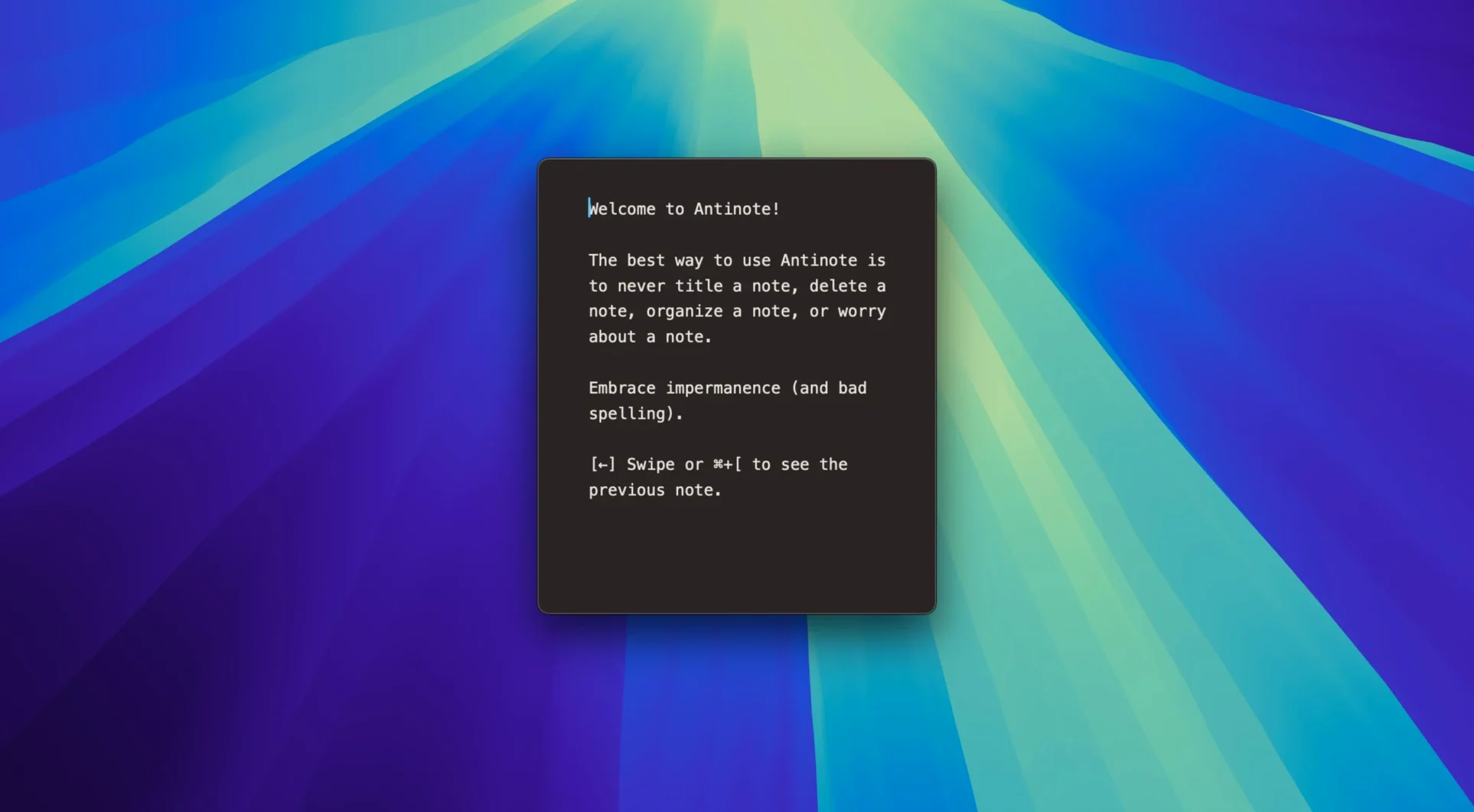
1. Summon it with a hotkey
From anywhere on your Mac, hit the global shortcut and Antinote slides into view — no switching windows, no hunting in the Dock. It’s built for the thought you’ll lose in three seconds unless you write it down immediately.
2. Do the maths inline
Type £45.50 * 3 and press equals. Antinote works out context-based maths right inside the text, so a quick budget check or a unit conversion never leaves the scratchpad. You can also set up compact custom calculators with variables if a sum repeats across a session.
3. Let it count and measure
Highlight a block of text and Antinote can count words, lines, or characters, and even gauge reading ease. The search is instant — start typing and the note filters before you finish.
4. Swipe to the next thought
A swift gesture moves between notes. It feels close to flicking through paper scraps, which matters when each note is a separate, disposable thing. Pasted text arrives stripped of formatting and indentation, so everything sits flush with the scratchpad’s plain aesthetic.
5. Send it somewhere permanent
Most notes are temporary, but the one that sticks can be exported straight into Apple Notes, Obsidian, or Bear. And if you delete too hastily, File > Recover Notes from The Void pulls the last batch back — a small safety net for a tool that otherwise encourages letting go.
Taking a thought from a messy email signature to a clean piece of working text shows where Antinote earns its keep. Say you need to pull three addresses from a forwarded message, total the associated costs, and set a reminder to ring the supplier. Copy the whole block of text — signatures, indents, hyperlinks and all — and paste it into a fresh note. The formatting vanishes immediately; what’s left is plain, readable text. Drag-select the addresses and use the instant count to confirm you’ve got three. Below them, type =(146.20 + 89.00 + 204.50) * 1.2 and hit equals to see the VAT-inclusive total appear inline. Finally, scribble a quick checklist with ! call glazing supplier re: lead time and ! email invoice to surveyor — the exclamation marks toggle them as to-do items. A few keystrokes later and the whole job is unscrambled without opening a spreadsheet or a dedicated task app.
Launches cold in under a second on macOS 14
Built entirely in SwiftUI, Antinote launches cold in well under a second on both Apple Silicon and Intel machines running macOS 14. The global hotkey response feels immediate, even when the app hasn’t been used for hours — there’s no background daemon chewing through resources, just a lightweight helper that listens for the shortcut. Memory usage hovers around 45–60 MB during normal scratchpad work, climbing modestly if you run the built-in OCR on a dozen images in quick succession. I’ve yet to see it trigger the fans on an M1 MacBook Air, which tells you something about how restrained the draw is.
The timer module — stopwatch, countdown and pomodoro — ticks away reliably in the background while you switch between notes, and the clipboard watcher never seems to miss a paste. Stability has been steady through the 2.1.x cycle; the double-fire bug on first launch was the main wobble, and that’s now patched. If you’re hunting for an antinote mac app that feels as swift as a built-in utility, the performance here matches the promise.
Minor snags and how to smooth them out
No app is friction-free, and Antinote has a few behaviours worth knowing about upfront. The most common confusion comes from the clipboard watcher: if you copy a password or a snippet you’d rather not see pasted, the automatic capture can feel intrusive. Switching the watcher off in Preferences until you need it stops that, and you can still paste manually.
OCR works well with crisp screenshots and scanned documents, but a crumpled photo taken at an angle will produce gibberish — flatten the image or crop tightly to the text first. A handful of users who try an antinote free download expecting a long-form note keeper find the temporary-scratchpad philosophy disorienting; the trick is to think of each note as a Post-it rather than a document. Export frequently if a note starts to matter. The link-shortening feature is clever, but it occasionally clips a URL at an unexpected boundary — tapping the shortened link and choosing “expand” in the context menu reveals the full address.
If the global hotkey ever stops responding after an OS update, re-registering it in the app’s General preferences usually restores it within seconds. And should you need a clean start, deleting the container folder in ~/Library/Containers/ resets everything — just remember to export anything you want to keep first.
Version 2.1.2 is a swift hotfix. On the first launch of 2.1.1, some shortcuts were firing twice — this release stops that. The update also keeps the recovery feature introduced earlier: deleted notes can still be rescued through File > Recover Notes from The Void.
- macOS 14 or later
- Apple Silicon and Intel Macs
Questions I keep hearing
Is Antinote meant to replace my main notes app?
No — it’s a scratchpad for temporary thoughts and fast calculations. You send anything lasting to Apple Notes, Obsidian, or Bear.
What happens if I accidentally delete a note?
Use File > Recover Notes from The Void. The feature retrieves recently discarded notes, so a slip of the finger isn’t the end of the story.
Does Antinote keep text formatting when I paste something in?
It strips all formatting and indentation. The scratchpad stays plain, which keeps the focus on the content rather than the styling.
Questions from the class 0
Sign in or join the class to ask a question.
Nobody has asked anything yet. If you have used it on a real job, say what the file did.
Also on the Office shelf
The whole Office shelf Adobe Acrobat Pro
Edits, signs and combines PDFs across desktop, mobile and web.
Adobe Acrobat Pro
Edits, signs and combines PDFs across desktop, mobile and web.
 Bear
Writes and organises private notes in plain Markdown, with optional formatting preview and flexible tags.
Bear
Writes and organises private notes in plain Markdown, with optional formatting preview and flexible tags.
 ABBYY FineReader PDF
Turns a scanned page image into searchable, editable text.
ABBYY FineReader PDF
Turns a scanned page image into searchable, editable text.
 Cardhop
Lets you search, add, or email a contact by typing a single plain-English sentence.
Cardhop
Lets you search, add, or email a contact by typing a single plain-English sentence.
 Complete Anatomy
Reveals the true spatial dance of nerves and organs that a flat textbook page cannot show.
Complete Anatomy
Reveals the true spatial dance of nerves and organs that a flat textbook page cannot show.
 DjVu Reader Pro
Opens and lets you read archived DjVu documents and scanned books reliably.
DjVu Reader Pro
Opens and lets you read archived DjVu documents and scanned books reliably.
 EndNote
Collects, organises, and cites your research references inside a word processor.
EndNote
Collects, organises, and cites your research references inside a word processor.
 Final Draft
Formats your screenplay as you type, keeping character names and cues tidy.
Final Draft
Formats your screenplay as you type, keeping character names and cues tidy.