 ASPNetWorld

Before installing a reference manager, people tend to ask the same handful of practical questions about how it actually works day to day.
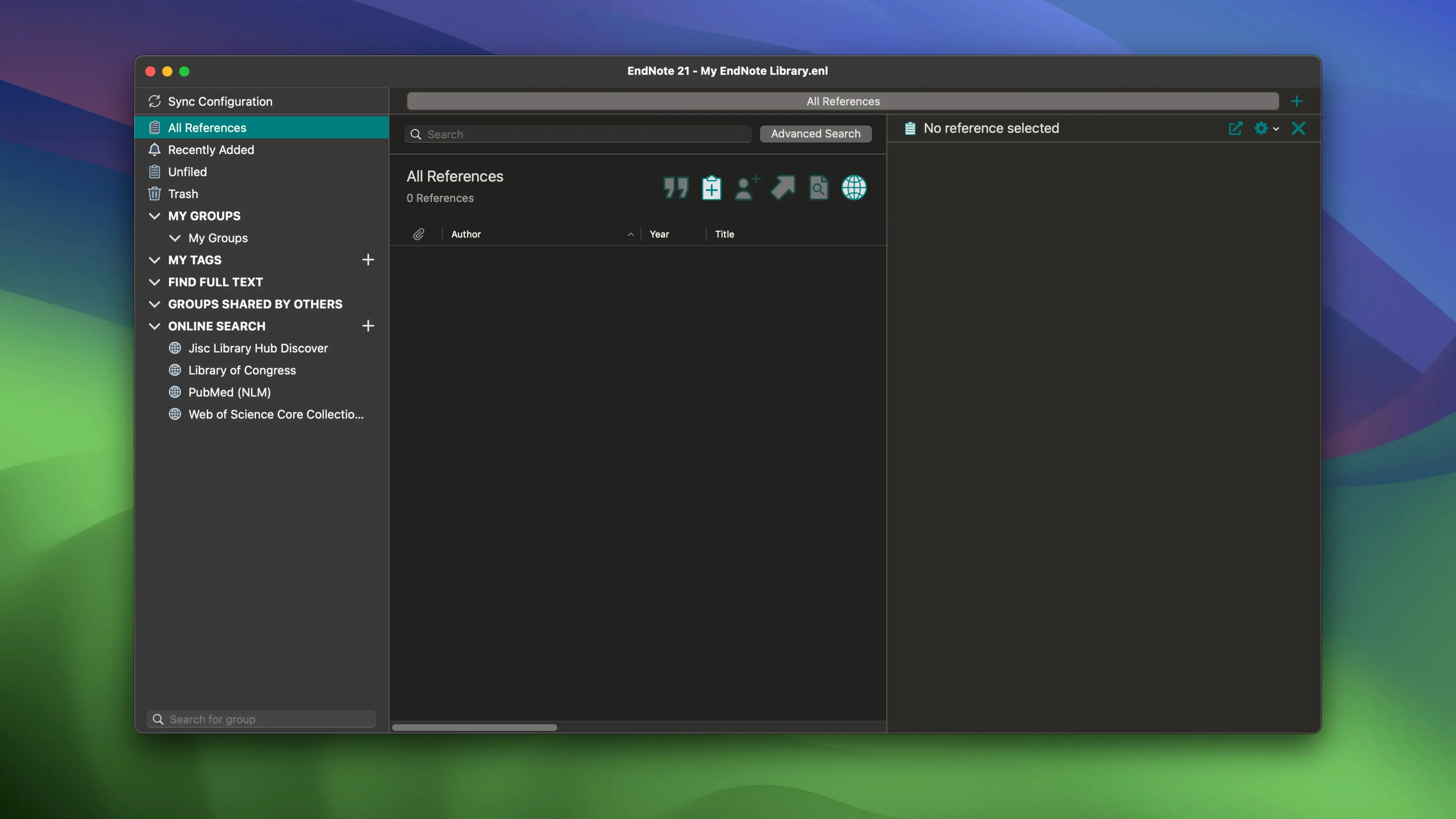
Syncing a library across devices — EndNote can keep your entire library, including PDFs, notes and annotations, consistent between the desktop app and EndNote Web, so a reference added on one Mac appears on another.
Cloud restore — if you move to a new computer or need to recover your work, you can restore a library from the cloud rather than relying on local backups alone.
Working with Word and Google Docs — the Cite While You Write plug-in connects directly to Microsoft Word, and there is Google Docs integration too, so you can insert citations and build a bibliography without leaving your document.
Organising a growing library — tags can be colour-coded, which makes it easier to spot groups of references at a glance, whether you are sorting by theme, priority or chapter.
Finding source material — the software can search for bibliographic data, books, journals and articles, pulling in the details you need to cite properly.
Undoing changes to a reference — previous versions of individual references can be restored, which is a quiet safety net when an edit goes too far.
A full Chinese interface arrived without the release notes making a fuss
Version 2025.3 (22.3.0.22265) arrived without fanfare, but two things in it matter more in daily use than the release notes let on. The first is Simplified Chinese localization — not just a menu translation, but a full interface switch that makes EndNote usable for researchers working in Chinese-language institutions or collaborating across borders. If your system language is set to Simplified Chinese, the entire reference management workflow now speaks your language.
The second is a bug fix that sounds tiny on paper but had been tripping people up for months. Previously, Word could crash when the Select Matching References dialogue appeared during a Cite While You Write session — the kind of crash that loses a paragraph or three if you haven't saved recently. That is now resolved. If you had grown wary of inserting citations in a long document, you can stop holding your breath.
Tag colours mapped to thesis chapters keep a multi-year project sane
PhD students writing a thesis live inside EndNote for eighteen months and come out the other side with a formatted bibliography and a thousand-yard stare. They lean on the colour-coded tags harder than most — one colour per chapter, another for "read later," another for "supervisor mentioned this once." The cloud restore feature pays for itself the day a laptop dies two weeks before submission.
Librarians and research assistants tend to value the search integration differently. They're not just building one library; they're curating shared collections, checking that journal abbreviations match house style, and pulling bibliographic data from obscure catalogues. The ability to restore previous versions of a single reference saves them from a particularly specific kind of embarrassment: the one where a DOI gets overwritten by accident and nobody notices for six months.
Collaborative writing teams — think multi-author journal papers or grant applications — get the most out of the sync engine. One person adds a reference on their office Mac, another sees it appear in EndNote Web, and the Google Docs integration means nobody has to merge five separate bibliographies by hand the night before the deadline. That's the theory, anyway; in practice, it works smoothly enough that the team can forget it's happening.
Right-click any tag to colour it instantly
A few conveniences are easy to miss during the first month of use.
- Right-click a tag to colour it instantly. The colour picker is right there in the context menu — no need to open a preferences pane. If you tag heavily, this saves a surprising number of clicks per session.
- Hold Option while dragging a PDF onto a reference. This forces EndNote to rename the file according to your current naming scheme, which is useful when you've tweaked the convention and want older attachments to match.
- The sync status icon lives in the bottom-left corner. A quick glance tells you whether your library has finished talking to the cloud. If it's spinning after you've closed the lid and reopened it, a manual sync from the Tools menu usually nudges things along.
- Cite While You Write can insert a citation mid-paragraph without breaking your train of thought. The keyboard shortcut inside Word is Command-Y on a Mac — faster than reaching for the mouse and hunting through the toolbar.
One workflow that seasoned users settle into: tag new imports immediately, even if the tag is just "unsorted." An untagged library grows unwieldy faster than you expect, and the colour system works best when you can scan for a shade rather than read a list.
After the library opens, scrolling stays responsive on Apple Silicon
EndNote has never been a lightweight application, and version 2025.3 still asks for a moment of patience when opening a library with several thousand references. Once loaded, though, scrolling and searching feel responsive on both Intel and Apple Silicon Macs — the M-series machines have a noticeable edge when re-indexing a large PDF collection after a sync. Memory usage tends to hover around 400–600 MB during normal work, climbing toward a gigabyte if you're running a full-text search across hundreds of attached papers.
Stability is vastly improved from the days when a Word crash could take down both applications. The fix for the Select Matching References bug closes one of the last remaining crash triggers that users could reliably reproduce. In practice, the combination of EndNote, Word and a large document now stays upright through long writing sessions — provided your macOS version is 10.14 or newer, as the software expects.
Battery impact is modest for a reference manager. It's not a background process that chews through power when idle, but a bulk PDF import will spin the processor for a while. If you're working unplugged in a library, do your heavy importing at the start of the session and let the indexing finish before you go back to writing.
Some researchers keep a second, minimal library open alongside their main one — a temporary holding pen for references they're still evaluating. This keeps the active library leaner and sidesteps the slight pause that comes with opening a 10,000-reference file. It is not an official feature, just a habit that emerges from how the software performs under real workloads.
- macOS 10.14 or later
- Works on both Intel and Apple Silicon Macs
Questions I keep hearing
Can I use EndNote on more than one Mac?
Yes, you can sync your library across multiple devices, including PDFs and annotations, so your references stay current wherever you are working.
Questions from the class 0
Sign in or join the class to ask a question.
Nobody has asked anything yet. If you have used it on a real job, say what the file did.
Also on the Office shelf
The whole Office shelf Final Draft
Formats your screenplay as you type, keeping character names and cues tidy.
Final Draft
Formats your screenplay as you type, keeping character names and cues tidy.
 DjVu Reader Pro
Opens and lets you read archived DjVu documents and scanned books reliably.
DjVu Reader Pro
Opens and lets you read archived DjVu documents and scanned books reliably.
 GoodNotes
Brings your handwritten iPad notes to the Mac desktop for editing and organising.
GoodNotes
Brings your handwritten iPad notes to the Mac desktop for editing and organising.
 GrandTotal
Creates clean, custom invoices and estimates free of spreadsheet clutter.
GrandTotal
Creates clean, custom invoices and estimates free of spreadsheet clutter.
 GraphPad Prism
Combines statistics, graphing and curve fitting in a single research workspace.
GraphPad Prism
Combines statistics, graphing and curve fitting in a single research workspace.
 Complete Anatomy
Reveals the true spatial dance of nerves and organs that a flat textbook page cannot show.
Complete Anatomy
Reveals the true spatial dance of nerves and organs that a flat textbook page cannot show.
 iA Writer
Clears away every toolbar so only your current sentence stays in focus.
iA Writer
Clears away every toolbar so only your current sentence stays in focus.
 Cardhop
Lets you search, add, or email a contact by typing a single plain-English sentence.
Cardhop
Lets you search, add, or email a contact by typing a single plain-English sentence.