 ASPNetWorld

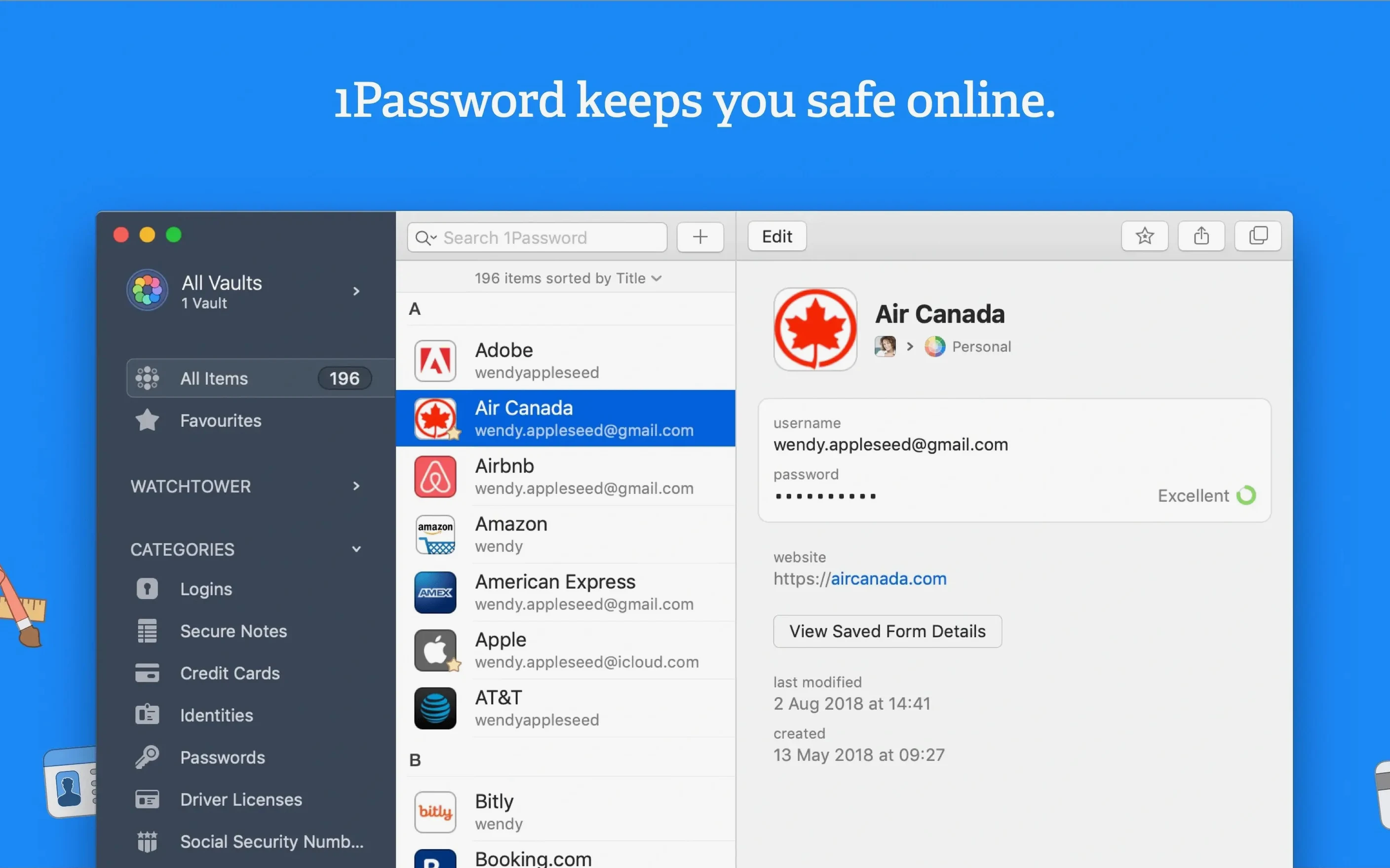
Watchtower is the part of 1Password that quietly gets on with the job of keeping an eye on your vault. It flags weak passwords, spots ones you've used more than once, and even checks if any of your logins have turned up in a known data breach. It's the sort of feature that works away in the background until it finds something worth telling you about, which is exactly how a good security tool should behave.
Will it handle more than just passwords?
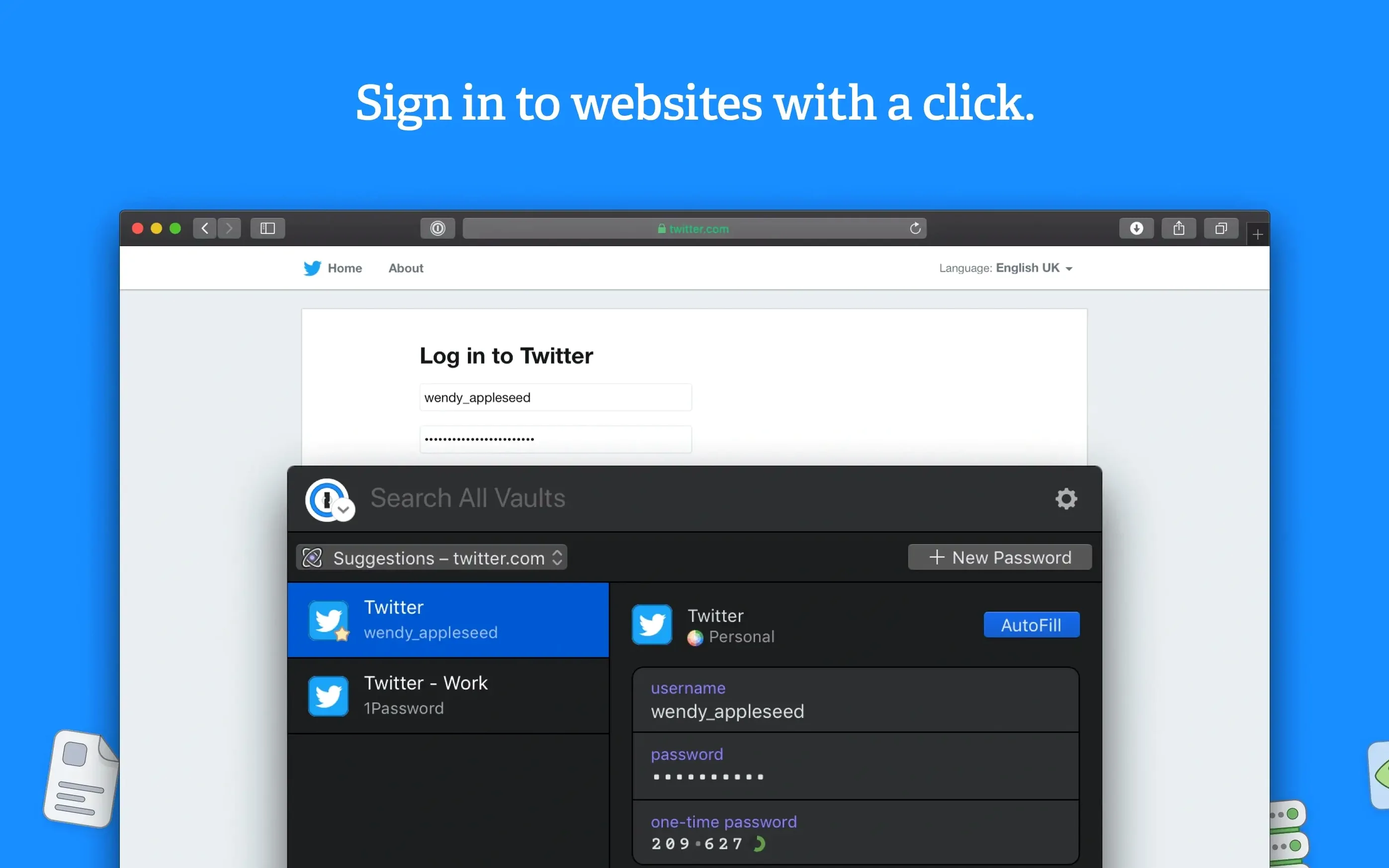
Yes, and that tends to be the second question people ask. Beyond logins, 1Password stores credit card details, secure notes, software licences, and anything else you'd rather keep encrypted. The browser integration is where most of the daily action happens: you can save a login as you sign up to a site, then have the app fill it in for you on the next visit. No copying, no pasting, no squinting at a sticky note. Watchtower also nudges you if a site is still using unencrypted HTTP or hasn't enabled two-factor authentication, which is a small detail that makes a big difference to how safe a login actually feels.
What about running it on an older Mac?
This version asks for macOS 10.12 and an Intel processor. It's a 64-bit app, so it'll sit happily on anything from a dusty MacBook to a more recent Intel machine, as long as the operating system is up to that minimum. The interface speaks a long list of languages — Afrikaans, Greek, Simplified Chinese, Hebrew, and many more — which reflects the fact that a password manager travels with you, no matter what keyboard you type on.
Scenario: the freelancer who juggles too many client accounts
Imagine a graphic designer who works with eight different clients, each with their own hosting provider, stock image library and project-management tool. Every log-in starts to feel like a memory test. The browser’s built-in password saving helps for a while, then it saves the wrong credentials on a staging site and suddenly twenty minutes vanish into a password reset loop. This is the person who needs a single vault that separates each client cleanly and doesn’t mix up the FTP password with the Slack login.
Rather than maintaining a spreadsheet or a notes file — both of which feel about as secure as leaving the keys in the front door — the designer stores each client’s details in distinct 1Password items, perhaps with a tag for the client name. Credit card entries sit in their own section, ready to be filled when it’s time to renew a domain or pay for stock assets. Watchtower sits quietly in the corner, flagging the fact that the same weak password was used across three hosting panels, and the designer fixes it before a client notices.
Unlock once in the morning and the browser fills everything else
Picture Monday morning. The Mac wakes, the coffee is hot, and the designer opens the browser. That’s the first moment 1Password makes itself felt: the extension is already waiting, unlocked with a master password typed once at the start of the day. Head to the first client’s project board. The log-in page loads and a single click — or a keyboard shortcut — fills both fields. No typing, no guessing.
Next, the designer needs to buy a font licence for another client. The checkout page appears, and 1Password offers to fill the stored credit card details. The security code still needs to be typed manually, which is a sensible touch — the vault holds the number and expiry, but the CVV stays off the clipboard unless you deliberately copy it. The purchase completes in under a minute.
After lunch, Watchtower sends a gentle alert. A news site the designer logs into once a month has appeared in a breach database. The password was unique, so the risk is contained, but it’s still time to change it. 1Password’s password generator suggests a 16-character string with symbols and numbers, and the designer accepts it. The new credential is saved and synced. The whole interruption takes ninety seconds, and the rest of the afternoon belongs to actual work.
Shorten the auto-lock timer so a stepped-away Mac locks itself
Out of the box, 1Password works in a way that suits most people, but a few tweaks make it feel more like your own. The first thing to visit is the Security section of the preferences, where you can set the auto-lock timing. The default is often fine, but if you work in a shared space, dropping it to a few minutes is a sensible move.
Next, look at the browser extension’s behaviour. You can decide whether 1Password should offer to save new logins automatically or prompt you first. The prompt route gives you more control and avoids the vault filling up with half-saved test accounts. While you’re there, turn on the option to show the password generator directly in form fields, so you’re not hunting through menus every time you create an account.
Finally, give Watchtower a proper tour. By default it checks for compromised logins, weak passwords and reused passwords. If you want to be thorough, enable the checks for two-factor authentication availability and unencrypted HTTP. Those are off by default but they’re the sort of quiet, useful warnings that make the feature earn its keep.
Managing work, freelance, and family logins in one place
People who manage logins across several contexts — work, freelance, family admin — get the biggest lift. If you’re only protecting a single email account and a streaming service, the built-in browser tools might feel like enough, but once the number of credentials climbs past a couple of dozen, the difference between a proper vault and a browser’s memory starts to widen quickly.
Mac users who still run older Intel machines are another group that benefits. This version asks for macOS 10.12 or later, so it runs on hardware that might not see the latest operating system updates. The fact that it speaks so many languages also makes it a natural fit for households where more than one keyboard layout is in play — a family where one person types in German and another in Japanese can share the same vault structure without friction.
Lastly, anyone who has ever stared at a password reset screen at eleven o’clock at night will appreciate the way 1Password turns “I think the password had a capital letter and an exclamation mark” into a non-event. It’s not just about security; it’s about reclaiming the brain-space that used to be occupied by half-remembered logins. That’s a quiet kind of upgrade, and for the right kind of Mac user it’s the one that matters most.
- macOS 10.12 or later
- Intel 64-bit processor
Questions I keep hearing
Does 1Password check if a site has been compromised?
Yes, Watchtower cross-references your saved logins against databases of known breaches and alerts you if a password needs changing.
Questions from the class 0
Sign in or join the class to ask a question.
Nobody has asked anything yet. If you have used it on a real job, say what the file did.
Also on the Mac Apps shelf
The whole Mac Apps shelf A Better Finder Attributes
Corrects mangled file dates and EXIF timestamps in batches.
A Better Finder Attributes
Corrects mangled file dates and EXIF timestamps in batches.
 ACDSee Photo Studio
Helps you cull, adjust and organise RAW photos from your card.
ACDSee Photo Studio
Helps you cull, adjust and organise RAW photos from your card.
 Adguard
Blocks ads and trackers across your browsers and apps.
Adguard
Blocks ads and trackers across your browsers and apps.
 Adobe Premiere Rush
Trims phone footage into a finished video with minimal fuss.
Adobe Premiere Rush
Trims phone footage into a finished video with minimal fuss.
 Affinity Designer
Turns rough sketches into crisp, scalable vector artwork and layouts.
Affinity Designer
Turns rough sketches into crisp, scalable vector artwork and layouts.
 Affinity Photo
Edits photos nondestructively with selective adjustments and raw processing.
Affinity Photo
Edits photos nondestructively with selective adjustments and raw processing.
 Affinity Publisher
Lays out multi-page documents combining text and high-res images for print.
Affinity Publisher
Lays out multi-page documents combining text and high-res images for print.
 AI Transcription
Converts batches of spoken recordings into searchable written text.
AI Transcription
Converts batches of spoken recordings into searchable written text.