 ASPNetWorld
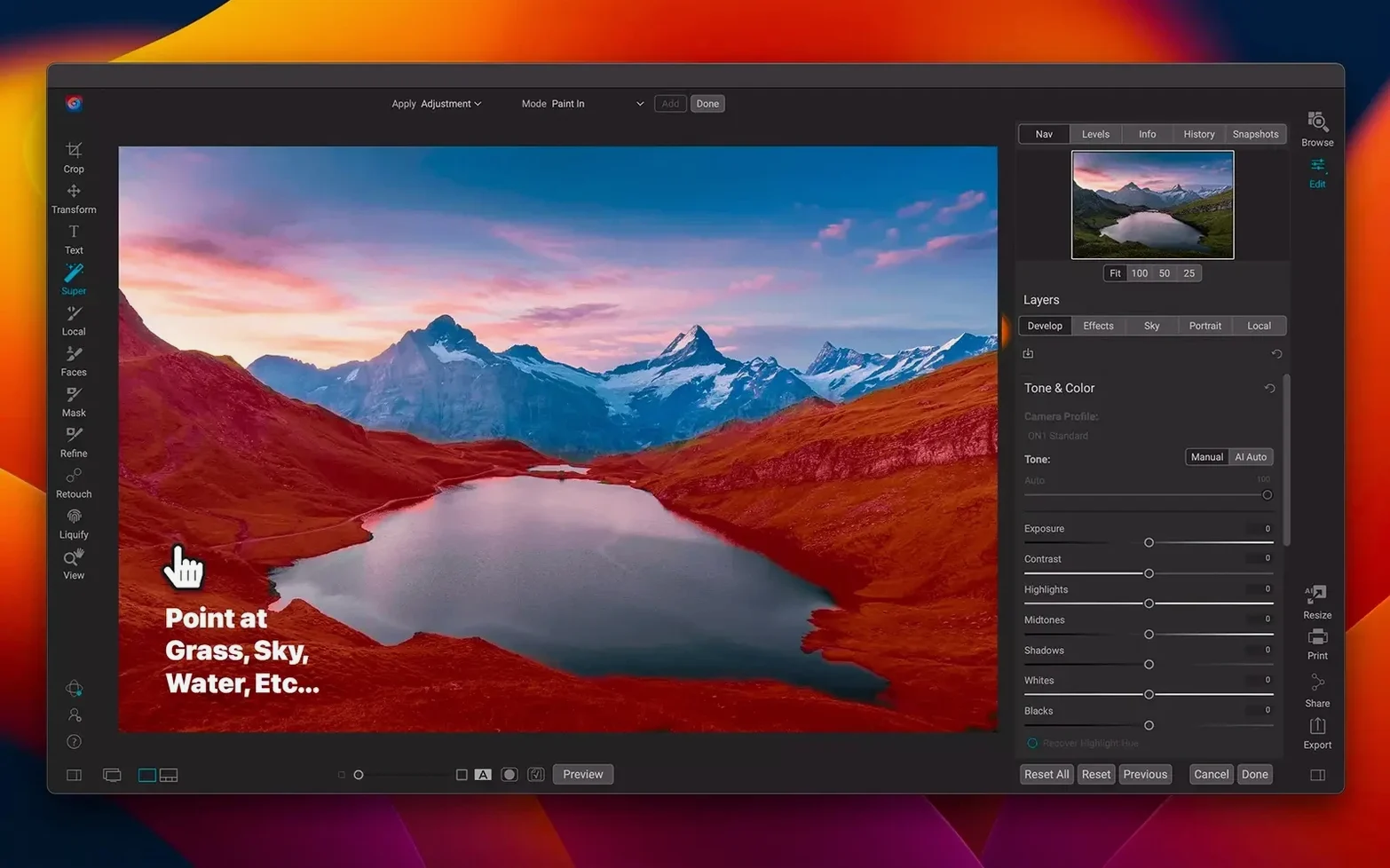
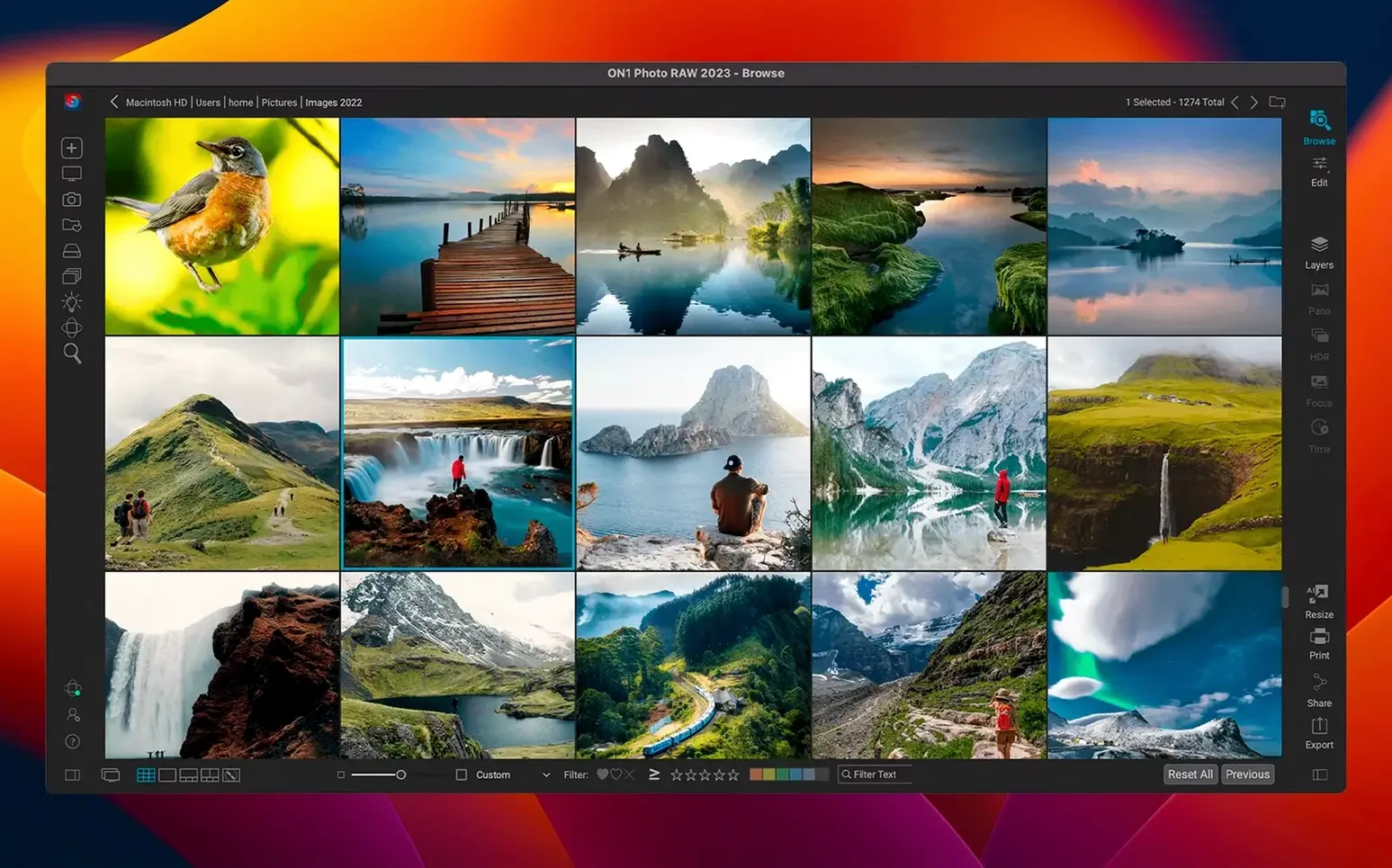
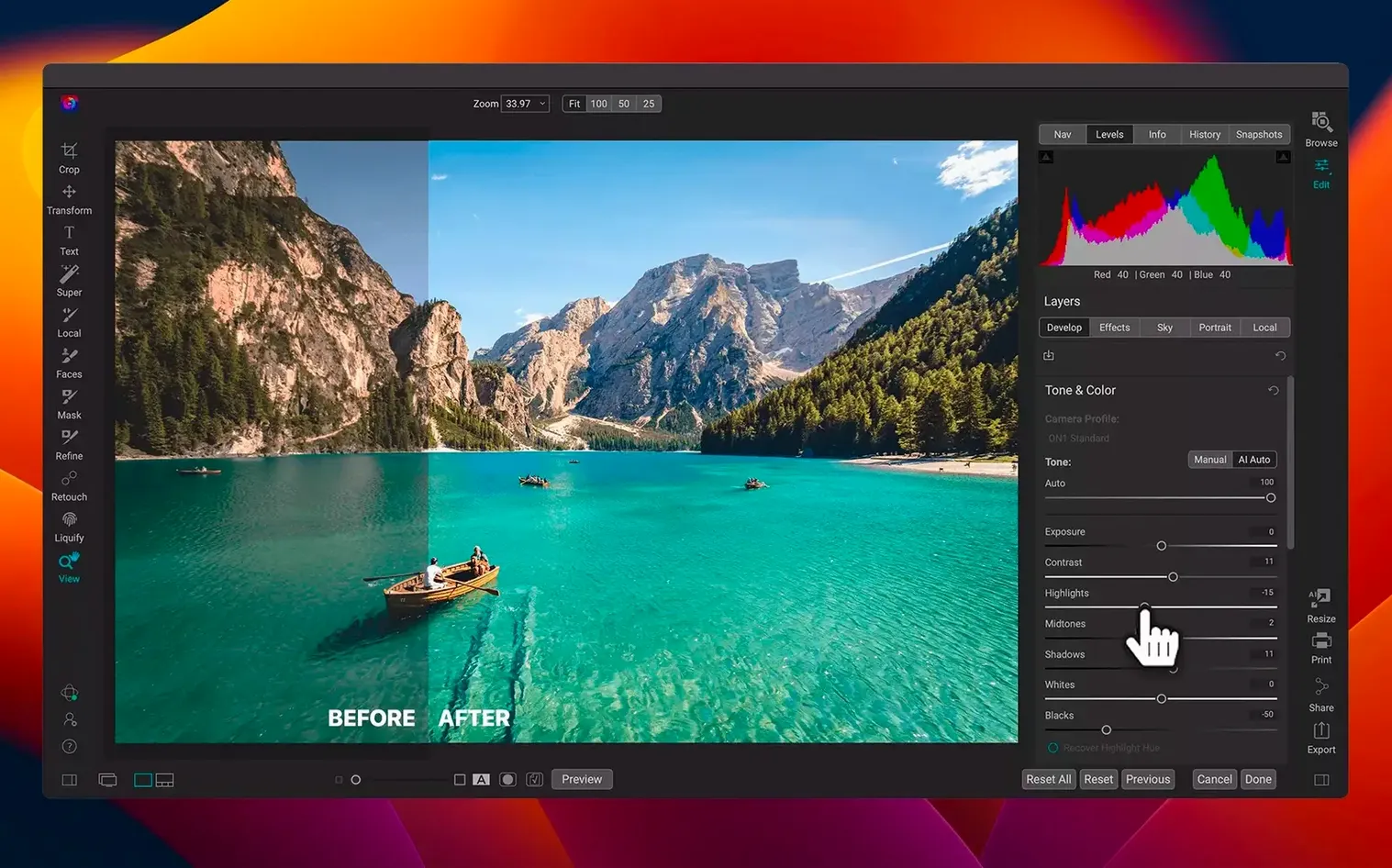
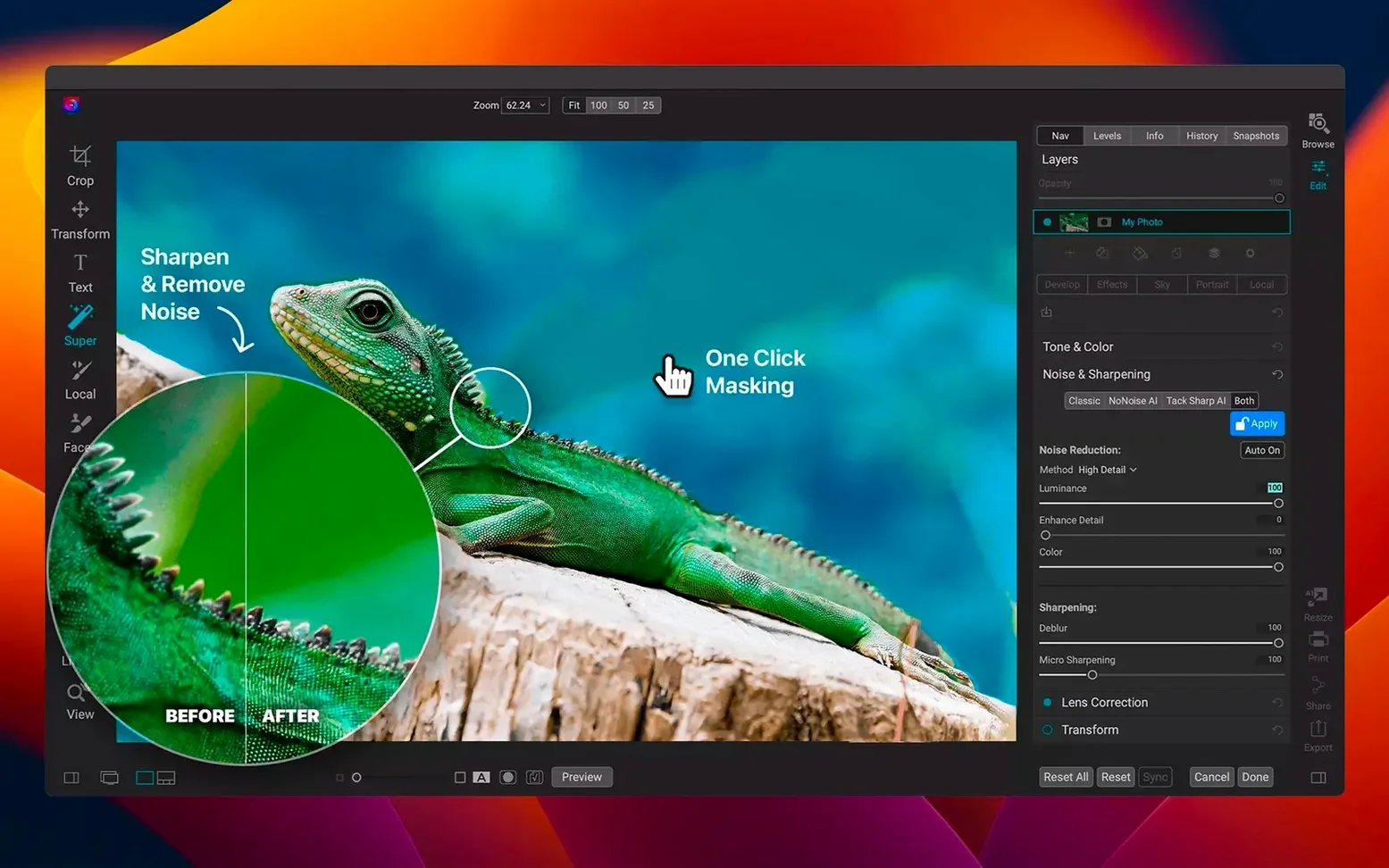
If you have used Lightroom Classic, the workflow of ON1 Photo RAW will feel instantly familiar. It offers the same combination of a local photo library and a full raw processing engine, but wraps it in a single standalone application that runs natively on both Apple Silicon and Intel Macs. The idea is that you browse, rate, edit and export your images without ever leaving the main window.
- A fast, local photo organiser that catalogues your drives without uploading anything to the cloud.
- Full non-destructive raw processing, so your original files stay untouched while you experiment.
- Layered editing with masks, text and live effects, closer to a pixel editor than a raw converter.
- AI-powered masking and portrait retouching tools that isolate skies, faces or backgrounds in a couple of clicks.
- Built-in sharing to social platforms and a direct export to ON1’s own mobile cloud sync service.
- Works as a standalone hub—you can also send an image out to Photoshop or Affinity Photo and bring it straight back.
The interface runs in eleven languages and feels cohesive rather than a patchwork of separate modules. It is a genuine do-it-all contender for photographers who prefer to own their files.
After the initial setup, the most productive thing you can do is resist the urge to edit a prized photograph straight away. Spend the first three days building a catalogue that actually reflects how your archive is organised on disk. Point ON1 Photo RAW at your top-level pictures folder and let it scan overnight. In the morning, switch to the Browse module and create a handful of practical albums — one for current client work, one for family snapshots, and one for experiments you are happy to delete later. This simple triage prevents the library becoming a digital attic.
First-week habits that save hours later
The keyword and star-rating shortcuts are worth memorising before you touch a single slider. Tap 1–5 to assign a rating, 6–9 for colour labels, and Cmd-K to open the keyword entry field. A rated, keyworded catalogue is the difference between finding a specific portrait of Aunt Marge in ten seconds and scrolling for twenty minutes. Another habit: set your preferred raw defaults immediately. Open a typical raw file, dial in your baseline sharpening, lens correction, and a gentle S-curve, then save those as camera-specific presets via the Develop module’s preset panel. Every future import will start from your taste, not a flat factory profile.
Users who migrate from Lightroom often overlook the fact that ON1 Photo RAW can read many Lightroom edits stored in XMP sidecar files. Before you abandon your old catalogue, select your most-edited folders and choose File > Migrate > Lightroom Edits to bring across as much adjustment data as possible. It is not a perfect translation — local brush strokes sometimes shift — but it rescues the bulk of your work.
Slip-ups even experienced editors make
The most common beginner mistake is treating the Browse module as a file manager and deleting source folders from within the app. ON1 Photo RAW catalogues the location of your files; if you delete a folder through the Browse pane, you are deleting the actual files on disk, not just the catalogue entry. Use Remove from Catalogue instead when you only want to tidy the library view.
Another frequent misstep is stacking non-destructive adjustments in the wrong order. The Effects panel applies globally after the Develop adjustments, so a heavy vignette added there will react to any exposure changes you make later in Develop, sometimes producing unpredictable dark halos. Keep tonal work in Develop and save vignettes, grain and edge effects for Effects, but check the interaction if you go back to tweak the raw conversion afterwards. Finally, do not ignore the Scratch Pad — it is the small panel that sits quietly at the bottom of the Develop module, and it stores temporary snapshots of your adjustments so you can compare two paths without creating full versions. Tapping Cmd-B to store a snapshot before you try something radical is a reflex worth developing.
A wedding photographer’s Saturday morning
Imagine a wedding photographer who shot 1,700 raw files the previous evening and needs a shortlist of 120 images on a client gallery by lunchtime. She mounts her backup drive, opens ON1 Photo RAW, and navigates to the folder in Browse. The thumbnails render quickly after the 2026.5.2 update, and she begins culling with the arrow keys, tapping 1 for rejects and 3 for keepers. The AI culling assistant flags the sharpest frames from each burst sequence, saving her from squinting at eyelash detail at 100% magnification.
With the shortlist filtered to three-star images, she selects a bridal portrait, switches to Develop, and applies a camera-specific preset that lifts shadows gently and warms the white balance for skin tones. The AI portrait brush identifies the bride’s face and irises, letting her brighten the eyes without affecting the veil. She copies those adjustments with Cmd-Shift-C, selects the remaining portraits, and pastes only the face-retouch settings. For a backlit group shot, she opens the Effects module, drops in a subtle sun flare filter, and masks it to the top-left corner where the sun was actually sitting. The whole edit takes just over two hours, and she exports web-sized JPEGs directly from the app, skipping the round-trip to a separate pixel editor entirely. The layered editor stays in reserve for the album cover image, where she composites text and a soft gradient overlay without ever leaving ON1 Photo RAW.
A single local catalogue for large raw-file workflows
Photographers who value a single local catalogue over a subscription-shaped cloud library tend to get the most from ON1 Photo RAW. That group includes wedding and portrait professionals who generate large raw files every weekend, serious hobbyists with multi-terabyte archives stored on external drives, and anyone who has grown frustrated by the performance overhead of switching between a raw developer, a pixel editor and a DAM application. Because the app runs natively on Apple Silicon, MacBook Pro and Mac Studio users notice the difference most — batch exports and AI masking tasks lean fully on the Neural Engine and GPU cores without the translation lag of Rosetta 2.
Landscape photographers, in particular, benefit from the combination of raw processing and a layered effects engine in one window. A single exposure can be developed with an emphasis on shadow detail in the midground, then a separate graduated exposure can be brushed onto the sky via a mask, and finally a subtle Orton glow can be applied in Effects — all as non-destructive layers saved inside the .onphoto file format. This kind of workflow is possible in other tools, but the absence of intermediate TIFF exports makes ON1 Photo RAW feel unusually fluid in long editing sessions.
Users who regularly download large raw sample libraries — the sort shared through photographer forums, or occasionally searched as an on1 photo raw torrent to test new camera profiles — will appreciate that the 2026.5.2 update added fresh lens corrections for several recent mirrorless bodies. The catalogue can handle tens of thousands of frames without slowing to a crawl, provided the previews are built during idle time. It is less suited to someone who edits a handful of JPEGs a month on a phone and only opens a Mac for email; the interface assumes a certain fluency with colour theory and layer logic. But for the photographer who already thinks in terms of raw development pipelines and wants to reduce their software stack to a single icon in the Dock, ON1 Photo RAW lands in a sweet spot that very few alternatives manage to occupy.
The 2026.5 update sharpens the editing experience with quicker filter previews and a fresh batch of lens profiles.
- Filter processing is noticeably snappier, especially when stacking several adjustments on high-resolution raw files.
- New lens profiles improve automatic distortion and vignette correction for a wider range of modern glass.
- macOS 13 Ventura or later
- Apple Silicon or Intel 64-bit Mac
Questions I keep hearing
Does ON1 Photo RAW work on the latest Macs?
Yes, version 2026.5 runs natively on both Apple Silicon and Intel 64-bit Macs and requires macOS 13 Ventura or later.
Is it a plug-in or a standalone app?
It is a fully standalone application. You can use it as your main photo hub, though it also integrates well with other editors via round-trip editing.
Can I use it in languages other than English?
Absolutely. The interface is localised into eleven languages including Russian, German, Spanish, French, Japanese, Korean and Portuguese.
Questions from the class 0
Sign in or join the class to ask a question.
Nobody has asked anything yet. If you have used it on a real job, say what the file did.
Also on the Mac Apps shelf
The whole Mac Apps shelf One Switch
Flicks common Mac settings like Dark Mode or Do Not Disturb on and off from a single menu bar panel.
One Switch
Flicks common Mac settings like Dark Mode or Do Not Disturb on and off from a single menu bar panel.
 Optimage
Compresses images to a smaller file size while keeping the visual loss invisible to the eye.
Optimage
Compresses images to a smaller file size while keeping the visual loss invisible to the eye.
 OmniPlayer: MKV Video Player Pro
Plays almost any video file you throw at it, fetches subtitles online, and streams web clips.
OmniPlayer: MKV Video Player Pro
Plays almost any video file you throw at it, fetches subtitles online, and streams web clips.
 OmniGraffle Pro
Builds precise diagrams, wireframes, and site maps from a deep library of draggable stencils.
OmniGraffle Pro
Builds precise diagrams, wireframes, and site maps from a deep library of draggable stencils.
 Pacifist
Extracts a single file from a .pkg installer without running the whole package.
Pacifist
Extracts a single file from a .pkg installer without running the whole package.
 Paragon NTFS
Lets your Mac write, copy and delete files on Windows-formatted drives.
Paragon NTFS
Lets your Mac write, copy and delete files on Windows-formatted drives.
 Parallels Desktop
Runs Windows and Linux apps alongside macOS without rebooting your Mac.
Parallels Desktop
Runs Windows and Linux apps alongside macOS without rebooting your Mac.
 Paste
Keeps a searchable visual timeline of everything you copy on your Mac.
Paste
Keeps a searchable visual timeline of everything you copy on your Mac.