 ASPNetWorld

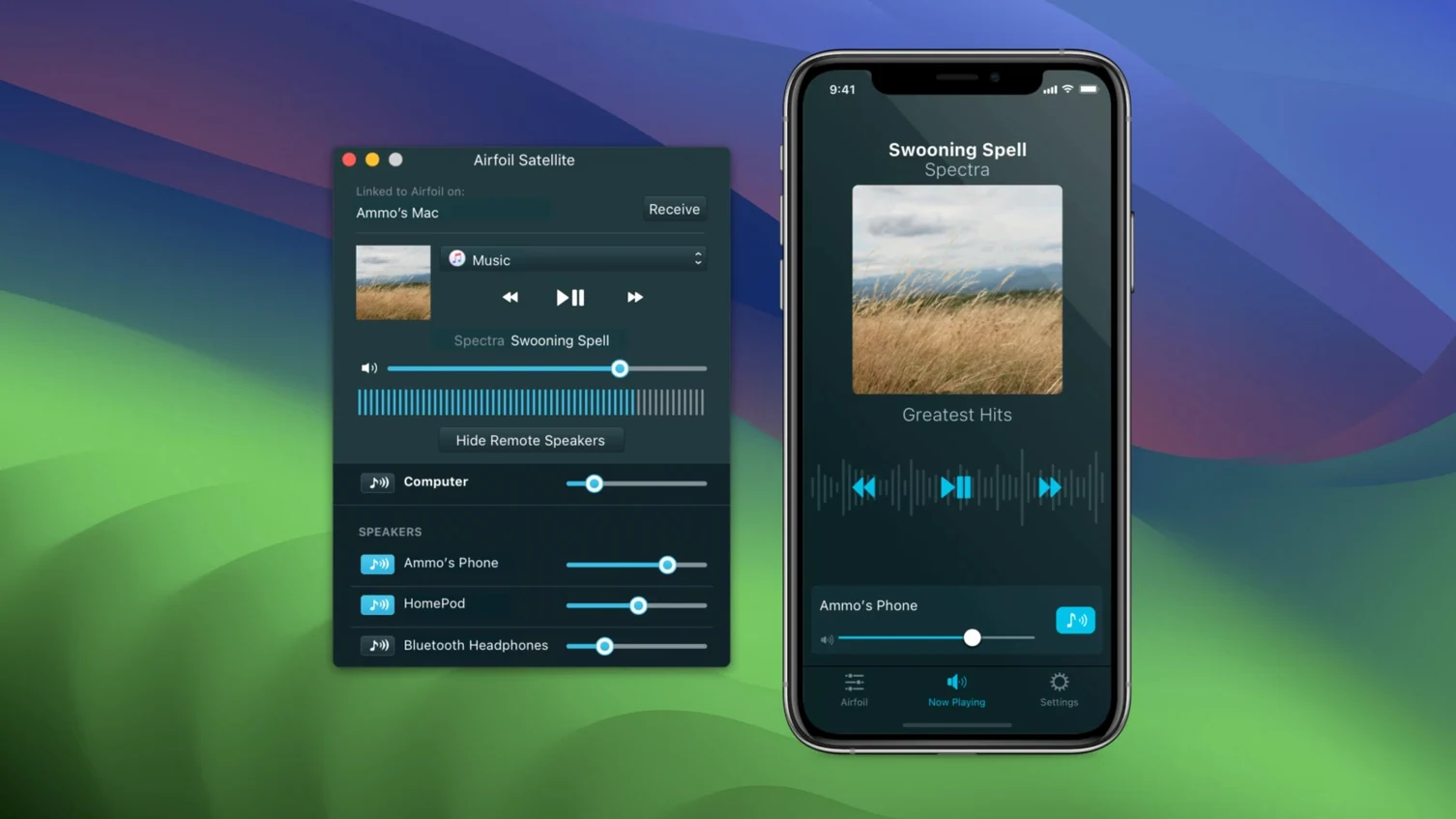
Most audio on a Mac stays locked to the machine playing it, which feels oddly old-fashioned when you have a house full of smart speakers. Airfoil is a utility built to unpick that knot. It grabs the sound from any application or the system itself and sends it out to AirPlay docks, Google Cast gadgets, Bluetooth headphones, even other Macs and PCs, all at the same time if you like.
The single OS requirement that decides if Airfoil runs on your Mac
Compatibility is refreshingly straightforward. Airfoil is a native 64-bit application that runs on both Apple silicon and Intel Macs, so it feels right at home on anything from the last decade. The one hard line is the operating system: you need macOS 14.4 or newer. If your Mac is sitting on Sonoma or a later release, you are in business. The latest 5.13 refresh, which landed in late September 2026, also quietly restored a key connection, bringing back the ability to stream directly to Apple TV and HomePod units that had been left waiting.
Stream one source to multiple rooms with different devices at once
Think of Airfoil as a patch cable that reaches every room. You can pipe a podcast to the kitchen HomePod while a different Mac plays the same music in the study, all driven from a single source. It sees AirPort Express bases, iOS devices running companion software, and any Bluetooth speaker your Mac already knows. The whole interface stays in English, and because it is a pure Rogue Amoeba creation, it slots neatly alongside their other audio tools without any fussy configuration or background services that nag for attention.
Take a freelance video editor who works from a garden office. They spend mornings in Adobe Premiere Pro cutting a client project, then break for lunch. The house Mac in the kitchen is hooked up to a decent pair of powered speakers, but the editor wants to keep an ear on the timeline audio while making a sandwich. Airfoil sits in the menu bar, quietly sending the Premiere output to the kitchen Mac. No cables, no AirPlay dropdown inside Premiere — just transparent routing that follows whichever app is active. The same editor later streams a reference track to a Google Nest in the living room to check how the mix translates on a bass-heavy consumer speaker. All from the same machine, without touching a single audio interface setting. That kind of flexibility is what makes Airfoil feel less like a utility and more like a rethink of how audio should work in a multi-room home.
A Saturday-morning playlist filling the ground floor in a few clicks
Picture a Saturday morning. You have a playlist queued in Apple Music, the sun is out, and you want it filling the ground floor. Here is how Airfoil turns that into a few clicks.
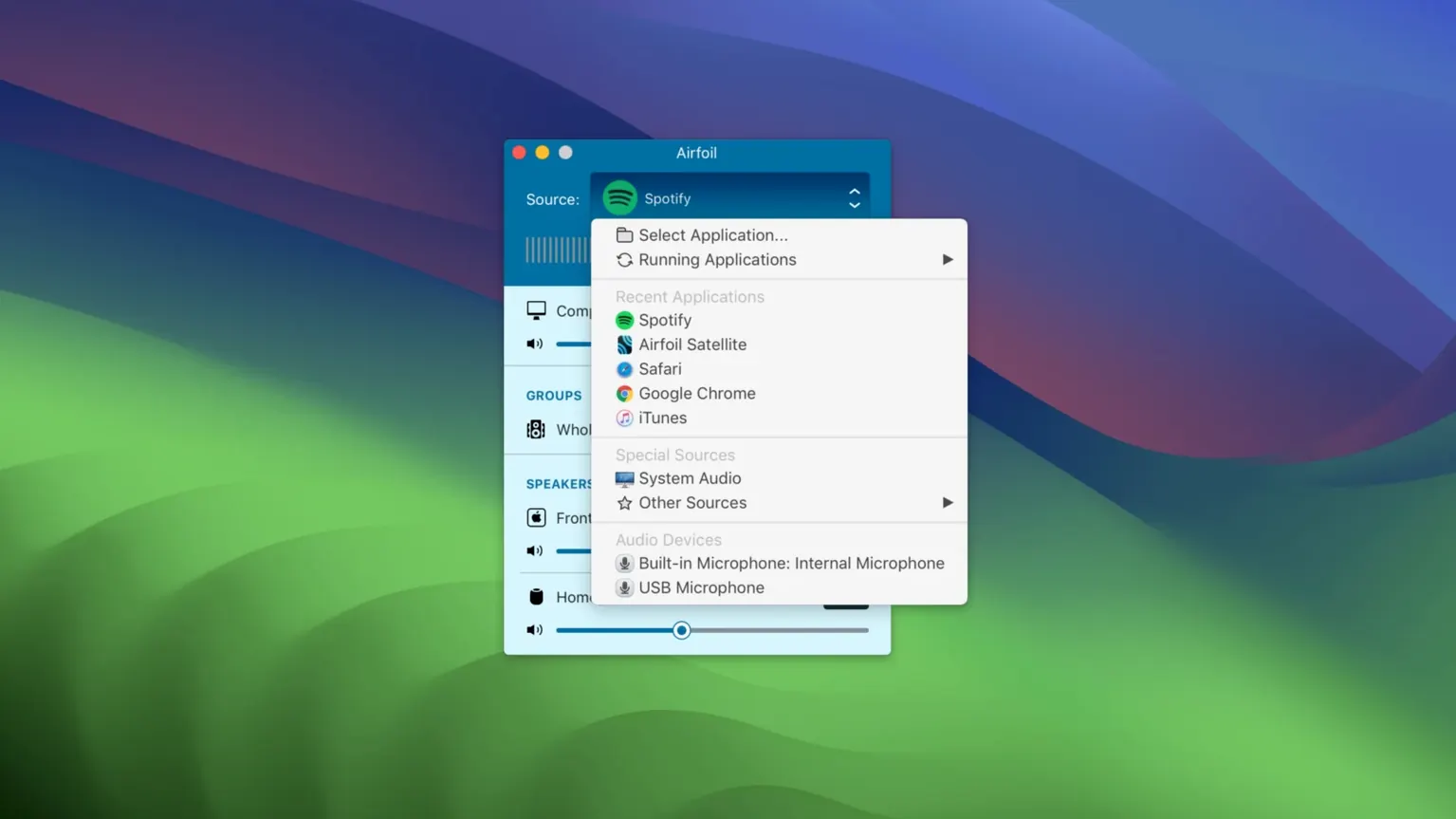
- Pick a source. Launch Airfoil and click the source selector at the top. You will see a list of running applications plus a system audio option. Choose Music — this tells Airfoil to grab only that app's output, so a stray notification ping from Mail never intrudes.
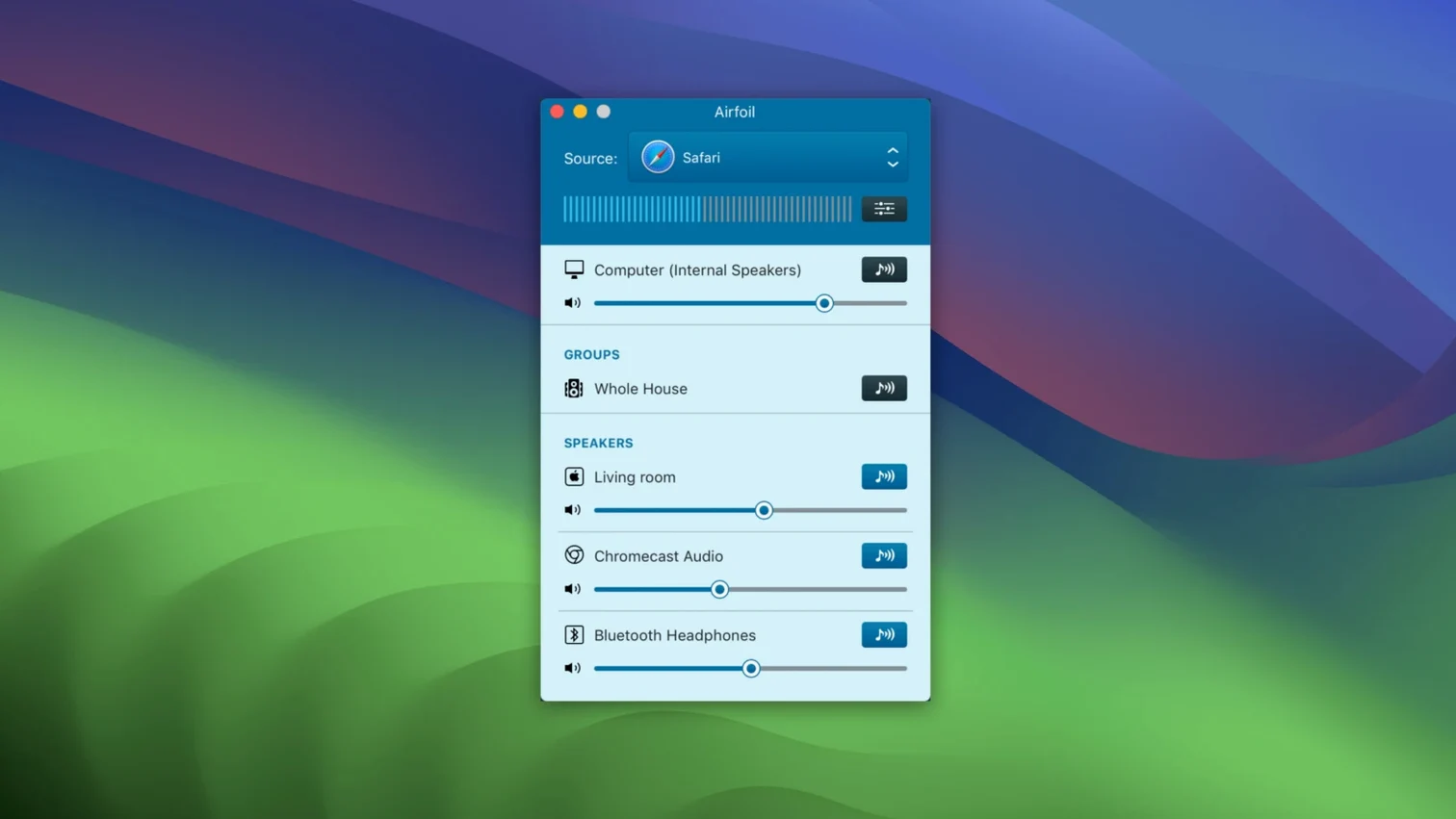
- Select your speakers. The main window fills with available devices: an Apple TV in the lounge, an AirPort Express in the dining room, a Bluetooth speaker on the patio. Click the speaker icons you want. They light up. Airfoil begins transmitting immediately, and because it uses Apple Lossless encoding, there is no audible compression squashing the detail.
- Balance the rooms. Each active speaker gets its own volume slider. The dining room might need a gentle nudge down so conversation is still possible; the patio speaker can go louder. Drag the sliders to taste. The equalizer button next to each device lets you trim bass or boost treble for a particular speaker's character — handy if your patio unit sounds tinny outdoors.
- Lock it in. Head to the Transmit menu and enable Automatically transmit to this device on launch if you want Airfoil to connect to the kitchen speaker the moment it opens. Not essential, but once you try it, the convenience sticks.
The beauty of this workflow is that it never asks you to change the Mac's main output device. Your headphones stay plugged in and private; Airfoil just branches off a copy of the audio and sends it elsewhere. That is the core idea Rogue Amoeba got right.
Name your remote speakers clearly on day one to avoid later fiddling
After you install Airfoil — drag it to Applications, run the Gatekeeper-friendly helper if prompted — spend the first afternoon building a few muscle-memory routines. They cost nothing now but save constant fiddling later.
- Name your remote speakers clearly. If you have three HomePods, give them descriptive labels in the Home app (or the device's own settings) so Airfoil shows "Kitchen HomePod" not "Living Room 2". The app pulls in the names the network advertises, so a little housekeeping upstream makes the speaker list instantly readable.
- Try the companion app straight away. Download Airfoil Satellite onto an iPhone or an old iPad. It turns that device into both a receiver and a remote control. Place the iPad on a coffee table and you can adjust volumes or switch sources without walking back to the Mac. That feels like a small luxury until the first time you host guests and want to tweak the music from across the room.
- Set a volume ceiling. In Airfoil's preferences there is an output limiter. Engage it and cap the master level at around 85 percent. It prevents a rogue volume spike from rattling a speaker — especially important if you stream to older AirPort Express units that do not have their own limiting.
- Check the equalizer presets early. The built-in EQ is simple but effective. Spend ten minutes with a track you know well, flicking through the presets for your most-used speaker. One saved custom curve per room means you will never have to think about it again.
Why your Apple TV or HomePod doesn’t appear and the quick fix
Even a polished tool like Airfoil has its friction points. Most are traceable to network quirks or macOS security layers, and they are almost always fixable in under a minute.
"My Apple TV or HomePod doesn't appear." Version 5.13 specifically restored this, so if you are running an older airfoil for mac build, that is your answer. On 5.13, check that both the Mac and the target device are on the same Wi-Fi band — many routers split 2.4 GHz and 5 GHz into separate network names, and AirPlay discovery can stumble if one device is on each. Also confirm that the Apple TV or HomePod is awake. A sleeping HomePod will not advertise itself.
"Audio stutters or drops out." Start with the obvious: move the Mac closer to the router, or switch the stream to a wired connection on the receiving side if possible. Airfoil transmits Apple Lossless, which is efficient but still demands a stable link. In the app's preferences, try ticking Use lower latency — it reduces the buffer, which sometimes paradoxically helps on congested networks by keeping the data flowing in tighter bursts. If you are sending to multiple devices simultaneously, temporarily disable one to see whether bandwidth is the bottleneck.
"Airfoil won't open after installation." macOS Gatekeeper can be overzealous with utilities that capture system audio, which is why the installer includes a Terminal-based helper. If you skipped that step, mount the disk image again, run the helper, and press Enter when prompted. The app then launches normally. People sometimes grab an Airfoil crack or Airfoil cracked Mac download and hit this same wall, mistaking a Gatekeeper block for a licensing issue. It is almost always just the security layer needing a one-time exception.
"My Bluetooth speaker has a noticeable delay." Bluetooth inherently adds latency — Airfoil cannot remove physics. What it can do is let you compensate visually. When you are streaming to a Bluetooth device alongside a wired or AirPlay speaker, use the per-device sync slider (hover over the speaker name to reveal it) to nudge the faster speaker back by a few milliseconds. It takes trial and error, but once dialled in, the audio arrives in sync across the room.
"I can't capture audio from a specific app." Some applications, particularly those that use exclusive hardware access (certain DAWs or conferencing tools), do not expose their audio to the system. In Airfoil's source list, switch from the app-specific capture to System Audio as a fallback. The trade-off is that all system sounds travel together, but it works when per-app routing hits a wall. If you are experimenting with an Airfoil torrent that predates 5.13, note that older versions had patchier per-app capture on Apple silicon — the current build handles this far more gracefully.
Version 5.13 patches a hole that had been frustrating users for a while.
- Streaming to Apple TV and HomePod devices is working again after an earlier disruption.
- macOS 14.4 or newer
- Apple silicon or Intel 64-bit Mac
Questions I keep hearing
Can Airfoil send audio to multiple devices at once?
Yes, it can stream to several remote speakers, AirPlay units, and other computers simultaneously from one Mac.
Does Airfoil work with Apple silicon Macs?
It does. Airfoil is a native 64-bit app with full support for both Apple silicon and Intel processors.
Which streaming targets does Airfoil support?
It streams to Apple TV, HomePod, AirPort Express, Google Cast devices, Bluetooth speakers, iOS gadgets, and other Macs and PCs.
Questions from the class 0
Sign in or join the class to ask a question.
Nobody has asked anything yet. If you have used it on a real job, say what the file did.
Also on the Audio shelf
The whole Audio shelf AIMP
Plays a vast range of audio file formats from a familiar desktop interface.
AIMP
Plays a vast range of audio file formats from a familiar desktop interface.
 Amadeus Pro
Edits and analyses audio files with a customisable favourite actions palette.
Amadeus Pro
Edits and analyses audio files with a customisable favourite actions palette.
 Absynth
Generates evolving, unearthly sounds through semi-modular synthesis.
Absynth
Generates evolving, unearthly sounds through semi-modular synthesis.
 Ableton Live
Lets you record, perform and improvise music without ever pressing stop.
Ableton Live
Lets you record, perform and improvise music without ever pressing stop.
 Audio Hijack
Routes any Mac audio into a recording and can transcribe it to searchable text.
Audio Hijack
Routes any Mac audio into a recording and can transcribe it to searchable text.
 Audiobook Builder
Joins dozens of audio files into a single, properly chaptered audiobook with cover artwork.
Audiobook Builder
Joins dozens of audio files into a single, properly chaptered audiobook with cover artwork.
 Bitwig Studio
Gives producers a sandbox for recording, sound design, and live performance with modular freedom.
Bitwig Studio
Gives producers a sandbox for recording, sound design, and live performance with modular freedom.
 Boom 3D
Reshapes your Mac's entire output with an equaliser, a volume boost, and spatial widening.
Boom 3D
Reshapes your Mac's entire output with an equaliser, a volume boost, and spatial widening.