 ASPNetWorld


Boom 3D sits at version 2.2.6 as a mature, system-wide audio layer for Mac, and while the headline feature is always that hefty volume lift, the tools an experienced ear will keep returning to live deeper in the interface. The app inserts itself cleanly into macOS 10.14 or later, processing all outgoing sound before it reaches your headphones, which means every application benefits without per-app setup.
What does the equaliser actually offer?
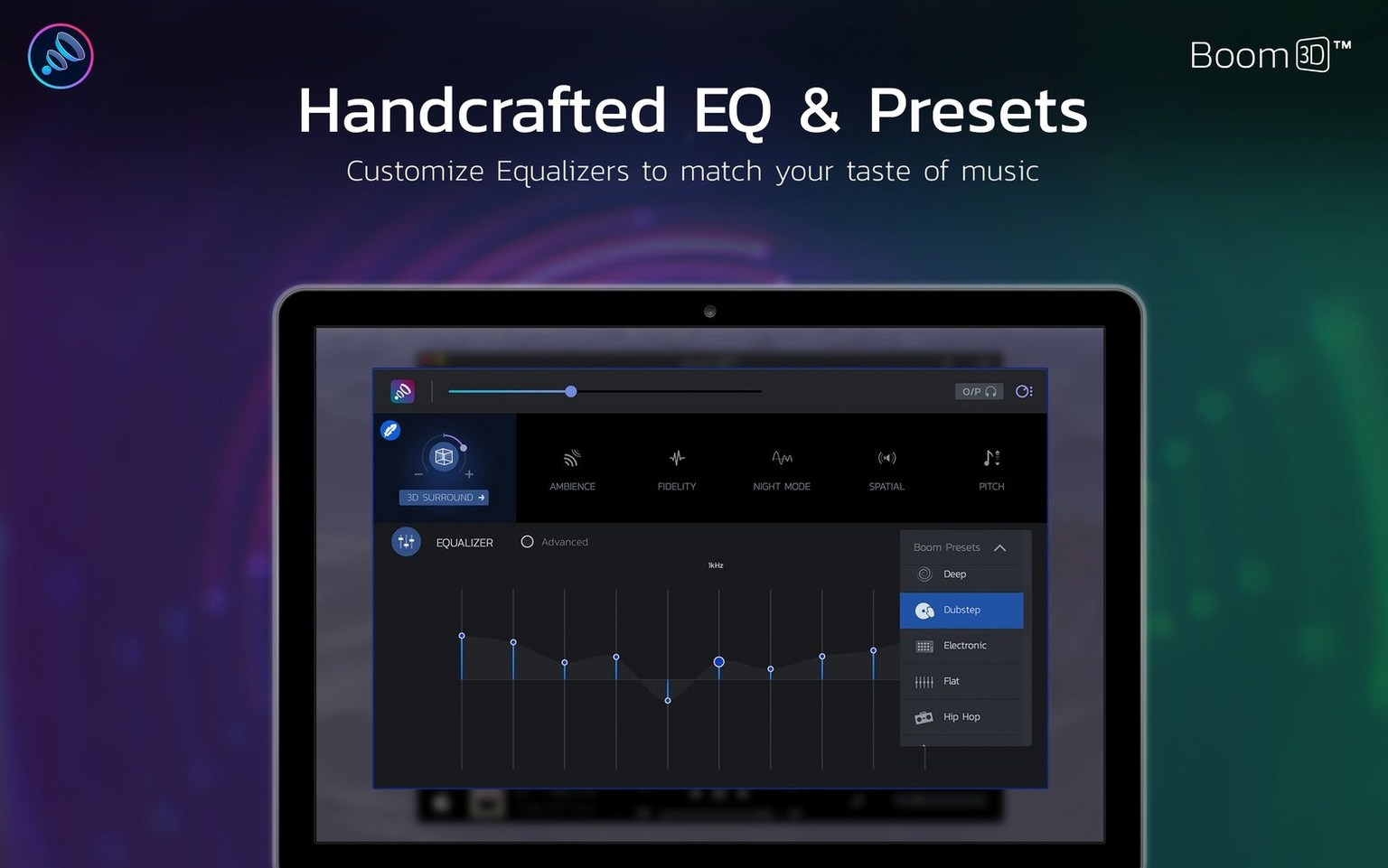
It's a full parametric-style precision equaliser, not a toy. You can dial in specific frequency adjustments across a wide spectrum and save them as named presets, letting you compensate for a particular pair of headphones or just craft a signature profile for late-night listening where clarity matters more than sheer power.
How does the surround sound work in a pair of headphones?
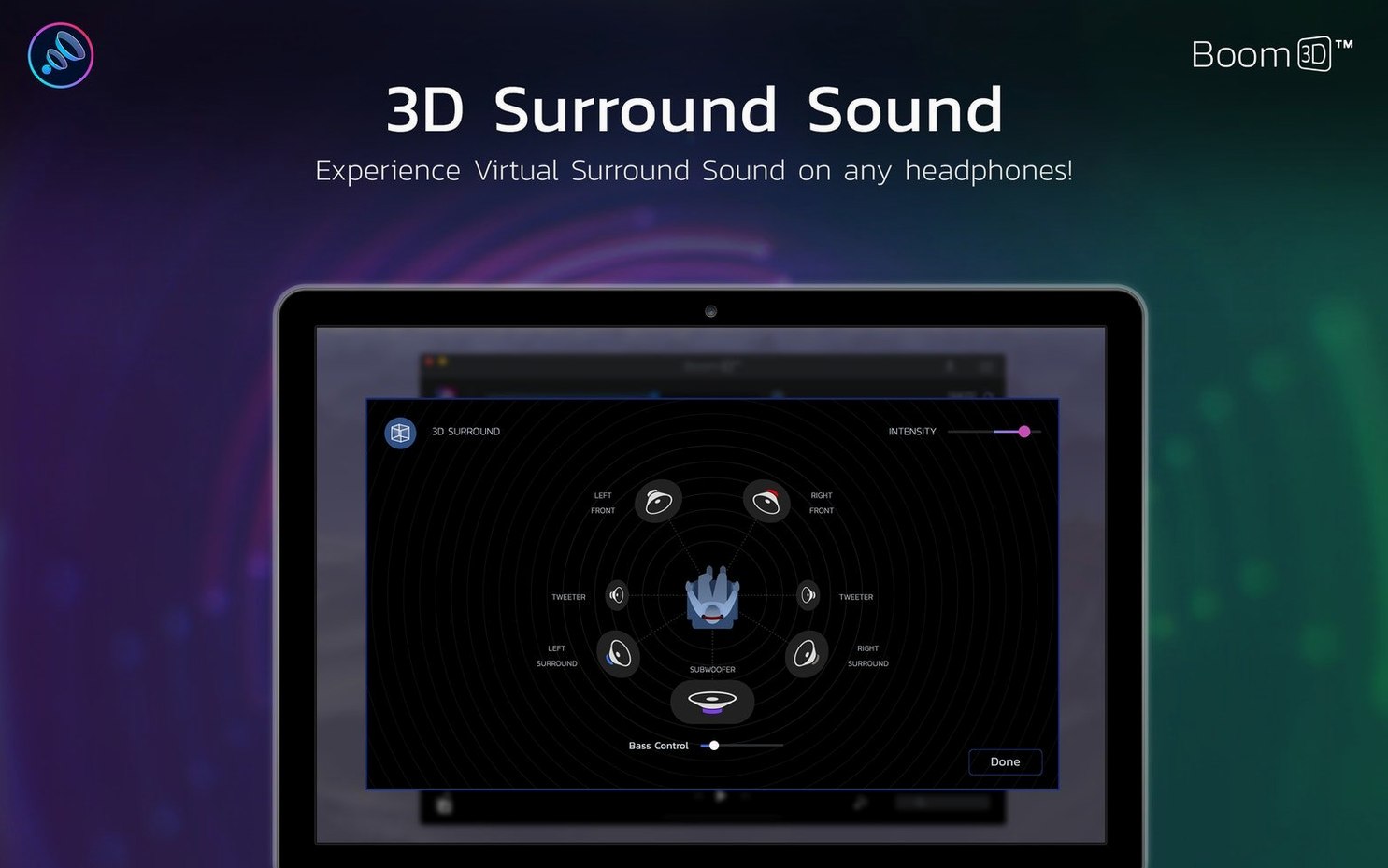
Global Delight's engine uses a spatialisation algorithm that creates a virtual multi-channel field from a standard stereo signal. The effect can be tuned for intensity, so you can push it for a cinematic spread or pull it back to a subtle widening that doesn't smear the centre image of a podcast voice.
Is this a replacement for Boom 2?
It's a separate product in the Boom line, not an incremental update. Boom 3D introduces the surround engine and a redesigned interface, and the two apps coexist as distinct options with different feature sets aimed at different listening habits.
Common mistakes beginners make with Boom 3D
Most people install the app, crank the master slider to the right and immediately wince. The first mistake is treating the booster like a volume knob rather than a gain stage. Pushing it hard into a set of headphones that already have a warm low-end can produce a muddy, distorted mess that sounds louder but worse. The booster works best when you find the point just before clipping and then shape what remains with the equaliser — not the other way around.
Another classic slip is leaving the 3D surround engine running at full intensity for everything. I've watched students have it on during a Zoom call and wonder why the tutor sounds like they're shouting from the far end of a cathedral. The surround setting needs to match the material: off or near-off for spoken word, a gentle nudge for music, and anything cinematic only when you've got the time to sink into a film. The app remembers your setting globally, so it's worth glancing at the slider before blaming your headphones.
The equaliser presets catch people out too. Loading the Bass Boost preset and then adding more low end with the manual sliders creates a double-dip that overwhelms the midrange. If you're using a preset, treat it as a starting point and adjust one or two bands at most. Listen for a few minutes before adding more — ear fatigue sets in quickly when the bass is too prominent, and you lose the ability to judge it accurately.
Finally, a handful of users assume Boom 3D is processing audio even when it's closed. It installs a system-level audio driver, and the processing only happens while the app is actively running. If you quit it from the menu bar, your Mac reverts to standard output. That's a feature, not a bug, but it confuses people who've tucked the icon away and forgotten it's there.
Flat headphones, bass-heavy clients, and a better monitoring chain
Imagine a freelance podcast producer who edits on a MacBook Air during the day and monitors on a pair of flat-sounding studio headphones that lack any real bass presence. When she hands off a draft episode to a client listening on consumer earbuds, the voice sounds thin and the intro music carries far more low-end rumble than she ever heard in the edit. The mismatch between monitoring and real-world playback becomes a reputation problem.
She sets up Boom 3D with two equaliser presets. The first compensates for the studio headphones by adding a gentle 3 dB shelf from 80 Hz downward, giving her a more natural representation of what most listeners will hear. The second preset flattens everything for late-night editing when ear comfort matters more than translation. The surround engine stays off for dialogue work, but she flicks it to about 30 percent when checking the stereo spread of background beds and transitions. The per-app volume control means Safari previews don't blast over her timeline audio, and the whole setup lives in the menu bar, toggled on only during critical listening passes. It's a small change in her workflow, but the client feedback on mix balance improves noticeably within her next two episodes.
One hour, one pair of familiar headphones, and music that fills the room
You sit down at your Mac with a fresh coffee and a pair of closed-back headphones you've owned long enough to know their character. The plan is an hour of focused music listening while clearing email, and you want the audio to feel present without being punishing.
You launch Boom 3D from the Applications folder. The app opens to its compact player-style window, and the first thing you do is check the output device — it's already set to your headphones, because the app remembered from yesterday. You drag the master boost slider up slowly while a familiar track plays, stopping around 22 percent, where the drums gain weight but the cymbals haven't turned harsh. That's your gain ceiling for this session.
Next you open the equaliser panel. You're not fixing anything specific today, so you load a preset you built last month called "evening vocal lift." It adds a modest 2 dB bump around 3 kHz and tightens the sub-bass with a narrow cut at 40 Hz. The preset suits the acoustic material you've been gravitating toward, and you leave it untouched.
The surround slider sits at the bottom of the window. You nudge it to 25 percent — just enough to push the stereo image a fraction wider without pulling the lead vocal into a phantom centre that feels disconnected. You close the main window and let the app shrink to the menu bar. For the next forty minutes, every track — whether it's a 24-bit FLAC file in your player or a YouTube clip someone sent — passes through that same gentle processing chain. The bass never overwhelms, the surround effect stays subtle, and the booster means you never have to push the Mac's system volume past halfway.
When an email attachment turns out to be a voice memo from a colleague, you pull up the menu bar icon, switch to a flat EQ preset and kill the surround entirely. Thirty seconds of speech, and then you switch back. The whole adjustment takes under five seconds once the muscle memory is there.
Apple Silicon native processing that stops the occasional audio hiccup
Version 2.2.6 didn't add headline-grabbing features, but it brought a quiet stability that matters more in daily life than any single new button. The build runs natively on Intel and Apple Silicon without Rosetta translation, which means the audio processing sits lightly on the CPU and doesn't wake the fans on a MacBook Air during a long listening stretch. Earlier versions had occasional dropouts when the sample rate switched between apps; the current release handles those transitions smoothly, so you can move from a 44.1 kHz music file to a 48 kHz video without a stutter or a reset.
The interface languages expanded over time to include Russian, Dutch, Portuguese, and both Traditional and Simplified Chinese alongside the standard European set. That's a quiet acknowledgment of the app's global user base, and it means a producer in Seoul or a student in São Paulo can work in their native environment without guesswork. The per-app volume control, refined in a previous update and stable here, has become the feature I mention most in evening classes — it solves the problem of one browser tab overpowering everything else without touching the system mixer.
For anyone who's been using Boom 2 and is curious about the differences, the Boom 3D lineage has steadily pulled ahead in spatial processing. The surround algorithm in the current version handles complex material with fewer phase artifacts than the early releases, and the equaliser's filter shapes feel more transparent when you're making surgical cuts. The app hasn't changed its core identity — it's still a booster first — but the polishing across recent versions makes it more of a daily driver and less of a novelty you enable for specific tracks.
How Boom 3D fits into a wider Mac audio workflow
Boom 3D doesn't try to replace your DAW or your media player's built-in processing. It sits one layer lower, intercepting all system audio before it hits the output device, which means it coexists with almost everything. I use it alongside Logic Pro for casual listening checks without touching the DAW's master bus, and I've seen students run it under DJ software where the extra headroom helps them hear a quiet rip without pushing the gain structure into the red.
The app plays nicely with macOS's Audio MIDI Setup utility as long as you remember that Boom 3D becomes the output device. If you're configuring multi-channel speaker layouts or aggregate devices, you set Boom 3D as the final destination and let it process the summed signal. The per-app volume control integrates with the standard volume mixer concept, though it's managed from within Boom 3D's own interface rather than the macOS menu bar.
A common pairing is Boom 3D with a system-wide shortcut tool that toggles EQ presets via keyboard commands — the app itself doesn't offer hotkey switching, but its menu bar presence means third-party macro utilities can reach it. I've watched a mastering engineer use a Stream Deck to cycle through three Boom 3D presets while comparing headphone curves, and the whole chain felt like a natural extension of the desktop rather than a bolted-on accessory.
For anyone exploring older versions or looking up boom 3d mac crack or a boom 3d torrent, it's worth knowing that the processing driver at the heart of the app is the same component that requires a proper installation to function reliably. A boom 3d mac torrent or a generic boom torrent will often bundle a driver that needs a quick check against your macOS version, especially on ARM machines. If you've ever dealt with a boom 2 mac torrent and its tendency to need a reinstall when macOS updates, you'll understand why the audio driver layer matters more than the app shell around it. The current version's stability is tied to that driver, and it's the main reason the app stays out of your way during daily use.
- macOS 10.14 or later
- Intel and Apple Silicon Macs
Questions I keep hearing
What languages does the Boom 3D interface support?
It ships with localisation for Russian, English, German, Spanish, Italian, Traditional Chinese, Simplified Chinese, Korean, Dutch, Portuguese, French and Japanese.
Does Boom 3D work with built-in Mac speakers as well as headphones?
The processing is system-wide and works with any output device, but the surround effect is specifically tuned to deliver its full spatial illusion through headphones.
Questions from the class 0
Sign in or join the class to ask a question.
Nobody has asked anything yet. If you have used it on a real job, say what the file did.
Also on the Audio shelf
The whole Audio shelf Bitwig Studio
Gives producers a sandbox for recording, sound design, and live performance with modular freedom.
Bitwig Studio
Gives producers a sandbox for recording, sound design, and live performance with modular freedom.
 Audiobook Builder
Joins dozens of audio files into a single, properly chaptered audiobook with cover artwork.
Audiobook Builder
Joins dozens of audio files into a single, properly chaptered audiobook with cover artwork.
 Audio Hijack
Routes any Mac audio into a recording and can transcribe it to searchable text.
Audio Hijack
Routes any Mac audio into a recording and can transcribe it to searchable text.
 Cockos REAPER
Turns a Mac into a full multitrack studio for recording, arranging and mixing audio.
Cockos REAPER
Turns a Mac into a full multitrack studio for recording, arranging and mixing audio.
 Cubase
Provides a musical workspace that keeps up with an arrangement as fast as you can imagine it.
Cubase
Provides a musical workspace that keeps up with an arrangement as fast as you can imagine it.
 Cycling '74 Max
Lets you build your own instruments and effects by connecting visual objects with virtual patch cords.
Cycling '74 Max
Lets you build your own instruments and effects by connecting visual objects with virtual patch cords.
 Amadeus Pro
Edits and analyses audio files with a customisable favourite actions palette.
Amadeus Pro
Edits and analyses audio files with a customisable favourite actions palette.
 djay Pro
Mixes tracks, samples, and video on a pair of software decks that grow with your skill.
djay Pro
Mixes tracks, samples, and video on a pair of software decks that grow with your skill.