 ASPNetWorld

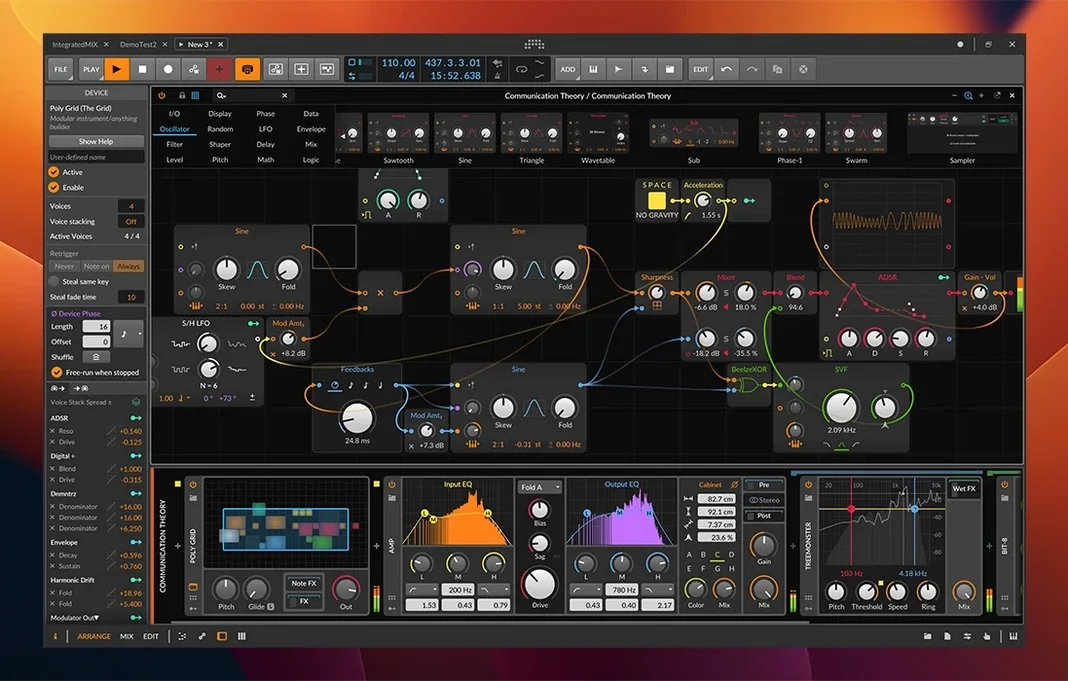
Bitwig Studio 6.1 runs on any Mac that can handle macOS 12 Monterey or later, with native support for both Apple Silicon and Intel processors. That means an M1 MacBook Air or a venerable Intel Mac Pro will each see the same tight integration with your audio interface and MIDI controllers. There is no secondary-class support here — the codebase is a single, unified build, so you can simply open a session and work.
The Detail Editor is where an experienced ear will spend a quiet kind of heaven. It handles nondestructive, per-clip audio editing without ever asking you to commit to a destructive render. You can slip the transient markers, adjust gain on a single syllable, or redraw a waveform cycle with surgical precision, all while the Arrange timeline and Mixer sit open on separate monitors. Those three workspaces — Arrange, Mix, and Edit — are not just tabs; they act as independent views into the same project, which makes multi-screen setups feel genuinely purposeful rather than merely spacious.
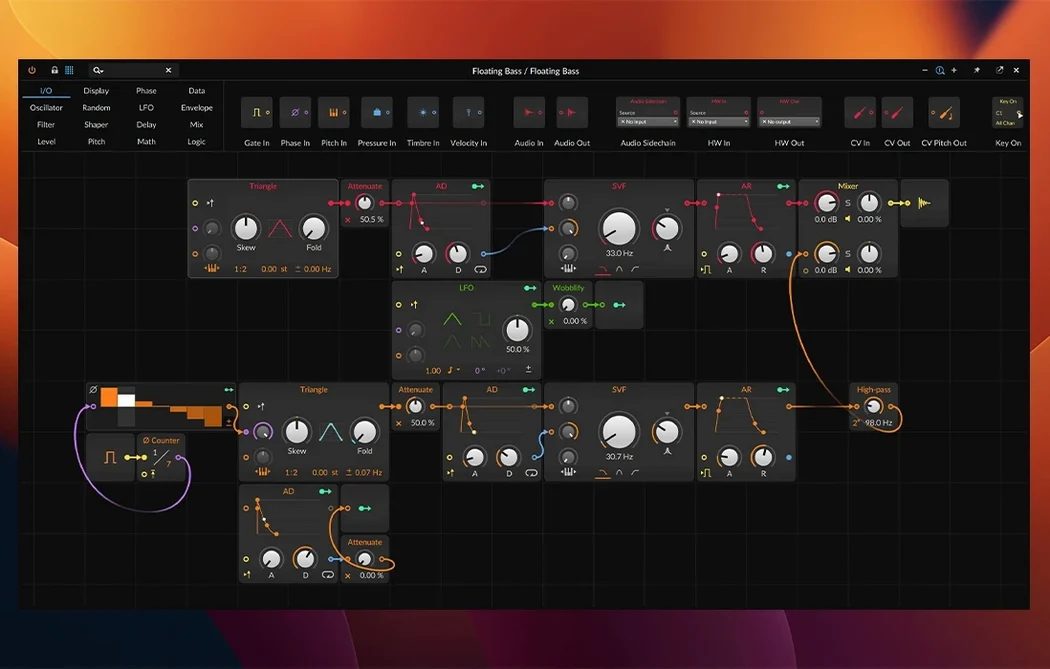
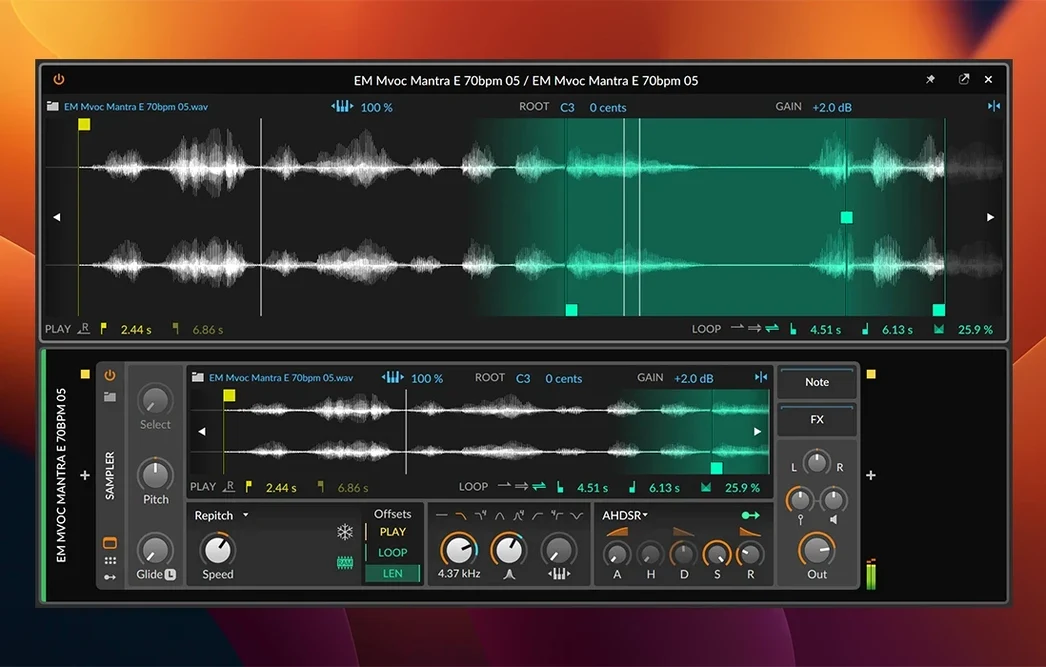
Modulation in Bitwig has always felt less like a feature list and more like a philosophy. Any parameter on any of the 80-plus built-in devices can become a modulation target, driven by LFOs, envelope followers, or audio-rate signals from another track. The 6.1 release quietly strengthens this with a radically updated Sampler. You can now slice a breakbeat across the keyboard in seconds, then drop individual slices into the new Spectral or Fragments play modes. Spectral mode pulls apart the frequency and noise components of a sound for independent manipulation; Fragments treats short grains of audio like a wavetable, letting you scan through a sample's texture in real time while automation curves bend the playback position.
Automatic tempo and pitch detection, also new in 6.1, mean dragging in a dusty vinyl rip or a found-sound recording no longer starts with a manual tap-tempo ritual. The software listens, decides, and maps the clip to the grid. It is a small, courteous touch that respects the fact that you probably opened the software to make music, not to do bookkeeping.
The silent arrange page and missing audio engine
Every DAW has its own personality, and Bitwig’s modular, window-based approach occasionally throws up quirks that can leave a newcomer staring at a silent arrange page. One of the most frequent headaches is the missing audio engine. If you load a project and nothing plays, check the audio engine power button in the top bar — Bitwig can be running with the engine off, which is useful for deep editing sessions but alarming when you are expecting sound. A related gotcha is the sample rate mismatch. Your audio interface might be locked at 48 kHz while a project from a collaborator expects 44.1 kHz. Bitwig will not automatically switch the interface; you need to open the Dashboard, choose the correct device, and match the rate manually.
Plugin scanning trips people up more than it should. When a third-party AU or VST3 plug-in shows up greyed out or refuses to load, it is usually because Bitwig sandboxes each plug-in as a separate process for stability. A plug-in that crashes during scanning simply gets disabled next time. The fix is not to reinstall the plug-in — it is to head to Settings > Plug-ins and click the circular arrow icon to re-scan the individual device. If you have just added a plug-in folder, Bitwig will not see it until you explicitly add the path and hit the rescan button. The sandboxing also explains why some older 32-bit plug-ins will never appear: the 64-bit-only architecture of the current build simply will not bridge them.
Latency during live performance can catch people out, especially on Intel Macs. The Detail Editor and the modulation system are hungry for CPU, and a project loaded with Spectral-mode samplers and per-note pressure automation can overwhelm a buffer size of 64 samples. The simple fix is to set a larger buffer — 256 or 512 samples — in the Dashboard for mixing and arranging, then switch to a lower buffer when you are recording a live take or playing a MIDI controller. Bitwig keeps separate buffer settings for playback and recording, which is easy to miss because the toggle is tucked inside the audio engine preferences rather than on the transport bar.
Plug-in Formats and File Organisation
Bitwig Studio 6.1 supports VST3, CLAP, and its own native device format. The absence of VST2 support sometimes surprises users migrating from older DAWs. If you have a library of legacy VST2 plug-ins, they simply will not load — the format is not supported on Apple Silicon builds of Bitwig. The CLAP format, by contrast, feels like a natural fit for the modulation architecture, because CLAP plug-ins can expose per-note and polyphonic modulation inputs that Bitwig’s modulators can target directly. If a developer offers both VST3 and CLAP versions of a synth, installing the CLAP version usually rewards you with deeper integration.
No Rosetta, no emulation on Apple Silicon
The question about Apple Silicon compatibility comes up so often it almost answers itself. Yes, Bitwig Studio 6.1 runs natively on M1, M2, and M3 chips. There is no Rosetta layer, no emulation, and no penalty for plug-ins that are also compiled for ARM. If a plug-in is Intel-only, Bitwig runs it in a separate Intel process that communicates with the native ARM host — you will see a small bridge icon next to the plug-in name in the device chain. In practice, this works reliably for most instruments and effects, though heavy sample libraries loaded via an Intel-only sampler may push memory usage higher than you expect.
Another recurring question is whether Bitwig works with a particular class of MIDI controller. The MPE support is baked in deeply: a ROLI Seaboard or a LinnStrument will just work, with per-note pressure, slide, and lift mapped automatically to whatever modulation targets you have set. Standard MIDI controllers and keyboards are equally straightforward — plug them in, open the Controller Settings panel, and Bitwig will usually detect them. The Ableton Link support also means you can sync tempo and transport wirelessly with iOS music apps or another laptop without running a single piece of cable.
People often ask about importing projects from other DAWs. Bitwig does not open Logic or Ableton project files directly, but it handles audio stems, MIDI files, and mixed-down WAV exports as well as anything else. A sensible workflow is to bounce stems from your old sessions, drag them into Bitwig’s Arrange view, and let the automatic tempo detection place them on the grid. The time-stretching engine gives you eight algorithms to choose from, so a drum stem can use a percussive mode while a pad stays on a smoother, polyphonic setting.
The Sound Designer’s Late Night
Picture a sound designer working on the score for a short animated film. She has a folder of field recordings — rain on a metal roof, a squeaking gate, wind through a broken windowpane — and she wants to turn them into the vocabulary of a ghost story. She drops a long gate-squeak file into Bitwig 6.1. The automatic pitch detection reads the recording’s unstable fundamental and sets the root note, so her first job is already done. She slices the file into eight distinct squeaks using the Sampler’s new slicing mode, then assigns each slice to a different key on her LinnStrument.
On the third slice, the one that sounds almost like a human breath, she switches to Fragments mode. A short grain loop scans through the sample at a rate controlled by an LFO, while a second LFO from Bitwig’s modulator bank shifts the grain start position. The result is a constantly evolving spectral shimmer that no longer resembles a gate at all. She routes the output through a convolution reverb device — one of the 80-plus built-in effects — and records the performance with per-note pressure mapped to the reverb’s wet/dry mix. Half an hour later, the recording has become the film’s main motif, and no external plug-in was opened. That is the kind of session where Bitwig’s modulation system stops feeling like a feature and starts feeling like the whole point.
A leaner device roster next to Logic’s orchestral library
Logic Pro is the obvious comparison for any Mac-based DAW. Logic ships with an enormous sound library and a polished set of virtual instruments that cover acoustic and orchestral territory beautifully. Bitwig Studio takes a different path: its built-in devices are more electronic and experimental in character, and its modulation architecture is far more open-ended. Where Logic asks you to assign an LFO via a drop-down menu, Bitwig lets you drag a cable from any modulator to any target and see the relationship on screen. Logic works brilliantly for linear, track-based recording and mixing; Bitwig feels more at home with electronic producers and sound designers who think in terms of signal flow and real-time manipulation.
Ableton Live shares Bitwig’s dual focus on studio production and live performance, and the family resemblance is no accident — Bitwig was founded by former Ableton developers. Live’s Session View and Bitwig’s Clip Launcher work on similar principles, but Bitwig’s modulation system runs deeper, and its hybrid
Version 6.1 refines the Sampler from a capable instrument into a genuinely deep sound-design tool. Slicing, along with the new Spectral and Fragments play modes, opens up ways of manipulating audio that sit somewhere between a traditional sampler and a modular synthesis rig. Automatic tempo and pitch detection have also arrived, so imported audio maps itself to the project grid without manual warping.
- macOS 12 Monterey or later
- Apple Silicon or Intel processor
- Compatible audio interface recommended
Questions I keep hearing
What are the three main workspaces in Bitwig Studio?
The Arrange, Mix, and Edit workspaces provide dedicated views for timeline arranging, mixing, and detailed audio editing, and they can be spread across multiple monitors simultaneously.
Does Bitwig Studio 6.1 work with Apple Silicon Macs?
Yes, Bitwig Studio offers native support for both Apple Silicon and Intel processors, requiring macOS 12 Monterey or newer.
What is new in the Bitwig Studio 6.1 Sampler?
The Sampler now includes audio slicing, plus new Spectral and Fragments playback modes for separating frequency components or granular-style wavetable scanning.
Questions from the class 0
Sign in or join the class to ask a question.
Nobody has asked anything yet. If you have used it on a real job, say what the file did.
Also on the Audio shelf
The whole Audio shelf Boom 3D
Reshapes your Mac's entire output with an equaliser, a volume boost, and spatial widening.
Boom 3D
Reshapes your Mac's entire output with an equaliser, a volume boost, and spatial widening.
 Audiobook Builder
Joins dozens of audio files into a single, properly chaptered audiobook with cover artwork.
Audiobook Builder
Joins dozens of audio files into a single, properly chaptered audiobook with cover artwork.
 Audio Hijack
Routes any Mac audio into a recording and can transcribe it to searchable text.
Audio Hijack
Routes any Mac audio into a recording and can transcribe it to searchable text.
 Cockos REAPER
Turns a Mac into a full multitrack studio for recording, arranging and mixing audio.
Cockos REAPER
Turns a Mac into a full multitrack studio for recording, arranging and mixing audio.
 Cubase
Provides a musical workspace that keeps up with an arrangement as fast as you can imagine it.
Cubase
Provides a musical workspace that keeps up with an arrangement as fast as you can imagine it.
 Cycling '74 Max
Lets you build your own instruments and effects by connecting visual objects with virtual patch cords.
Cycling '74 Max
Lets you build your own instruments and effects by connecting visual objects with virtual patch cords.
 Amadeus Pro
Edits and analyses audio files with a customisable favourite actions palette.
Amadeus Pro
Edits and analyses audio files with a customisable favourite actions palette.
 Airfoil
Sends any Mac audio to AirPlay and Bluetooth speakers around your home.
Airfoil
Sends any Mac audio to AirPlay and Bluetooth speakers around your home.