 ASPNetWorld
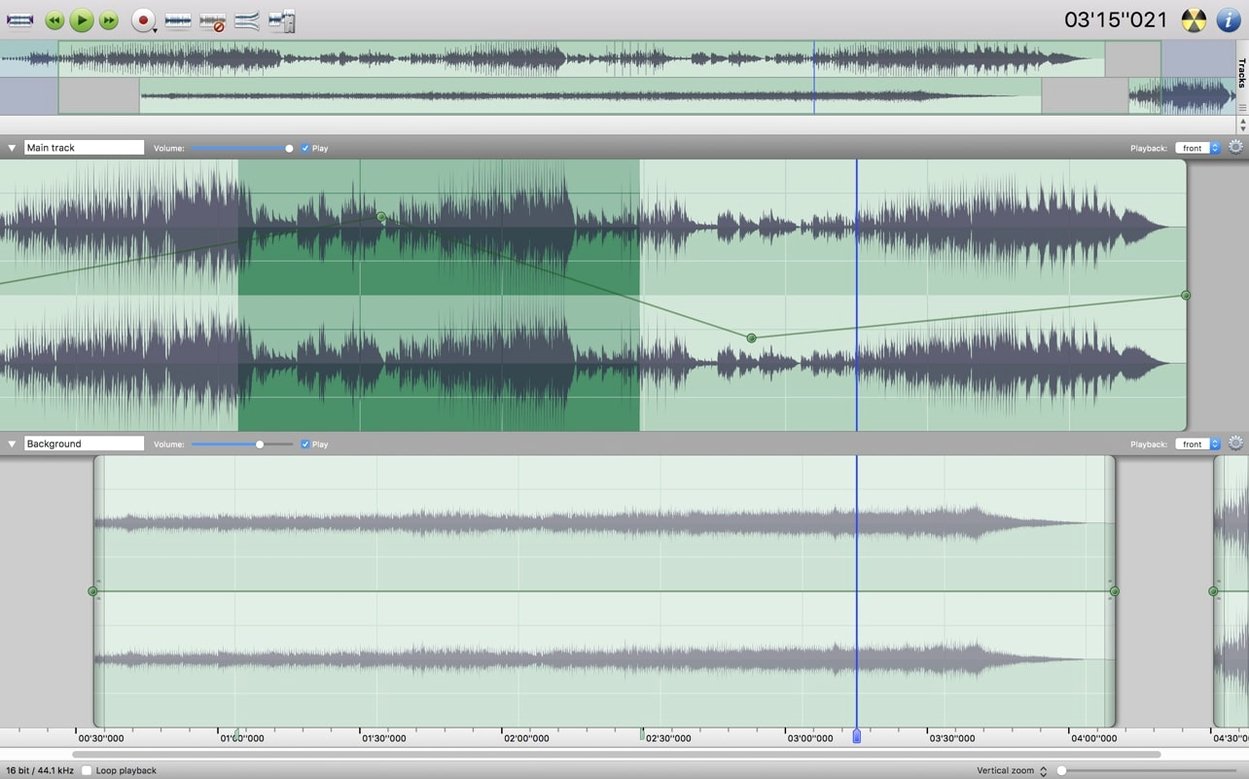
Favorite Actions is one of those panels that, once you know it's there, quietly reshapes how you work. Instead of hunting through menus for the same five or six edits, you park them in a single floating palette. It feels like building a tiny custom toolbar that follows you from one project to the next.
What people tend to wonder before they install
- Will it handle a noisy recording? Yes — noise reduction works across an entire track or just a highlighted section, so you can clean up a chair squeak in an interview without softening the voice itself.
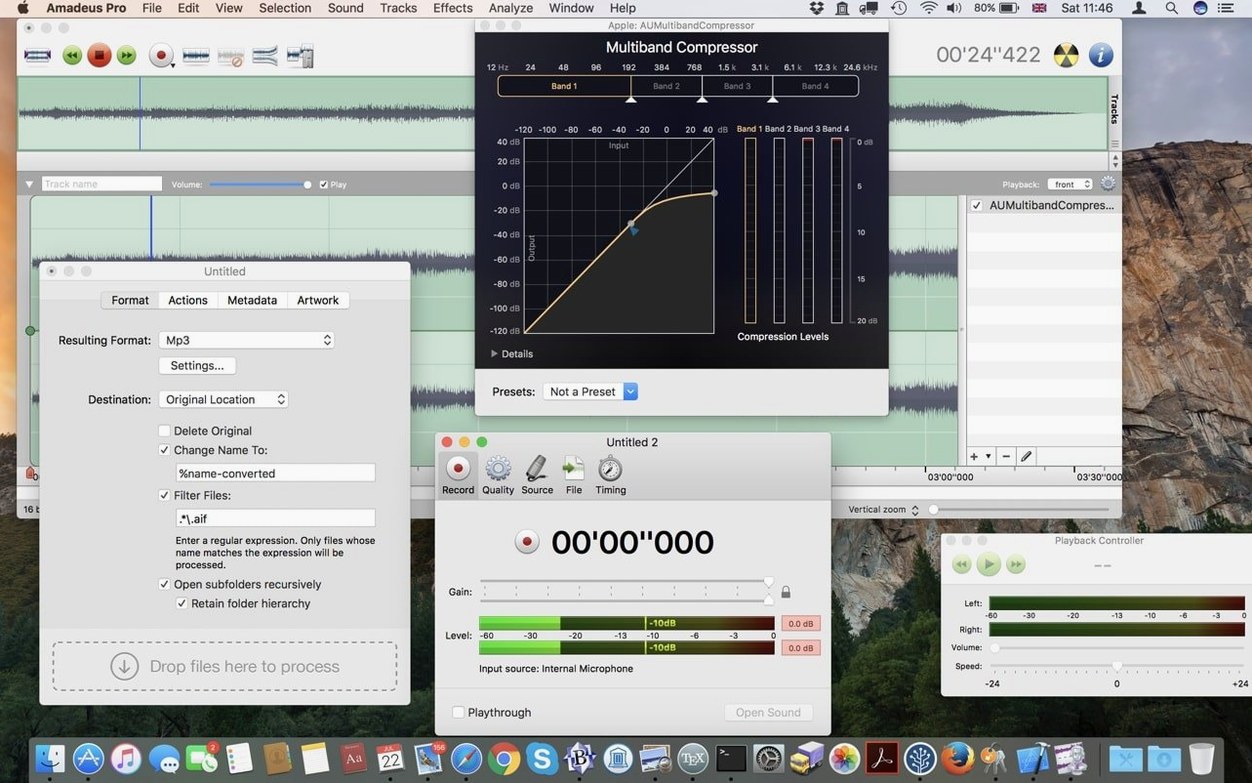
- Does it play nicely with other audio tools? It supports Audio Units, the native macOS plug-in format, so your existing EQs and compressors slot straight in.
- Can I mark up a long file? Markers are built in, which turns a two-hour concert recording into something you can navigate by section rather than by guesswork.
- Is the interface stuck in English? The menus switch to German, Danish, Spanish, Italian, Finnish, or French — a small thing unless you think best in your first language.
The quiet cleverness under the hood
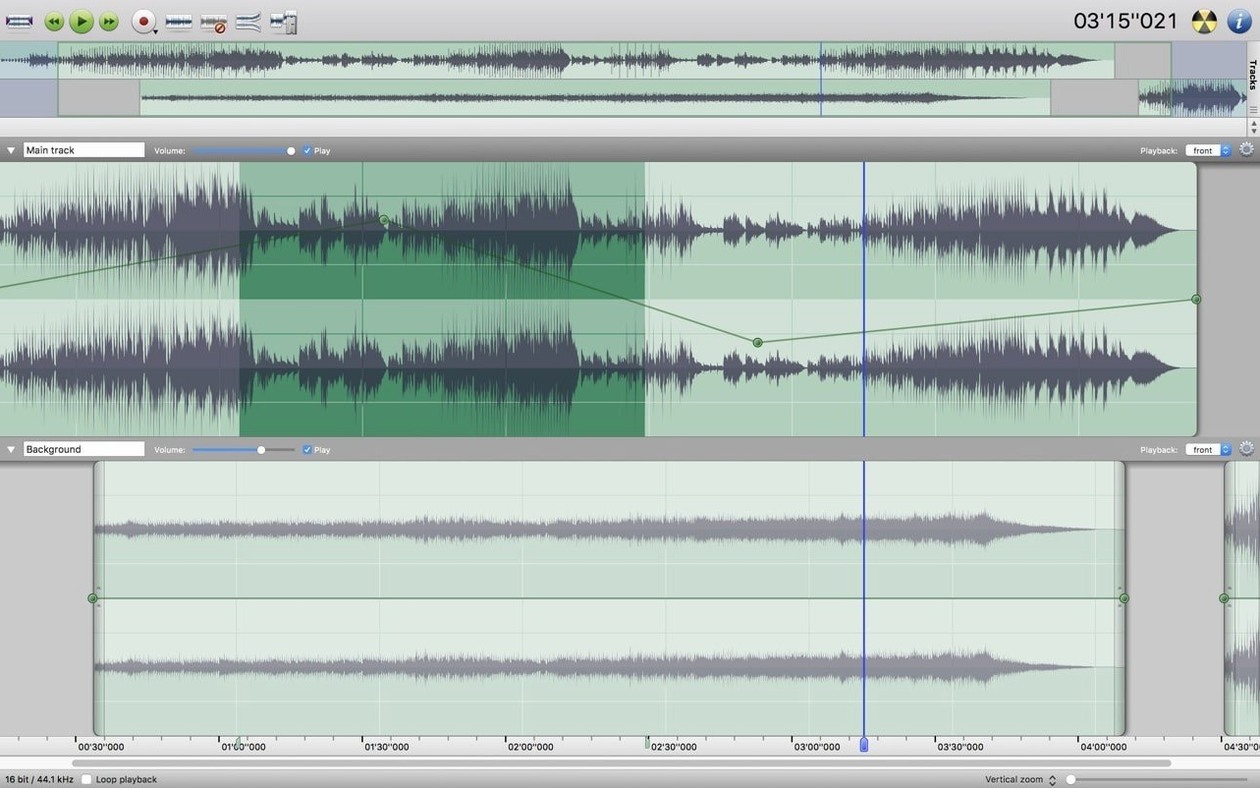
Waveform caching is the sort of feature you never notice until it's missing. By storing a pre-calculated visual map of your audio, the editor stays snappy even when you're scrolling through very long files. Add simple fade-in and fade-out handles on every clip, and you have an application that respects your time without making a fuss about it. It doesn't try to be a full recording studio — it's a focused audio editor for macOS, and it is all the better for it.
Waveforms redraw almost instantly even on older Intel Macs
On a modest Intel Mac, the kind still running macOS 10.14 or 10.15, Amadeus Pro loads in about two seconds — not the fastest cold launch in the world, but once it's up, waveform redraws are essentially instant. That's the waveform caching at work. You can scrub through a two-hour spoken-word recording or a digitised side of vinyl and the display never stutters. Memory usage sits around 120–150 MB with a couple of moderate-length tracks open, which means it coexists peacefully with a browser and a mail client without swapping.
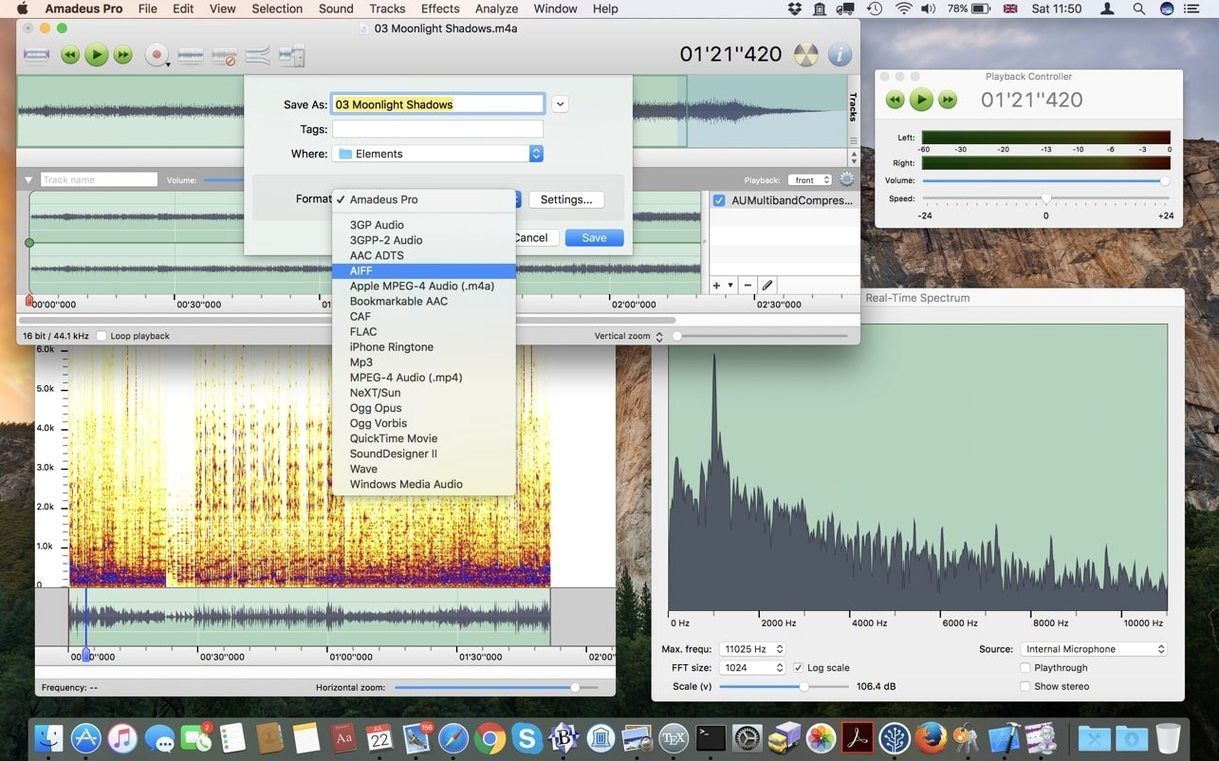
Stability is the real story. During a long batch conversion of forty-odd WAV files to FLAC, the progress bar chugs along in the foreground; you can still work in another track while it runs, and it doesn't seize up when you alt-tab away. I've had the beta running for afternoons at a stretch — editing, applying VSTs, trimming silence — and it hasn't thrown a single crash. Direct-to-disk output helps here: instead of holding an entire processed file in RAM before writing, it streams the result straight to storage. That keeps the pressure off memory and makes even large sessions feel predictable.
One thing worth noting for anyone who regularly digitises old tapes or records: the recording panel gives you a live level meter and a simple timer. It's not lavishly decorated, but the meters respond quickly enough that setting input gain becomes a matter of watching the green and yellow, nudging a knob, and hitting record. No fuss, no latency surprises.
Streaming audio capture needs a virtual driver or loopback utility
Can it record streaming audio from the internet? Yes, provided your Mac's audio routing is set up correctly. Amadeus Pro can capture any signal that appears at its selected input, so with a virtual audio driver or a loopback utility, you can grab internet radio, video calls, or a live performance. The application itself doesn't care where the sound originates — it just records whatever you feed it.
Will it flatten my battery on a MacBook? On an older Intel MacBook Air, editing with occasional playback pulls roughly 15–20% of the CPU and keeps the Energy Impact rating in Activity Monitor comfortably in the green. Obviously, heavy-duty batch processing or running a dozen convolution reverbs will push that higher, but for cutting interviews, trimming ringtones, or tidying up field recordings, it is surprisingly gentle. The direct-to-disk architecture means the drive works in short bursts rather than constant writes, which also helps keep things cool.
Does it play well with plug-ins from other sources? Audio Unit support is baked in, and VST compatibility means you can reach for freeware compressors or niche spectral tools without a bridging layer. I have thrown a handful of older 32-bit VSTs at it via a wrapper, and they loaded without complaint — your mileage may vary, but the plug-in scanning routine is forgiving.
Podcasters get independent track nudging, trimming, and fading
The obvious audience is anyone who needs a multi-track audio editor on macOS without committing to a sprawling digital audio workstation. Podcasters who record two or three local microphones and want to nudge, trim, and fade each track independently will find the workflow refreshingly linear. There is no console view to configure, no bus routing to puzzle over — you see the waveforms, you edit them, you export.
Musicians who digitise vinyl or cassette collections get a lot out of Amadeus Pro too. The ability to record a whole side, drop markers between tracks, and then batch-export those marked regions as separate files saves a surprising amount of time. Combine that with the built-in noise reduction for surface hiss, and you have a tidy archiving tool that doesn't demand a degree in audio engineering.
Language teachers and field researchers are a less obvious but equally good fit. Markers can hold notes — "question starts here," "speaker change," "background noise sample" — and the interface's availability in French, Spanish, German, Italian, Danish, and Finnish means the menus can match the working language of the project. Long-form interview editing, with its need for careful trimming and occasional noise cleanup, plays to the application's strengths.
Native Cocoa controls make it feel built for macOS, not grafted on
Audacity shares the free, cross-platform spirit and covers many of the same bases: multi-track editing, noise reduction, batch processing. But Audacity's interface has always felt grafted onto macOS rather than built for it. Amadeus Pro uses native Cocoa controls throughout; scrolling, text rendering, and keyboard shortcuts behave exactly how a Mac user expects. Audacity also lacks the direct-to-disk architecture, so very large projects can become memory-hungry in a way that Amadeus Pro sidesteps. If you search for amadeus mac alongside Audacity comparisons, the conversation usually lands on this point: one feels like a Mac application, the other feels like a port.
Fission from Rogue Amoeba is a polished, single-window editor aimed at quick trims and format conversions. It is lighter on its feet for one-track jobs — snipping a ringtone or topping-and-tailing a podcast — but it does not offer multi-track layering or VST support. If your work involves lining up a voiceover with a background bed, Amadeus Pro gives you the tracks; Fission sends you to a different application. People hunting for an amadeus pro mac solution often do so because they have outgrown Fission's track limit.
Ocenaudio is another free editor with a clean interface and real-time preview of effects. It handles large files admirably and runs natively on macOS. However, it remains a single-track editor at heart — you can open multiple files, but you cannot stack them on independent timelines. For stereo editing or quick mastering checks, Ocenaudio is splendid; for layered sound design or multitrack music editing, amadeus pro download searches tend to signal the moment someone realises they need more than one track lane.
Each of these alternatives makes sense in a particular corner of the audio world. Amadeus Pro sits in a comfortable middle ground: more capable than a single-track editor, less intimidating than a full DAW, and thoroughly Mac-native in ways that matter during a long editing session.
- macOS 10.9 or later
- Intel processor
Questions from the class 0
Sign in or join the class to ask a question.
Nobody has asked anything yet. If you have used it on a real job, say what the file did.
Also on the Audio shelf
The whole Audio shelf Airfoil
Sends any Mac audio to AirPlay and Bluetooth speakers around your home.
Airfoil
Sends any Mac audio to AirPlay and Bluetooth speakers around your home.
 AIMP
Plays a vast range of audio file formats from a familiar desktop interface.
AIMP
Plays a vast range of audio file formats from a familiar desktop interface.
 Audio Hijack
Routes any Mac audio into a recording and can transcribe it to searchable text.
Audio Hijack
Routes any Mac audio into a recording and can transcribe it to searchable text.
 Audiobook Builder
Joins dozens of audio files into a single, properly chaptered audiobook with cover artwork.
Audiobook Builder
Joins dozens of audio files into a single, properly chaptered audiobook with cover artwork.
 Absynth
Generates evolving, unearthly sounds through semi-modular synthesis.
Absynth
Generates evolving, unearthly sounds through semi-modular synthesis.
 Ableton Live
Lets you record, perform and improvise music without ever pressing stop.
Ableton Live
Lets you record, perform and improvise music without ever pressing stop.
 Bitwig Studio
Gives producers a sandbox for recording, sound design, and live performance with modular freedom.
Bitwig Studio
Gives producers a sandbox for recording, sound design, and live performance with modular freedom.
 Boom 3D
Reshapes your Mac's entire output with an equaliser, a volume boost, and spatial widening.
Boom 3D
Reshapes your Mac's entire output with an equaliser, a volume boost, and spatial widening.