 ASPNetWorld

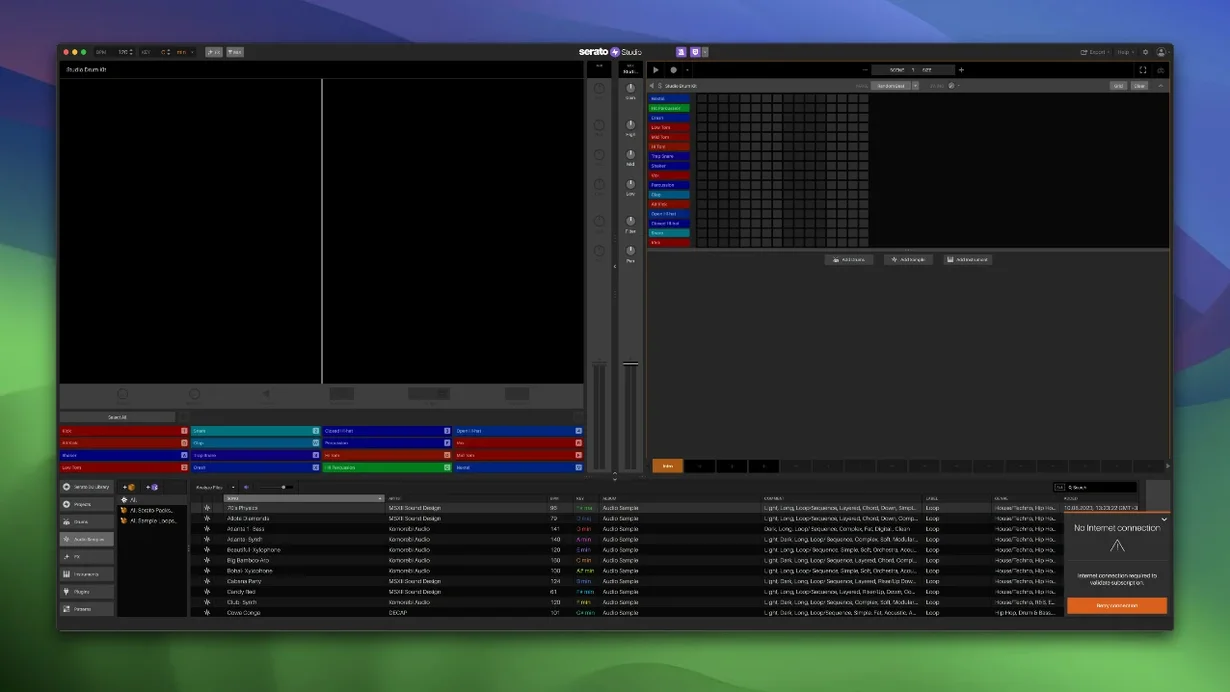
It runs on any Mac from macOS 10.14 Mojave onwards, including the latest Apple Silicon machines and the freshly supported macOS 26 Tahoe. If you have a Serato DJ library, it already knows your tracks.
Isolate and automate acapella, melody, bass and drums inside a sample
- Stem-level control in Sample Decks. You can now isolate and mix the acapella, melody, bassline and drum parts of any sample independently, then automate their levels and even switch whole stems on or off across a scene — useful for building breakdowns that breathe.
- Musical shortcuts that keep you moving. Auto Chord mode generates chord progressions that stay in the project key, while one-touch key switching and ready-made drum patterns let you sketch out ideas before the moment passes.
- A familiar mixer environment. Colour-coded waveforms sit in a proper mixer channel with effects. If you use DJ hardware, the channel strip thinking translates immediately.
- Plugin and export flexibility. VST and AU support means you can reach for third-party instruments and processors, and stem export lets you bounce separated parts for a mix engineer or a live set.
Built for loop-based performance, not deep linear arrangement
- The workflow is built for speed rather than deep linear arrangement — it suits loop-based and performance-driven production.
- Native control for the AlphaTheta SLAB arrived in this version, but hardware integration is still centred on Serato’s own ecosystem.
Flip the pad order to match your controller muscle memory
A few preferences make the app feel more like yours straight away. Open the setup screen — the one with the gear icon — and spend two minutes on these.
- Reverse Pad Order. If your muscle memory comes from a particular piece of DJ hardware where the pads run bottom-to-top, ticking this box saves a surprising amount of head-scratching. It flips the on-screen pad grid so the layout matches what your fingers expect.
- Buffer size and sample rate. The defaults are sensible, but lowering the buffer to 128 or 64 samples on an Apple Silicon Mac gives you noticeably tighter response when tapping in drum parts from a controller. Keep it at 256 or higher on older Intel machines if you plan to stack many plugin instruments.
- Library paths. Studio shares the Serato library, so point it at the same folders your Serato DJ installation uses. That way your crates, cue points and analysed BPM data appear without any import dance. The new Crate Search field makes finding a half-remembered folder name much quicker than scrolling.
Launches in seconds and stays under 600 MB on Apple Silicon
On a modern Apple Silicon Mac the application launches in a couple of seconds and sits comfortably under 600 MB of RAM with a modest project loaded. Older Intel machines feel sprightly enough, though the fan may wake up when you start automating stem levels across several Sample Decks at once — that particular feature leans on real-time audio separation, which eats a few CPU cycles.
Stability has been solid through long sessions. Crashes are rare and almost always traceable to a misbehaving third-party AU plugin rather than the host itself. The patch installer in this build ensures you are not wrestling with activation screens, which removes one common frustration. If you keep your plugin collection tidy and avoid loading half-finished betas, you can run Studio for an afternoon without a hiccup.
Disk usage is modest for a beat-making environment — the core pack plus a handful of extra sound packs will sit under 3 GB. The application does not insist on placing its library on your system drive, so offloading content to an external SSD is painless.
Stem automation can drift out of sync after nudging the sample start
Stems automation occasionally trips people up the first time. If you record a Scene View automation pass that switches stems on and off, then later nudge the sample start point, the automation lanes can drift out of sync. The fix is to lock your sample placements before writing automation, or re-record the pass once the arrangement feels settled.
Another frequent hiccup involves plugin windows going missing behind the main interface. Studio does not use a floating-window policy for every AU instrument, so a synth GUI can vanish when you click back on the mixer. Press Cmd+` to cycle through open windows — it usually brings the rogue plugin back into view.
When the Feel control on a chord part sounds too loose, try backing it off to around 15–20% rather than leaving it at the default midpoint. The effect imitates the slight timing spread of a live keyboard player, and a lighter touch often sounds more natural than the heavier setting.
If you are working from a serato studio mac torrent source, you may find the library update — the one that adds Track Rating and Favorite Crates — needs a manual rescan of your existing folders. Right-click the crate and choose “Rescan Tags” to pull in ratings that Serato DJ wrote earlier. A serato studio torrent download typically includes the core sound packs, but you might need to grab additional sample content separately; missing kick samples in a template project usually mean the sound-pack path needs re-linking in the library tab.
The after-hours slot where half-finished ideas turn into experiments
Imagine a club DJ who has a residency every Saturday and a pile of half-finished ideas on their laptop. The after-hours slot from two until four in the morning is when the interesting experiments happen — looping an acapella from last week’s warm-up set, dropping a bassline stem from a track that never quite worked on the dancefloor, and building a new beat underneath it while the energy of the night is still fresh.
They open Studio at the kitchen table after getting home. The Serato DJ library already shows the tracks they played, complete with cue points. They drag an old vocal into a Sample Deck, isolate the acapella stem using the new level controls, and pull the bassline stem from a different song into a second deck. Auto Chord mode gives them a four-bar progression in the same key as the vocal. They tap out a hi-hat pattern on the laptop keyboard — no controller plugged in — and by the time the tea has gone cold, there is a rough arrangement with Scene View automation fading the drum stem out for a breakdown.
It is not a finished track. But it is a solid sketch, made in under an hour, using the same library they rely on behind the decks. That is the space Serato Studio occupies: not a full linear DAW, but a rapid capture device for the ideas that appear when a DJ’s ears are still ringing.
Version 2.5.0 brings stem automation into the Arranger View and adds official support for macOS 26 Tahoe.
- Individual stem levels for acapella, melody, bassline and drums can now be adjusted per Sample Deck.
- Stems On/Off and stem levels are automatable in Scene View — draw in changes across a performance.
- Native control for AlphaTheta SLAB hardware.
- Full compatibility with macOS 26 Tahoe.
- macOS 10.14 or later (including macOS 26 Tahoe)
- Intel or Apple Silicon Mac
Questions I keep hearing
Can I separate a finished track into stems?
Yes — you can adjust individual levels for acapella, melody, bassline and drum stems in any Sample Deck, and export those stems for use elsewhere.
Does it work with my existing Serato DJ library?
It reads the Serato DJ library directly, so your crates, cues and analysed files appear without any conversion step.
Will my third-party plugins load?
It supports both VST and AU formats, so most instrument and effect plugins should appear once their locations are set.
Questions from the class 0
Sign in or join the class to ask a question.
Nobody has asked anything yet. If you have used it on a real job, say what the file did.
Also on the Audio shelf
The whole Audio shelf Serato DJ Pro
Plays two or more audio tracks in sync and lets you blend them with hardware decks.
Serato DJ Pro
Plays two or more audio tracks in sync and lets you blend them with hardware decks.
 SoundSource
Gives you a menu-bar panel to adjust the volume and output of every app on your Mac individually.
SoundSource
Gives you a menu-bar panel to adjust the volume and output of every app on your Mac individually.
 Steinberg Nuendo
Edits dialogue and sound for film and games.
Steinberg Nuendo
Edits dialogue and sound for film and games.
 QLab
Controls audio, video and lighting cues for live performances.
QLab
Controls audio, video and lighting cues for live performances.
 Studio One
Streamlines music production with drag and drop.
Studio One
Streamlines music production with drag and drop.
 Swinsian
Plays and organises local music files.
Swinsian
Plays and organises local music files.
 Plugin Alliance Brainworx bx_mastering studio
Polishes a finished stereo mix with a few focused mastering controls.
Plugin Alliance Brainworx bx_mastering studio
Polishes a finished stereo mix with a few focused mastering controls.
 Traktor Pro
Mixes on four decks and isolates drums, bass or vocals from a track in real time.
Traktor Pro
Mixes on four decks and isolates drums, bass or vocals from a track in real time.