 ASPNetWorld

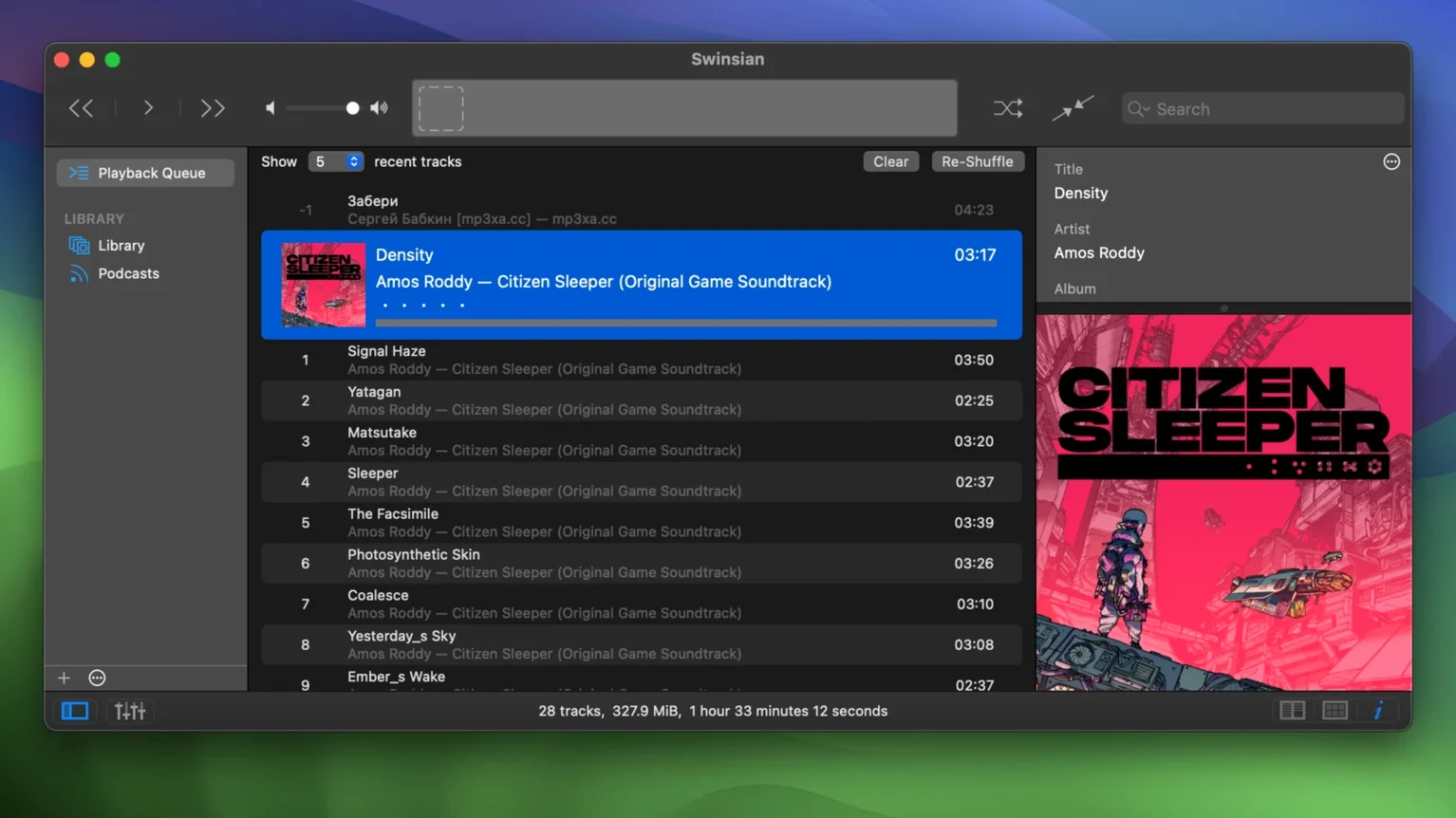
You plug in a drive holding fifteen years of FLACs and WAVs, neatly organised by artist but never touched by Apple Music. The Mac’s default apps stare back blankly, but Swinsian simply gets on with it — scanning every folder, respecting every cue sheet, and building a navigable library in seconds without importing a thing.
A player built for existing local libraries, not streaming or editing
Swinsian is not a DAW, not a streaming client, and certainly not a cataloguing obsessive’s side project. It is a player for people who already have a substantial library and want it handled with the same care a good mastering engineer gives a mix. Folder watching means the app stays in sync with files wherever they live — on an internal SSD, a networked volume, or a portable drive. The advanced tag editor supports regular-expression search, which makes cleaning up messy metadata less of a chore, and the interface stays snappy even with a very large library. Gapless playback and album-art fetching are built in; the latest update quietly fixes quadraphonic FLAC playback and adds hidden options for larger text, which tells you plenty about the user base this app attracts.
Formats and feeds, without the platform wars
There is something quietly satisfying about an app that treats FLAC, ALAC, Opus, and DSF as first-class citizens alongside MP3 and AAC. Swinsian’s format support is broad but never feels bolted on — cue sheets and embedded cue metadata work as they should, which is rarer than it ought to be. Podcast subscriptions download automatically in the background, and importing an existing iTunes library takes a single step, so you lose nothing when you make the switch. It will not replace Logic Pro or Audacity, but it slots in beside them as the player that finally stops getting in the way.
Match sample rates automatically and set up per-library artwork folders first
Out of the box Swinsian is perfectly usable, but a handful of preferences make it feel like it was built for your collection specifically. Head to the General pane first and tick Automatically change sample rate of output device — if your DAC supports it, this stops Core Audio’s resampling from getting between you and a bit-perfect stream. Next, under Playback, check Show playback notifications only if you want them; I leave them off because the menu-bar icon gives me everything I need with a glance. The real power move is in the Artwork section: tell Swinsian to embed artwork into files rather than storing it in its own database. That way, if you ever move your library to another machine or point a different player at the same folders, every cover travels with the audio.
Global keyboard shortcuts deserve five minutes of your time. The defaults are sensible — play/pause, skip, and rating — but mapping a shortcut to Show Playing Track in Library saves endless scrolling when you are deep in a smart playlist and want to jump to the album. One hidden gem that arrived quietly in version 3.0.8: a terminal command lets you bump interface text size for art grid labels, which is a thoughtful nod to anyone squinting at a high-resolution display from a sofa.
A jazz collector’s Saturday morning
Imagine someone who has been ripping Blue Note CDs since the early 2000s, long before streaming catalogues were complete. Their library sits on a Thunderbolt drive — about 40,000 tracks, half FLAC and half ALAC, with metadata that has seen three different tagging tools and shows it. On a Saturday morning they mount the drive, launch Swinsian, and the library is already current because folder watching has been tracking additions and deletions all week. They pull up the Tag Editor with the keyboard shortcut, select a dozen Herbie Hancock tracks where the album artist field was left blank years ago, and use a regular-expression find-and-replace to fill it in across all of them in one operation. Then they build a smart playlist that gathers everything from 1964 to 1969 labelled “hard bop” or “post-bop”, drag it into a separate playlist window, and let it play while they cook. The 31-band equaliser gets a tiny nudge at 80 Hz — just enough to warm up a pair of nearfields in a kitchen with too much glass. No importing, no cloud sync, no prompts to subscribe to anything.
It watches folders instead of managing a single library file
The most common stumble is treating Swinsian like iTunes and expecting it to manage a monolithic library file. It does not — it watches folders. If you move or rename files outside the app without adding the new location as a watched folder, Swinsian will show them as missing. The fix is simple: add the parent folder once and let the watcher do its job. Another mistake is assuming the Import iTunes Library option copies audio files. It pulls in playlists, ratings, and play counts, but the actual tracks stay where they are. People sometimes run the import, delete what they think is a duplicate in Finder, and then wonder why Swinsian cannot find the file. Think of the import as adopting the library’s metadata, not duplicating it.
Beginners also overlook the Duplicate Finder, which lives under the Library menu and is far more useful than its quiet placement suggests. It can spot duplicates by metadata, by file hash, or by a combination, and it presents the results in a sortable list rather than auto-deleting anything. Finally, some users switch on the graphic equaliser and immediately push every band upward, which clips the output. Boosting a band is fine, but if you raise more than three by the same amount you are effectively just turning up the volume with extra distortion — start by cutting what you do not want rather than boosting what you do.
Vox prioritises streaming and single albums over deep tag editing
Set Swinsian next to Vox and the differences surface quickly. Vox leans hard into its streaming-service integrations and a minimalist design that prioritises single-album playback over library management. Its tag editing is basic — you can fix a misspelled artist name, but you will not find regular-expression search or batch find-and-replace. Vox also stores your library in its own cloud-synced container, which is convenient until you want a folder on an external drive to stay in sync without uploading anything.
Audirvāna competes on sound quality rather than library maintenance. It goes deep on exclusive-mode playback, upsampling filters, and kernel streaming, and it sounds superb with a well-matched DAC. But its library features — smart playlists, duplicate detection, global keyboard shortcuts — feel secondary to the audio engine. Audirvāna wants to be your listening room; Swinsian wants to be your archive that can also play beautifully. The tag editor in Audirvāna is workable, but it lacks the regex muscle and the find-and-replace workflow that makes cleaning up a large collection practical.
IINA sometimes gets recommended as a lightweight alternative because it opens FLAC and plays gaplessly, but it is a video player that happens to handle audio — there is no library, no folder watching, no smart playlists, and certainly no cue-sheet support. It works for playing a single album from Finder, but it is not in the same category. If you find yourself searching for a swinsian download or a swinsian mac page, you are probably already past the point where a general-purpose media player is enough. The gap between a capable single-file player and a proper library tool becomes obvious around the time you first try to find every track tagged with a specific producer across three hundred albums. Swinsian handles that query in under a second on a library ten times that size.
- macOS 10.13 (High Sierra) or newer
- Runs natively on both Apple Silicon and Intel 64-bit Macs
Questions I keep hearing
Can Swinsian play FLAC files without converting them?
Yes, FLAC is supported natively along with ALAC, WAV, AIFF, DSF, and several other formats — no conversion or additional plug-ins required.
Questions from the class 0
Sign in or join the class to ask a question.
Nobody has asked anything yet. If you have used it on a real job, say what the file did.
Also on the Audio shelf
The whole Audio shelf Studio One
Streamlines music production with drag and drop.
Studio One
Streamlines music production with drag and drop.
 Steinberg Nuendo
Edits dialogue and sound for film and games.
Steinberg Nuendo
Edits dialogue and sound for film and games.
 SoundSource
Gives you a menu-bar panel to adjust the volume and output of every app on your Mac individually.
SoundSource
Gives you a menu-bar panel to adjust the volume and output of every app on your Mac individually.
 Traktor Pro
Mixes on four decks and isolates drums, bass or vocals from a track in real time.
Traktor Pro
Mixes on four decks and isolates drums, bass or vocals from a track in real time.
 Serato Studio
Builds beats and full arrangements around your existing DJ library and its stem-separated parts.
Serato Studio
Builds beats and full arrangements around your existing DJ library and its stem-separated parts.
 Serato DJ Pro
Plays two or more audio tracks in sync and lets you blend them with hardware decks.
Serato DJ Pro
Plays two or more audio tracks in sync and lets you blend them with hardware decks.
 QLab
Controls audio, video and lighting cues for live performances.
QLab
Controls audio, video and lighting cues for live performances.
 Plugin Alliance Brainworx bx_mastering studio
Polishes a finished stereo mix with a few focused mastering controls.
Plugin Alliance Brainworx bx_mastering studio
Polishes a finished stereo mix with a few focused mastering controls.