 ASPNetWorld

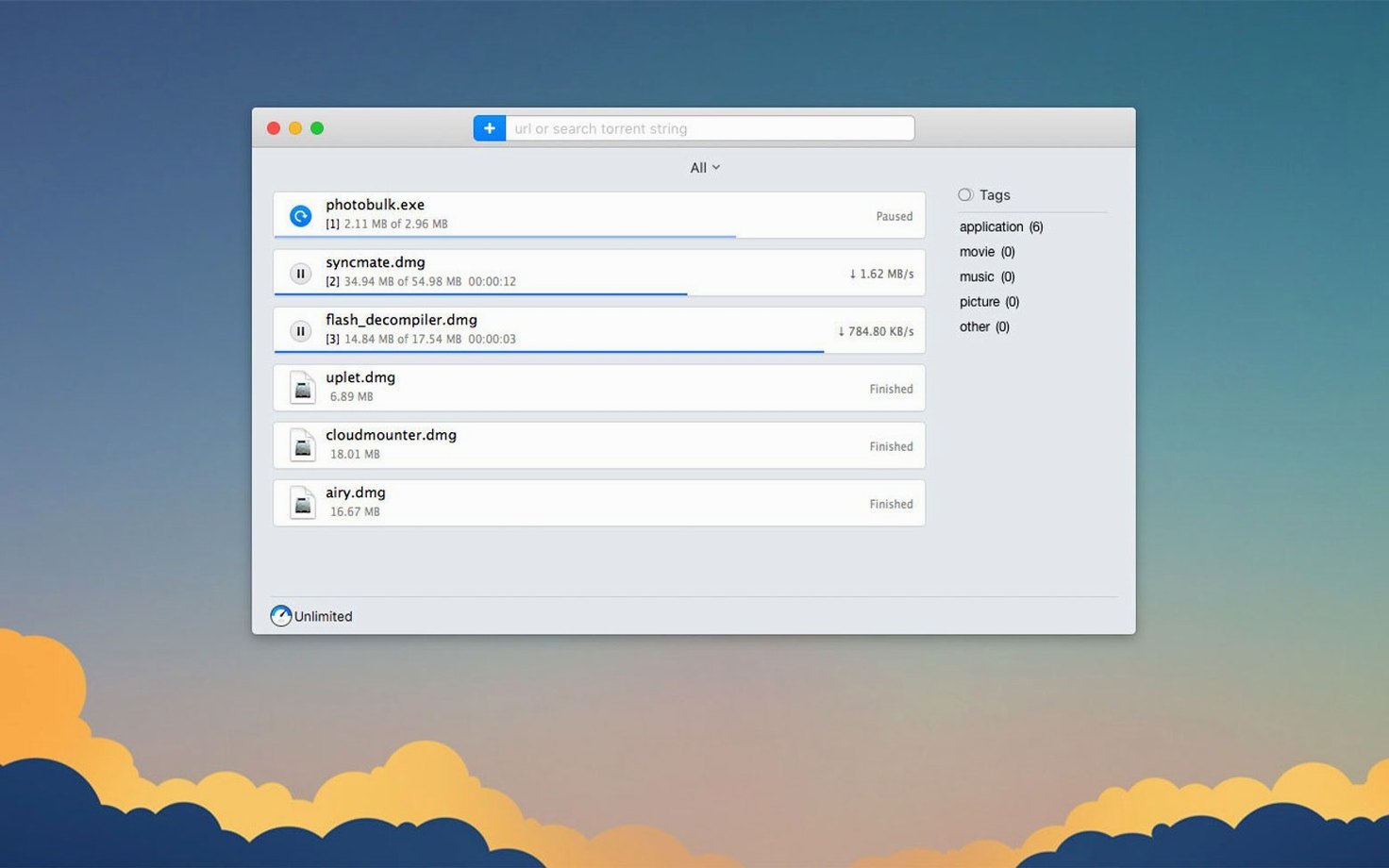
You have found a series of video lectures, a large software disk image and a well-seeded torrent for a Linux distribution. Rather than juggle three browser download panes, you add them all to Folx Pro and let one application manage the queue, the speeds and the finished files.
Setting up the job
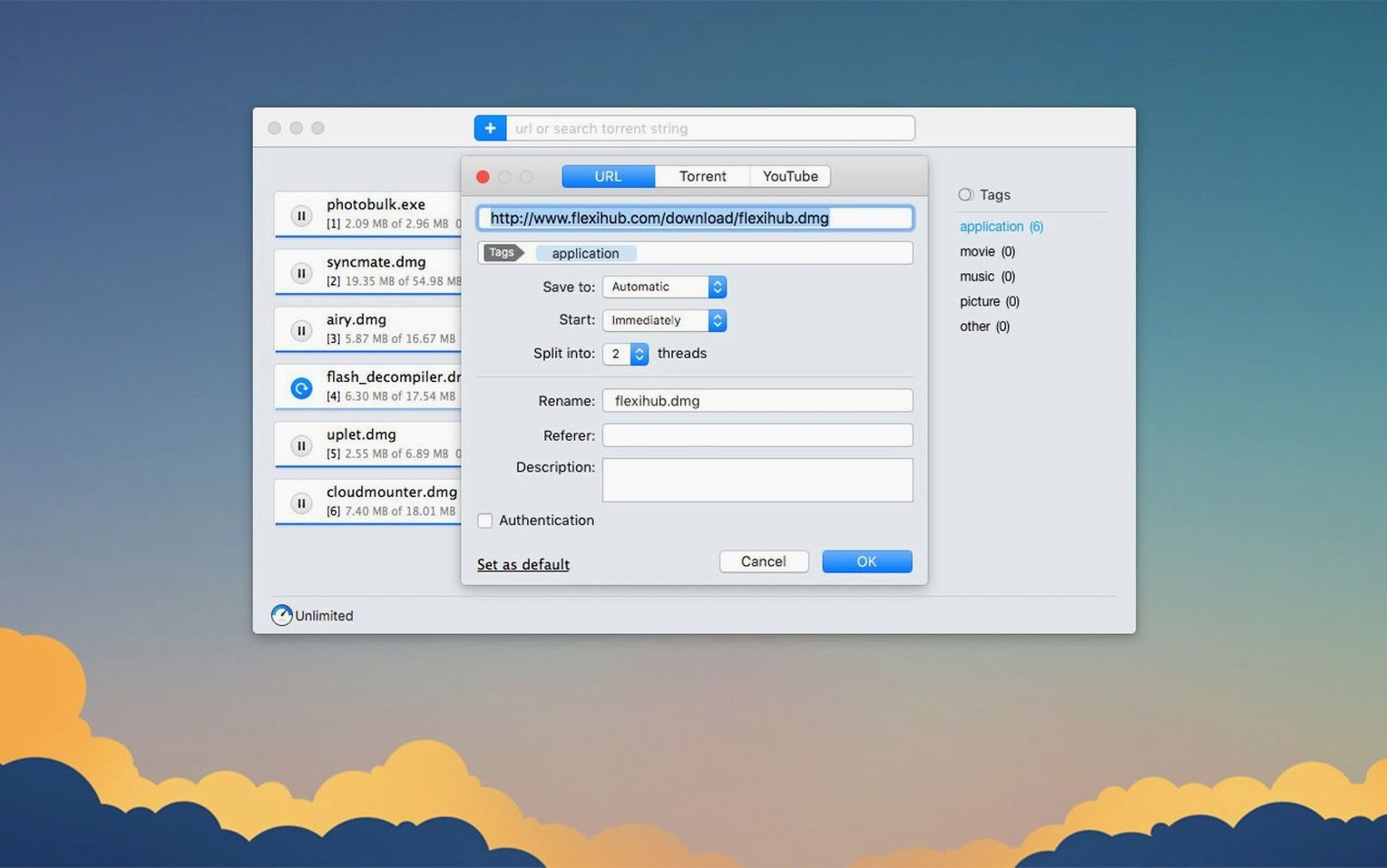
After opening Folx Pro, you paste the first lecture URL into the new task window. The app remembers logins for sites that ask for them, so a course portal is not a problem. For YouTube material, Folx includes a dedicated downloader, and you can rename the output file and choose a lower save quality when that makes more sense than pulling a 4K original. A large disk image benefits from the option to split a transfer into up to 20 threads, which can make a noticeable difference on a fast connection.
Finishing with a torrent
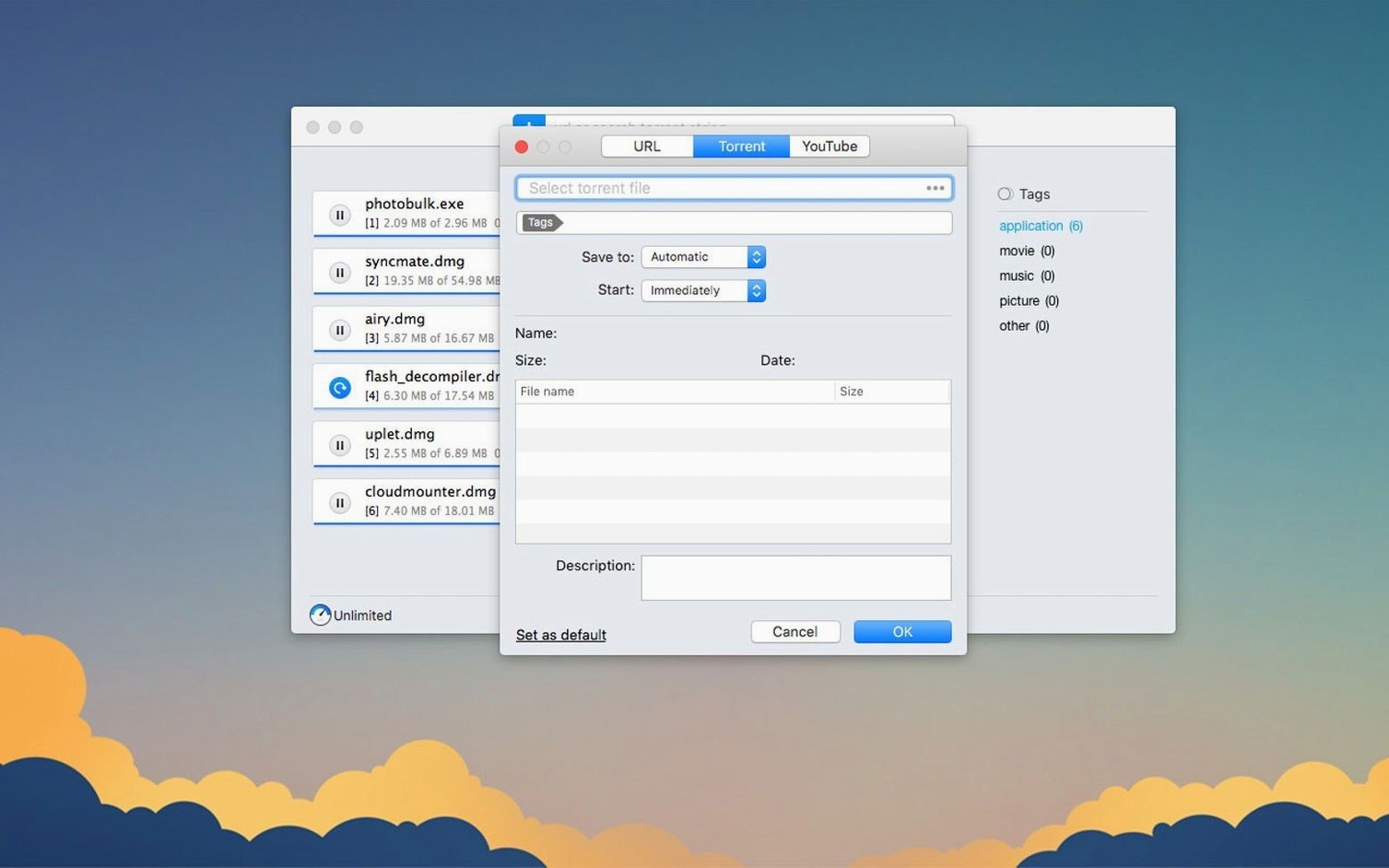
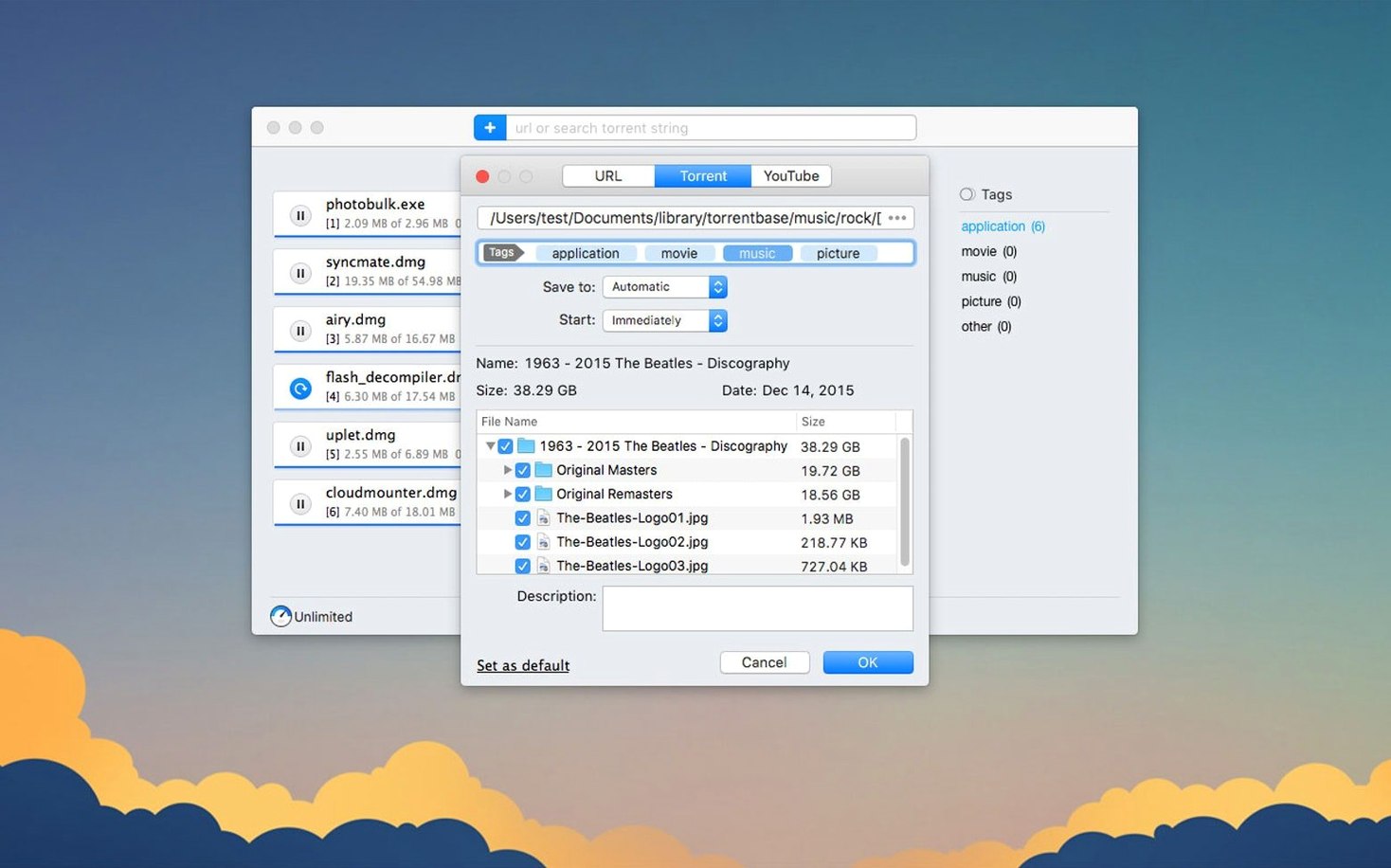
The Linux distribution arrives as a magnet link. Folx Pro supports magnet links, and once the torrent is added you can pick only the files you actually need rather than the whole bundle. The queue view keeps everything in order, and the finished files land in one folder. Version 5.34 also fixed a crash that could happen when adding certain magnet links, so the process is steadier than in previous builds.
Grabbing Creative Commons clips for a seminar while scheduling YouTube uploads
Imagine a part-time lecturer who teaches media studies during the day and runs a modest YouTube channel in the evenings. On a typical Tuesday, she needs to grab a set of Creative Commons-licensed documentary clips for a seminar, download the latest build of a video transcoder from a site that requires a login, and pull a few high-seed archival reels from a public-domain torrent tracker. With Folx Pro, she pastes the seminar URLs into the app during her morning coffee, tells the torrent to download only the reels she has not already archived, and ticks the scheduler so the bulkier files transfer after midnight when her home broadband is less contended. The YouTube downloader lets her rename each clip to match her lesson-plan numbering before the file even touches the disk. By the time she walks into the lecture theatre, all the material sits in a single, tidy folder.
Who clicks with Folx Pro—and why
Mac users who regularly juggle direct downloads, YouTube videos and occasional well-seeded torrents tend to settle into Folx Pro the fastest. The application suits people who want one queue rather than three separate tools: there is no need to run a browser extension for video grabbing, a standalone torrent client for magnet links and a separate scheduler for large nightly transfers. Because the interface shows speeds, thread counts and seed ratios in a single window, it also appeals to anyone who likes to keep an eye on what their connection is doing without clicking between tabs.
Creatives building stock-footage libraries get on well with the selective file-download feature inside torrents—grab the clips, skip the project files. Developers pulling nightly builds from authenticated servers benefit from the credential-remembering system. And Mac users running older hardware on macOS 10.13 through to the latest Apple Silicon machines can use the same build, which keeps things simple in a mixed-age household or a small studio with a couple of machines.
A magnet link stuck at “resolving” usually just needs a pause and restart
One of the first things a new user notices is that a magnet link can take a moment to resolve. Version 5.34 made this stabler, but if a link sits at “resolving” for more than a minute, pausing and restarting the task usually shakes it loose. A weak proxy connection can cause the same sluggishness; the 5.34 update improved proxy behaviour, so making sure the proxy settings in Folx match those in System Settings is worth a quick check.
Selective file downloading within a torrent occasionally confuses people who are used to clients that auto-start the whole payload. In Folx Pro you add the torrent, expand the file list while the task is paused, untick what you do not need, then start. Doing it in that order avoids a brief moment where unwanted files begin writing to disk. If you accidentally start the full torrent, removing the task and re-adding it with the correct selections is the cleanest recovery.
YouTube quality selection trips up a handful of users because the available resolutions depend on what the source actually provides. If only 360p and 720p appear, the original uploader did not supply a 1080p stream. The rename field appears in the same download panel, and filling it in before the transfer starts avoids a later trip to the Finder.
20-thread downloads saturate a 500 Mbps line while memory stays under 220 MB
On a 500 Mbps fibre connection, a direct download split into 20 threads regularly saturates the line. The app does not feel heavy while this happens; memory use on an M1 MacBook Air hovers around 180–220 MB with a dozen tasks in the queue, which is modest for a download manager that also handles torrent traffic. CPU spikes are brief and tend to coincide with the moment a multi-part download knits its pieces together at the end.
Torrent performance depends on the swarm, as always, but Folx Pro’s sorting by seed count makes it easy to pick healthy sources. During a four-hour seeding session of a 6 GB file, the app stayed responsive and did not trigger a single beachball. The 5.34 fixes for torrent-related crashes are noticeable if you previously had the app quit when adding a malformed magnet link; that scenario now fails gracefully with a status message instead of a crash report.
Folx Pro plays well with macOS’s App Nap and low-power modes on Apple Silicon. When the display sleeps, transfers continue at full speed but the energy-impact reading in Activity Monitor drops to single digits. On an Intel Mac with a spinning hard drive, heavy multi-threaded writes to the same disk can make the system feel a little sluggish; pointing the download folder to an external SSD sidesteps this neatly.
Version 5.34 is a maintenance release that puts most of its effort into torrent handling. Torrent downloading is smoother, completed tasks are stored more reliably, selective file downloading works better, and proxy use has been tidied up. Two crashes have been fixed: one when adding certain magnet links, another during torrent search. The minimum macOS requirement has moved to 10.13 or later.
- macOS 10.13 or later
- Works on Intel and Apple Silicon Macs
- Interface languages: Russian, English, German, Vietnamese, Spanish, Italian, Simplified Chinese, Korean, French, Japanese
Questions I keep hearing
Which macOS versions does Folx Pro run on?
Folx Pro requires macOS 10.13 or later, and the current version runs on both Intel and Apple Silicon Macs.
Can Folx Pro download YouTube videos?
Yes, it includes a YouTube downloader that lets you rename the output file and choose the save quality when options are available.
Does Folx Pro handle magnet links?
Yes, it supports magnet links, and version 5.34 fixed a crash that could occur when adding some of them.
Questions from the class 0
Sign in or join the class to ask a question.
Nobody has asked anything yet. If you have used it on a real job, say what the file did.
Also on the Video Downloaders shelf
The whole Video Downloaders shelf HarborDrop
Takes over downloading so you control exactly how files arrive on your Mac.
HarborDrop
Takes over downloading so you control exactly how files arrive on your Mac.
 Downie
Grabs a video file from almost any website when you paste its link.
Downie
Grabs a video file from almost any website when you paste its link.
 iDownerGo
Grabs the media stream the moment you press play on a supported site.
iDownerGo
Grabs the media stream the moment you press play on a supported site.
 iTubeGo
Grabs online video and audio and saves it to your Mac in a format you choose.
iTubeGo
Grabs online video and audio and saves it to your Mac in a format you choose.
 AmpliTube
Models guitar amps and cabs for crafting your own virtual rig tones.
AmpliTube
Models guitar amps and cabs for crafting your own virtual rig tones.
 Musify
Downloads music from streaming platforms and saves tracks as playable offline audio files.
Musify
Downloads music from streaming platforms and saves tracks as playable offline audio files.
 4K YouTube to MP3
Strips the audio from an online clip and saves it locally.
4K YouTube to MP3
Strips the audio from an online clip and saves it locally.
 4K Video Downloader
Fetches and saves online video so you don't need browser tools.
4K Video Downloader
Fetches and saves online video so you don't need browser tools.