 ASPNetWorld

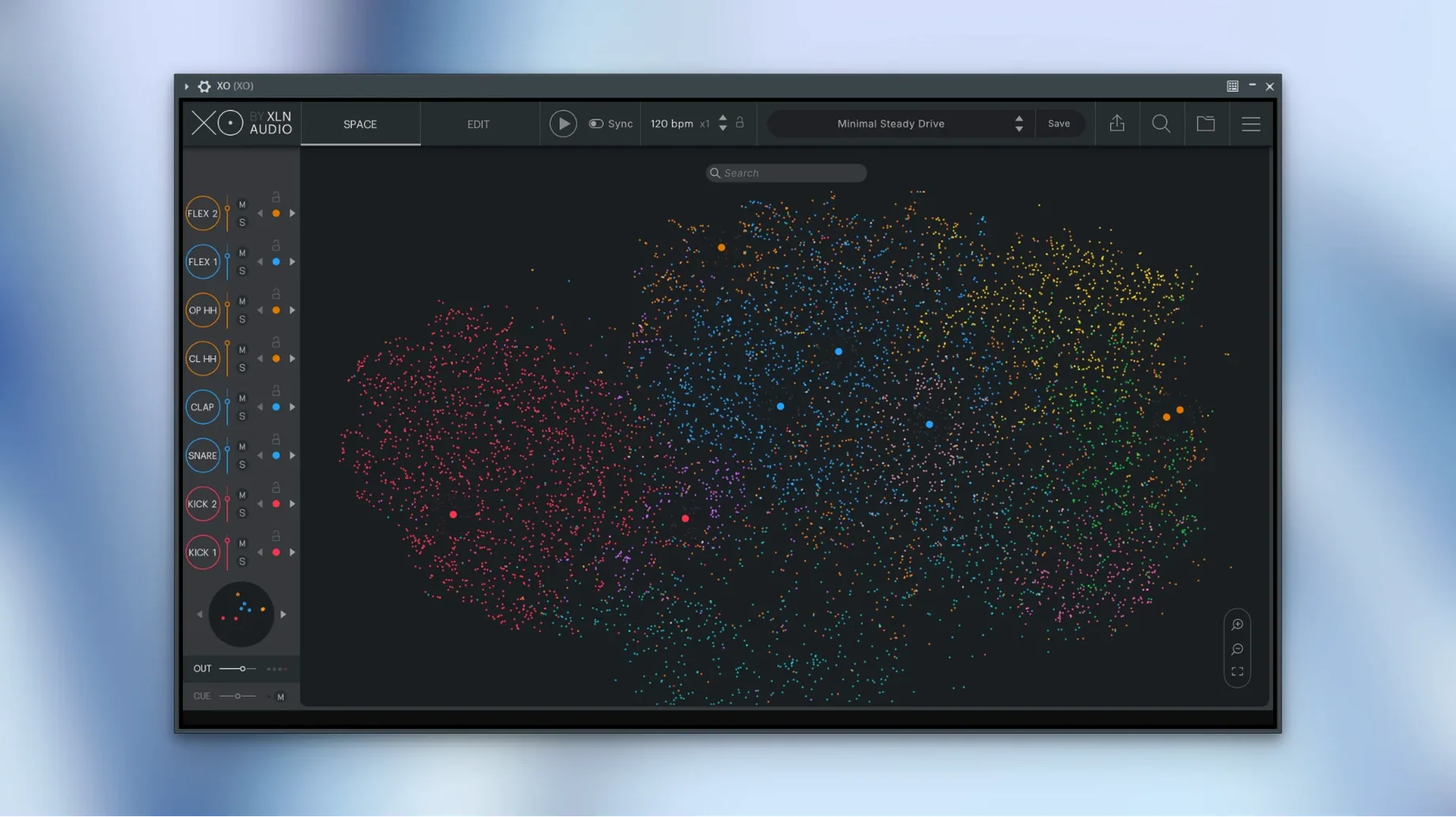
XO tends to end up in the hands of two kinds of people. The first is the producer with a hard drive full of unlabelled samples — thousands of kicks and snares, most of which never get heard. The second is the beat-maker who wants to move fast, pulling a kit together by feel rather than by scrolling through folder names. Both groups will find something that clicks here, because XO doesn't ask you to browse by file name at all.
The Space where samples find their neighbours
The heart of the plugin is the XO Space, a cloud of coloured dots where each dot represents a drum one-shot. XO has already analysed your folders and placed sounds with similar timbre, pitch and length close together — kicks cluster with kicks, short hi-hats gather in their own region, and so on. Clicking anywhere in the Space lets you swap a sound instantly, which is what XLN call Hot Swap. The clever part is that you can adjust the spread of similarity, so a tight cluster gives you near-identical alternatives while a looser radius throws in happy accidents. It turns auditioning from a filing job into something closer to playing an instrument.
Building the beat from the ground up
Once your eight slots are loaded, the built-in sequencer handles the pattern work. Each lane gets its own step grid, and you can drag MIDI or audio straight out to your DAW when the idea needs arranging. The Accentuator adds a layer of humanisation — not just random velocity wobble, but a push-and-pull that makes a loop breathe. With over 240 presets across genres, you can start from something polished and tweak it, or build from a blank grid. The whole thing runs as a plug-in or in standalone mode, so you can sketch beats without loading a full session.
The first thing you notice after a few days is how little XO fights the rest of your setup. It loads quickly — the 1.8.10 build tidied up a rare slow start‑up that a handful of users had reported — and once it is running, CPU sits low enough that you forget to check it. On an Apple Silicon Mac it feels native and responsive; on older Intel machines the vector analysis still happens in the background without tripping up playback. Memory use climbs with very large libraries, naturally, but the browser caches analysis data so a folder of 20,000 one‑shots does not need a full rescan every time you open the plug‑in. Stability is what you would expect from a mature release: dragging audio or MIDI out while the host plays was specifically fixed in this version, and muted lanes stay muted when you export MIDI, which used to be a small but persistent annoyance.
A session from cold start to finished groove
Let me walk you through how an afternoon session might unroll. I open Logic with a rough chord progression already in place, instantiate XO on an instrument track, and point it at a folder I have barely touched — a collection of electronic drum hits salvaged from old projects. XO chews through the analysis for maybe twenty seconds, then the Space fills with dots. I drag the similarity slider to about forty per cent, click on a kick somewhere in the low‑end cluster, and hold the mouse button: Hot Swap previews the sound in time with the DAW, so I can hear how each candidate thumps against the bassline before I commit. I settle on a kick with a short decay, then do the same for a snare, this time widening the radius to pull in a rim‑shot that was sitting in a cluster I would never have thought to check.
With eight slots assigned, I open the sequencer. I tap in a basic pattern on the kick and snare lanes, then switch to Playground mode to trigger fills and variations by clicking around the Space while the loop runs. A couple of happy accidents later I have a percussion layer I did not plan. I highlight four bars in the DAW, drag the audio out of XO, and the rendered loop drops straight onto the arrangement. From opening the plug‑in to having a printed groove took under ten minutes, and I spent almost none of that time looking at file names.
Small touches that earn their keep
Every plug‑in has features you stumble on after the first week. XO is no different, and some of them quietly change how you work once you know they exist.
- Right‑click to lock a slot. When you are swapping sounds in the Space, XLN Audio XO will replace whichever slot is selected — unless you right‑click a slot first to lock it. That one gesture stops your carefully chosen kick from vanishing while you hunt for a better clap.
- Drag and drop from the Space to a DAW track. You can pull individual hits straight from the cloud of dots onto an audio track without touching the sequencer. Useful for layering a single snare transient under a drum bus.
- Groove Templates are more than swing. The preset grooves nudge timing and velocity in patterns drawn from real performances. Apply one to a straight pattern, then dial it back with the amount knob until it sits right — the difference between robotic and alive is often just a few per cent.
- Accentuator per lane. It is easy to miss that the humanisation amount is lane‑specific. A subtle push on the hi‑hat lane keeps the groove loose while the kick stays metronomic, which is exactly what you want in a lot of hip‑hop and broken‑beat programming.
- MIDI export with processing intact. When you drag a MIDI region out, XO renders the Accentuator and groove shifts into the notes and velocities, so the pattern replays identically through any other drum instrument. That makes it trivial to combine XO’s discovery engine with your favourite drum synth.
Those who grab an XLN Audio XO free download — or find their way to it via an XLN Audio XO torrent or an XO torrent — quickly learn that the visual browser is the headline act, but it is these smaller shortcuts that keep the plug‑in on the screen session after session. An XLN Audio XO crack Mac user benefits from the fact that the analysis engine and sequencer work identically whether the plug‑in runs standalone or hosted, which means your library builds up its intelligence once and stays useful everywhere.
- macOS 10.13 or later
- Supports Intel and Apple Silicon Macs
- Available in English
- Runs in VST, AU and AAX formats, plus standalone
Questions I keep hearing
Can I export patterns from XO to my DAW?
Yes, you can export both audio and MIDI from XO. MIDI export with muted lanes was specifically fixed in version 1.8.10.
How does XO sort my drum samples?
It analyses each sample by its sonic character — things like timbre, length and pitch — and groups similar sounds together in a visual map called the XO Space.
Does XO work on its own without a DAW?
Yes, XO includes a standalone application alongside the VST, AU and AAX plug-in formats, so you can use it as a self-contained beat-making instrument.
Questions from the class 0
Sign in or join the class to ask a question.
Nobody has asked anything yet. If you have used it on a real job, say what the file did.
Also on the VST Plugins shelf
The whole VST Plugins shelf XLN Audio Life
Generates rhythmic patterns from any sound you feed it, turning everyday audio into a drum machine.
XLN Audio Life
Generates rhythmic patterns from any sound you feed it, turning everyday audio into a drum machine.
 Xpand!2
Lets you build rich sounds by layering up to four independent instrument parts within a single patch.
Xpand!2
Lets you build rich sounds by layering up to four independent instrument parts within a single patch.
 WaveLab Pro
Provides a dedicated mastering workspace with sample-accurate editing and analysis tools.
WaveLab Pro
Provides a dedicated mastering workspace with sample-accurate editing and analysis tools.
 VocalSynth 2
Thickens a vocal with vocoder and polyvox layers while keeping its core identity intact.
VocalSynth 2
Thickens a vocal with vocoder and polyvox layers while keeping its core identity intact.
 VocalNet
Morphs a lead vocal with breathy samples to create an airier double without a second take.
VocalNet
Morphs a lead vocal with breathy samples to create an airier double without a second take.
 Valhalla DSP Bundle
Offers nine plugins of reverb, delay, and modulation built on deep acoustic models.
Valhalla DSP Bundle
Offers nine plugins of reverb, delay, and modulation built on deep acoustic models.
 UnderTone Audio UnFairchild
Adds valve-style harmonic saturation you can season independently of the compression.
UnderTone Audio UnFairchild
Adds valve-style harmonic saturation you can season independently of the compression.
 Ultra Audio Ultra
Puts a wavetable synthesiser with simple controls onto your instrument track.
Ultra Audio Ultra
Puts a wavetable synthesiser with simple controls onto your instrument track.