 ASPNetWorld

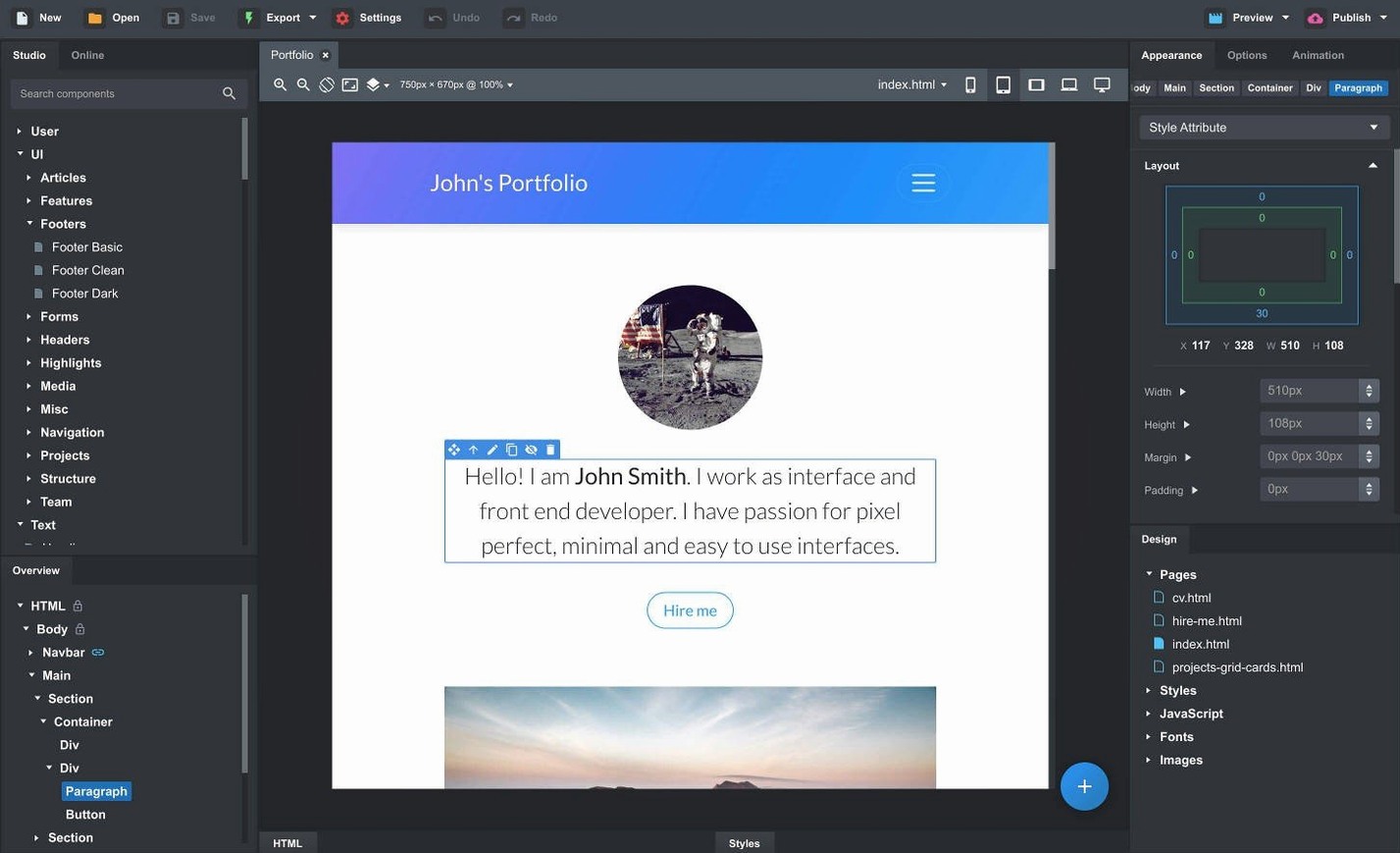
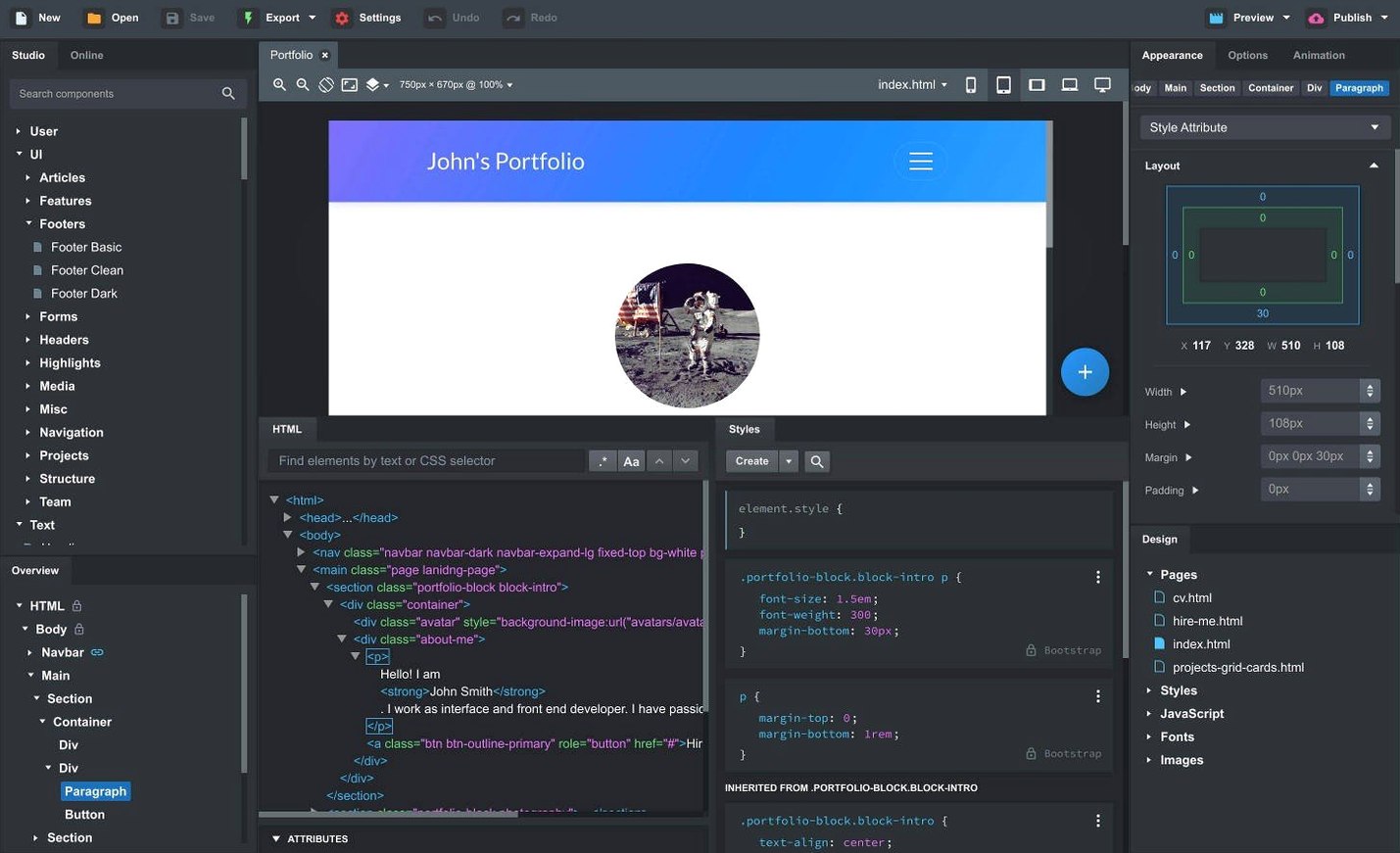
You have a landing page sketched on paper, a navbar in mind, and a client waiting. You open Bootstrap Studio on your Mac, drag a Bootstrap component onto the canvas, and the responsive grid takes shape without you writing the first media query. That is the core promise of this desktop builder, and version 6.7.3 keeps it intact.
What is new for sticky navigation?
Sticky navbars now come with a Sticky On option, so you can control the breakpoint at which a navbar pins itself to the viewport. It is a small change that removes a common source of layout surprises on mobile screens.
What changed with modals and the AI Assistant?
Bootstrap modals gained a Click Outside to Close option, which matches behaviour many visitors already expect. On the AI side, the Assistant now offers gpt-4o-mini and gpt-4o alongside the existing models, and a fix means the OpenAI API key dialog accepts keys it previously rejected.
What stayed reassuringly familiar?
The smart drag-and-drop for nested components, the online library of community-created elements, and the ability to turn part of a design into a reusable custom component all remain. So does direct editing of CSS, JavaScript, and HTML for moments when you want to go beyond the visual tools.
Should you expect a different app?
No. This is still a desktop website builder aimed at Bootstrap-based pages and apps. The update refines rather than reworks, which suits anyone who prefers stability in the middle of a project.
When the canvas misreads the Bootstrap grid
Even a visual builder has its friction points, and Bootstrap Studio is no exception. Most of them stem from the gap between what the canvas shows and what happens inside Bootstrap's grid logic. Once you recognise the pattern, the fix is usually quick.
The grid does not behave the way you expect. You drop a column inside a row, resize it by eye, and the preview looks nothing like the canvas. This happens because the drag handles set flex-basis values that can clash with Bootstrap's breakpoint classes. Instead of dragging column edges, open the Options panel and set the column width explicitly using the Column class dropdown — col-lg-4 is far more predictable than a pixel value you nudged with the mouse.
Custom CSS changes vanish after an export. This catches people who write styles directly in the HTML panel rather than in the Styles tab. Inline styles stay put, but any rule you typed into a <style> block inside a page's HTML will be overwritten the next time the visual editor regenerates the markup. The safe home for your own CSS is the dedicated Stylesheet panel or an imported SCSS file. Keep the two separate and the frustration disappears.
Linked components go out of sync. The feature is powerful — update a header once and see it change across twenty pages — but it relies on the component being genuinely identical at the moment you link it. If you link a component, then later add a class or a wrapper div to one instance, the link breaks silently. The editor does not warn you; it simply lets the two diverge. After any structural edit to a linked instance, right-click it and choose Update Linked Components to push the change everywhere, or unlink it first if the variation is intentional.
The canvas preview lags on older Macs. Bootstrap Studio keeps a live browser engine running behind the scenes, and on machines with integrated graphics that can feel sluggish with JavaScript-heavy pages. A workaround is to close the internal preview pane and rely on the external browser preview — it offloads the rendering to a real browser and often runs smoother.
Building a photographer's portfolio before Friday
Imagine a freelance designer starting a portfolio page for a photographer. The brief calls for a full-screen hero image, a grid of recent work, and a contact form — all responsive, all due by Friday.
She opens Bootstrap Studio and creates a new project from the blank template. The first drag brings a Navbar component onto the page. She replaces the placeholder brand text with the photographer's name, strips out the dropdown menus, and sets the new Sticky On option to md — meaning the navbar only pins on tablets and desktops, staying free-floating on phones where screen height is precious.
A Hero component follows, dropped above the navbar in the outline panel to keep the source order logical. She swaps the stock image for a supplied photograph, adjusts the overlay opacity so the headline remains readable, and previews on a simulated iPhone screen via the device toolbar. The headline breaks awkwardly; she reduces the font size for the sm breakpoint using the responsive controls, and the layout snaps into place.
For the portfolio grid, she drags a Row into a Container, then drops four Columns inside. Each column gets an Image component and a caption paragraph. She groups the column with its caption into a custom component called "Gallery Item" and uses it to populate the remaining slots — three more drags instead of three more builds. One of the photographs needs a different aspect ratio, so she unlinks that single instance and adjusts the image height without affecting the rest.
The contact form comes from the online library. She searches for "minimal contact form", finds a community component that fits the photographer's aesthetic, and imports it with two clicks. She swaps the recipient email placeholder in the form settings, tweaks the button colour in the appearance panel, and tests the submission logic in the browser preview.
Before exporting, she opens the AI Assistant, describes the photographer's palette in plain English — "warm slate background, ivory text, burnt orange accents" — and asks it to generate matching SCSS variables. The Assistant returns a variable block; she pastes it into the SCSS editor, and the whole project adopts the new scheme. She exports the clean HTML and CSS, sends the folder to the client, and the job is done.
Trading keystrokes for visual speed with Bootstrap knowledge
Bootstrap Studio makes the most sense for people who already understand Bootstrap's grid and utility classes, but who have grown tired of typing them by hand. A frontend developer who can write a responsive navbar in twenty minutes might still use the app to build it in five, then export the markup and wire up the JavaScript logic in their own editor afterwards. The exported code is clean enough that this hybrid workflow feels natural.
Prototype builders benefit from the speed. A UX designer who needs to show a stakeholder three page variations by lunchtime can assemble them from components, link the shared header and footer, and present a live browser preview that looks production-ready. The stakeholder sees something close to the final product, not a wireframe with Lorem Ipsum.
Small teams without a dedicated frontend specialist also do well here. A marketing person who knows enough HTML to be dangerous can maintain a company landing page, swapping images and updating copy, without breaking the underlying grid. The visual editor keeps them away from the raw markup, but the exported site remains standard Bootstrap that any developer can later extend.
Absolute beginners, by contrast, may find the learning curve steeper than expected. The app assumes familiarity with container-row-column nesting, breakpoint logic, and Bootstrap's class naming conventions. It does not teach these concepts; it simply makes them faster to apply. If you are starting from zero, plan to spend the first week learning Bootstrap fundamentals alongside the tool.
Recreate a page you already know before starting real work
Install Bootstrap Studio and resist the urge to build a full client project on day one. Spend the first session recreating a page you already know well — perhaps your own portfolio or a Bootstrap example page from the documentation. The goal is to map your existing mental model onto the app's interface, not to deliver work.
Open the online component library early and bookmark a handful of useful building blocks. The community has contributed headers, footers, pricing tables, and testimonials that save you from starting every project with an empty canvas. Import a component, study how it is structured in the outline panel, then rebuild it from scratch to understand the assembly logic.
Set up the external browser preview on day one. Point it at Chrome, Firefox, and your phone on the local network. The multi-device live preview is one of Bootstrap Studio's quiet strengths — changes appear on every screen simultaneously, which catches responsive breakpoint issues far earlier than testing after export.
Make a habit of naming your custom components clearly, because a project with twenty unnamed Component 1 entries in the library becomes unmaintainable after a week. A name like Project Card - Wide tells you immediately what it is and how it differs from the standard version.
Finally, explore the SCSS panel even if you normally write plain CSS. Bootstrap's variables live there, and changing $primary in one place recolours every component that uses the primary class. It is the fastest way to apply a brand palette across an entire project, and it takes about three minutes to learn.
Version 6.7.3 is a maintenance and refinement update. The most practical change is a fix for the OpenAI API key entry dialog, which now accepts keys it previously rejected.
- Sticky navbars have a new Sticky On option.
- Bootstrap modals can be set to close when you click outside.
- The AI Assistant adds gpt-4o-mini and gpt-4o.
- The Icon Dialog now shows the icon count and type for each set.
- macOS 10.13 or later
- Intel or Apple Silicon Mac
- Interface language: English
Questions I keep hearing
Does Bootstrap Studio for Mac include an online component library?
Yes, it includes an online library with community-created components you can bring into your own projects.
Questions from the class 0
Sign in or join the class to ask a question.
Nobody has asked anything yet. If you have used it on a real job, say what the file did.
Also on the Mac Apps shelf
The whole Mac Apps shelf BricsCAD
Draws and models in the DWG format so a team can share files without converting a single line.
BricsCAD
Draws and models in the DWG format so a team can share files without converting a single line.
 Bloom
Lets you browse, tag, and preview files across local and cloud storage from a single window.
Bloom
Lets you browse, tag, and preview files across local and cloud storage from a single window.
 Camo Studio
Turns a phone or tablet into a studio webcam with manual focus and a virtual green screen.
Camo Studio
Turns a phone or tablet into a studio webcam with manual focus and a virtual green screen.
 Camtasia
Records your screen and camera, then gives you a timeline to trim, annotate, and export the lesson.
Camtasia
Records your screen and camera, then gives you a timeline to trim, annotate, and export the lesson.
 Canopy
Adds an iPhone-style interactive panel to your Mac for quick glances at weather or calendar.
Canopy
Adds an iPhone-style interactive panel to your Mac for quick glances at weather or calendar.
 Cap Pro
Records your screen into a local, shareable video without touching a cloud service.
Cap Pro
Records your screen into a local, shareable video without touching a cloud service.
 CapCut
Assembles short videos with auto-captions, effects, and a timeline that stays out of your way.
CapCut
Assembles short videos with auto-captions, effects, and a timeline that stays out of your way.
 Binary Ninja
Opens up compiled code so you can study, patch, or understand how a program really works.
Binary Ninja
Opens up compiled code so you can study, patch, or understand how a program really works.