 ASPNetWorld

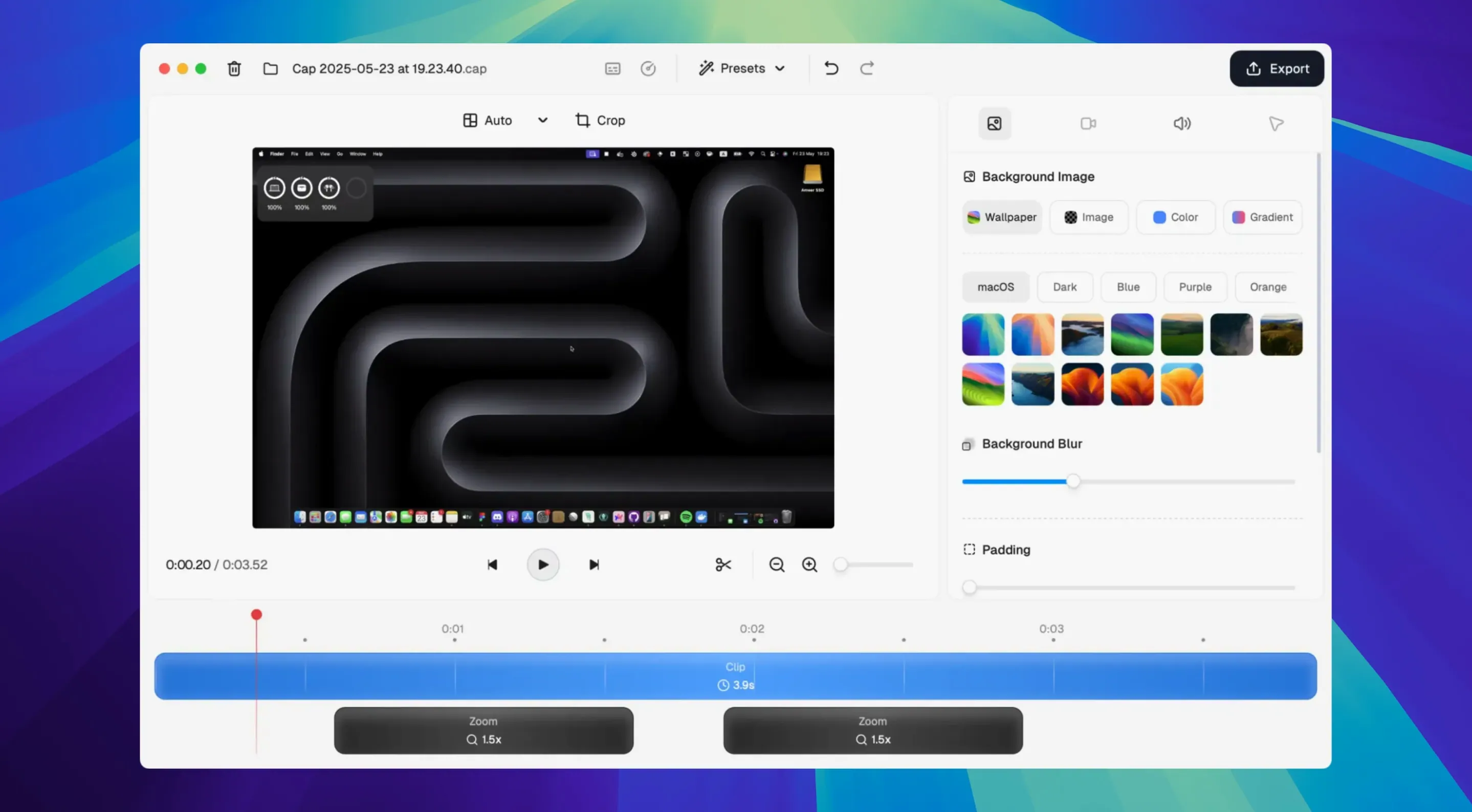
You’ve just walked a remote colleague through a tricky bug fix and want to send them a clean recording of the steps without uploading anything to a cloud service you don’t control. That’s the sort of job Cap Pro is designed for — a lightweight, open-source recorder that keeps your captures local and your workflow simple.
Capture the screen with split audio control
Recording grabs your screen and webcam simultaneously, with separate faders for microphone and system audio — useful when you need to narrate over a video call or silence your Mac’s alert pings while keeping your voice clear. Studio Mode pushes the capture quality higher for polished presentations, and the built-in noise reduction tidies up room hum before it reaches the file.
Trim and arrange without another app
A timeline editor is baked right in, offering frame-accurate trimming, joining, and clip reordering. Smart Auto-Zoom automatically reframes the action to follow your cursor or a window, so you spend less time keyframing manual zooms. If you’re migrating from Loom, the importer pulls your old videos straight into the timeline.
Keep everything local, then share on your terms
Cap Pro saves recordings to your own drive first: no account, no forced cloud upload. When you’re ready to share, you control where the file goes. It’s a straightforward tool that gives you back ownership of your screen captures without stripping away the conveniences you’d expect from a modern recorder.
Plenty of people install Cap Pro, record a quick clip, and never dig into the quieter corners of the interface. That’s fine — the defaults are sensible — but a handful of tucked-away touches reward a few minutes of poking around. Right-clicking the recording button, for instance, lets you lock the capture region to a specific window so it follows that window if you move it mid-recording; helpful when you’re switching between a code editor and a browser and don’t want to re‑select the area every time. Once you’re on the timeline, you can nudge a clip ten frames left or right by holding Shift and tapping the arrow keys, which is far less fiddly than dragging with a trackpad. The cursor effects panel is another place people often skip: you can combine click visualisation with motion smoothing, then dial the magnification ring down to something subtle, so a viewer’s eye follows your pointer without feeling seasick. If you share raw recordings regularly, open the app preferences and check the Auto-save region toggle — it remembers your last capture area between launches, saving you the crop‑and‑drag ritual every morning.
Where Apple’s tool stops and Cap Pro starts
Stack Cap Pro against the built-in Screenshot tool (Cmd‑Shift‑5) and the difference is immediate: Apple’s utility records the full screen or a chosen rectangle with a single audio source, then hands you an unedited MOV. There’s no webcam overlay, no timeline, no cursor effects. Cap Pro adds a proper editor and multi‑source audio without asking you to open another app, which suits anyone who needs to polish a recording before it leaves the machine.
Next to OBS Studio, the comparison gets more interesting. OBS gives you scenes, filters, virtual cameras, and streaming — a broadcast desk that can feel overbuilt for a thirty‑second bug report. Cap Pro trades that flexibility for speed: you open it, pick a mode, and record. Studio Mode brings enough fidelity that most screencasts won’t suffer, and you’re not building scenes from scratch each time. The open‑source ethos is shared, but Cap Pro prioritises a short path from idea to shareable clip. People hunting for a Cap Pro Mac torrent often discover the source is on GitHub and the DMG is right there, compiled and notarised, so grabbing a build is refreshingly straightforward.
CleanShot X is the third point of reference. CleanShot bundles screenshot annotation, scrolling capture, and a cloud service into one package. Cap Pro doesn’t annotate stills or auto‑upload to a proprietary cloud; what it does do is give you a timeline editor and Loom importing, which CleanShot’s video side doesn’t match. If your work leans heavily on sharing quick annotated screenshots, CleanShot is the broader toolkit. If you mostly record walkthroughs, tutorials, or feedback clips and want to trim them before sharing, Cap Pro feels more focused.
What the trial’s watermark means in practice
Does it force me to create an account?
No account is required to record, edit, or save locally. The app opens straight into the capture interface. Cloud sharing is optional and only asks for a login if you decide to use it; plenty of users stay entirely offline. The open‑source code makes that easy to verify — nothing phones home unless you invite it to.
Will it run smoothly on an Intel Mac?
The build is universal — ARM and Intel — and the minimum requirement is macOS 13.1. On Apple Silicon, 4K at 60 fps is comfortable. Intel machines from the last few years handle 1080p and 1440p without trouble; older Intel Macs may drop frames at 4K, so dropping the recording resolution or switching from Studio Mode to Instant Mode keeps things fluid.
- macOS 13.1 or later
- Apple Silicon and Intel Macs
Questions from the class 0
Sign in or join the class to ask a question.
Nobody has asked anything yet. If you have used it on a real job, say what the file did.
Also on the Mac Apps shelf
The whole Mac Apps shelf CapCut
Assembles short videos with auto-captions, effects, and a timeline that stays out of your way.
CapCut
Assembles short videos with auto-captions, effects, and a timeline that stays out of your way.
 Canopy
Adds an iPhone-style interactive panel to your Mac for quick glances at weather or calendar.
Canopy
Adds an iPhone-style interactive panel to your Mac for quick glances at weather or calendar.
 Capture One
Processes raw photos with colour tools that let you correct a white balance with a single click.
Capture One
Processes raw photos with colour tools that let you correct a white balance with a single click.
 Camtasia
Records your screen and camera, then gives you a timeline to trim, annotate, and export the lesson.
Camtasia
Records your screen and camera, then gives you a timeline to trim, annotate, and export the lesson.
 Carbon Copy Cloner
Creates an exact, bootable duplicate of your drive so you can start up from the copy in an emergency.
Carbon Copy Cloner
Creates an exact, bootable duplicate of your drive so you can start up from the copy in an emergency.
 Camo Studio
Turns a phone or tablet into a studio webcam with manual focus and a virtual green screen.
Camo Studio
Turns a phone or tablet into a studio webcam with manual focus and a virtual green screen.
 BricsCAD
Draws and models in the DWG format so a team can share files without converting a single line.
BricsCAD
Draws and models in the DWG format so a team can share files without converting a single line.
 CCleaner Pro
Sweeps away browser caches, logs, and leftover files that macOS's own tools leave behind.
CCleaner Pro
Sweeps away browser caches, logs, and leftover files that macOS's own tools leave behind.