 ASPNetWorld
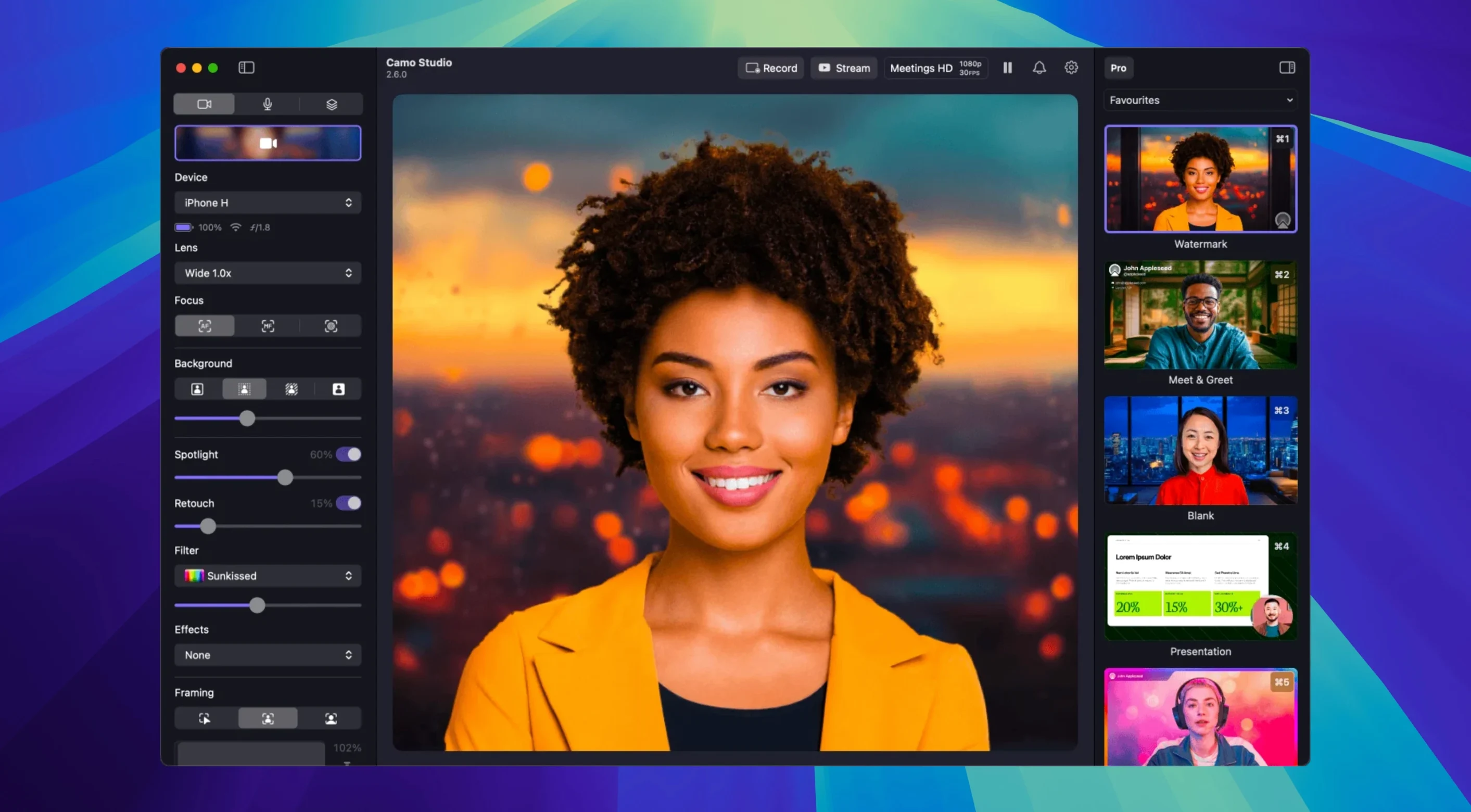
Content creators and streamers who rely on their iPhone or Android phone as a primary camera often reach for Camo Studio. It turns a phone or tablet into a Mac webcam with far more control than a built-in lens, handling everything from manual focus to a virtual green screen. But before diving into the feature set, the first practical question is whether your machine can run it.
MacOS requirements at a glance
Camo Studio needs macOS 12.3 or later. That puts the baseline at a reasonably modern release without shutting out older Intel machines. The app runs natively on both Apple Silicon and Intel processors, so there is no Rosetta penalty for M1/M2/M3 Macs. One hard limitation: it does not work on macOS Tahoe. If your system sits below 12.3, you are out of luck until an upgrade.
- Minimum OS: macOS 12.3
- Architecture: Apple Silicon and Intel, both natively supported
- Language: English interface
Phone handles the video encoding so your Mac stays cool
With compatibility confirmed, the app hands you a proper camera control panel. Exposure, white balance, manual focus, and zoom are all adjustable from the Mac, while video processing stays on the phone so the computer is not sweating through encode cycles. Portrait mode provides a natural bokeh effect, and the virtual green screen replaces backgrounds without a physical cloth. AI face retouching, digital image stabilization, and automatic framing that keeps you centred round out the production tools. Version 2.9.0 introduces isolated recordings on macOS, so you can capture clean video and audio tracks independently during a session.
A common complaint about older camera apps was that every new release seemed to rearrange the interface without adding much beneath it. The 2.9.0 update is not that kind of release. Dual-format streaming and recording is the headline change, and in everyday use it means you can send one format to your streaming platform while keeping a different one locally. A streamer broadcasting in 1080p can record the same session in 4K without running a second pass through the Mac's processor, because the phone handles the video work either way.
Isolated recordings follow the same practical logic. Before this update, separating audio and video after a recording often meant spending time in an editor you had not planned to open. Now the raw material arrives split, which suits anyone who records interviews, lessons or commentary and wants the freedom to replace a voice track without rebuilding the entire take.
Audio noise reduction is the change most people feel first, though. A busy room, a keyboard with loud switches, the fridge humming two rooms away — it is the sort of background texture that never seems audible until you play back the recording. Camo Studio's noise reduction is applied on the Mac side in 2.9.0, and it works quietly in the background rather than asking you to learn a collection of sliders and thresholds.
The addition of control from AI agents is less visible day to day, but it has a certain appeal for streamers who build their own automation. An agent can adjust exposure, switch scenes or trigger a recording based on conditions you define elsewhere. It is not a feature that transforms how most people use the app, yet it hints at where the developers expect Camo Studio to fit in a broader setup.
You can run it over USB for a steadier signal
People usually want to know whether the phone needs to be tethered at all times. The connection between phone and Mac can work over USB or Wi-Fi, and USB is generally the more dependable route for long sessions. A phone running on battery will drain faster than usual while processing video, so keeping it plugged in during a two-hour stream is the practical choice rather than an optional one.
Another recurring question is whether Camo Studio replaces a dedicated webcam entirely. The honest answer is that it depends on what you already own. A good phone lens and sensor outperform most built-in laptop cameras, and the manual controls give you far more room to shape the image. The app is not a magic upgrade for a phone with a scratched lens or a dying battery, but in typical conditions it produces a cleaner picture than the webcam sitting above your MacBook screen.
Some newer Mac users also ask about Apple Silicon. Camo Studio runs natively on M1, M2 and M3 machines, and the phone carries most of the heavy lifting anyway. An older Intel Mac can still handle the interface and overlays, though it will feel the load more once scenes and layered elements pile up.
Activity Monitor shows a surprisingly light footprint
In daily use, Camo Studio is surprisingly light on the Mac. Because image processing happens on the phone, the Mac application mostly manages the preview window, overlays and recording duties. Activity Monitor will show a modest footprint during a standard video call, though local 4K recording naturally asks more of the storage drive than of the CPU. The app has settled into a stable rhythm on current macOS releases, and crashes during ordinary use are rare enough that most people stop thinking about them after the first week.
Latency over USB is low enough for live conversation, which matters more than headline resolution when you are trying not to interrupt someone in a meeting. Wi-Fi introduces a little more unpredictability depending on router congestion, so a cable remains the sensible default when timing matters.
Any app that expects a webcam sees Camo immediately
Camo Studio presents itself as a standard camera source, which means it plugs into whatever already expects one. Video call apps pick it up the way they would any webcam, and screen recording tools treat the feed like a connected capture device. Overlays and scenes work inside Camo Studio itself, so you do not need to layer another composition app on top for simple layouts. For streamers who already run broadcasting software, the app can feed a clean signal into that setup without forcing you to abandon the tools you know.
macOS features also cooperate well. The app respects standard camera permissions, and feed switching between apps is straightforward once the phone is recognised. If you use Shortcuts, you can trigger a recording or change a scene from a custom shortcut, which suits anyone who wants camera changes without touching the mouse mid-broadcast.
Version 2.9.0 sharpens the macOS production workflow. The headline addition is isolated recordings, which let you capture separate video and audio tracks for more flexibility in post.
- Isolated recordings for macOS — clean, independent video and audio capture
- Dual-format streaming and recording added for macOS
- Audio noise reduction now available on macOS
- Control from AI agents introduced for macOS
- macOS 12.3 or newer
- Apple Silicon or Intel Mac
Questions from the class 0
Sign in or join the class to ask a question.
Nobody has asked anything yet. If you have used it on a real job, say what the file did.
Also on the Mac Apps shelf
The whole Mac Apps shelf Camtasia
Records your screen and camera, then gives you a timeline to trim, annotate, and export the lesson.
Camtasia
Records your screen and camera, then gives you a timeline to trim, annotate, and export the lesson.
 BricsCAD
Draws and models in the DWG format so a team can share files without converting a single line.
BricsCAD
Draws and models in the DWG format so a team can share files without converting a single line.
 Canopy
Adds an iPhone-style interactive panel to your Mac for quick glances at weather or calendar.
Canopy
Adds an iPhone-style interactive panel to your Mac for quick glances at weather or calendar.
 Cap Pro
Records your screen into a local, shareable video without touching a cloud service.
Cap Pro
Records your screen into a local, shareable video without touching a cloud service.
 CapCut
Assembles short videos with auto-captions, effects, and a timeline that stays out of your way.
CapCut
Assembles short videos with auto-captions, effects, and a timeline that stays out of your way.
 Bootstrap Studio
Turns a drag-and-drop library of responsive components into a complete website front-end.
Bootstrap Studio
Turns a drag-and-drop library of responsive components into a complete website front-end.
 Capture One
Processes raw photos with colour tools that let you correct a white balance with a single click.
Capture One
Processes raw photos with colour tools that let you correct a white balance with a single click.
 Carbon Copy Cloner
Creates an exact, bootable duplicate of your drive so you can start up from the copy in an emergency.
Carbon Copy Cloner
Creates an exact, bootable duplicate of your drive so you can start up from the copy in an emergency.