 ASPNetWorld
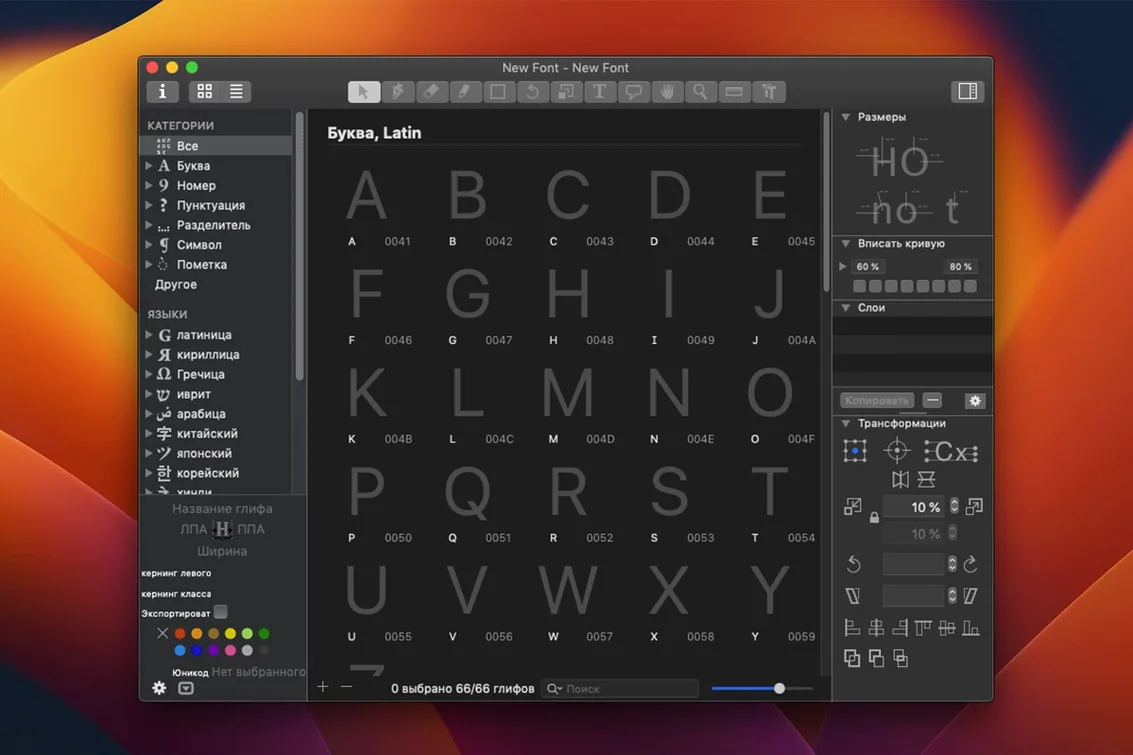
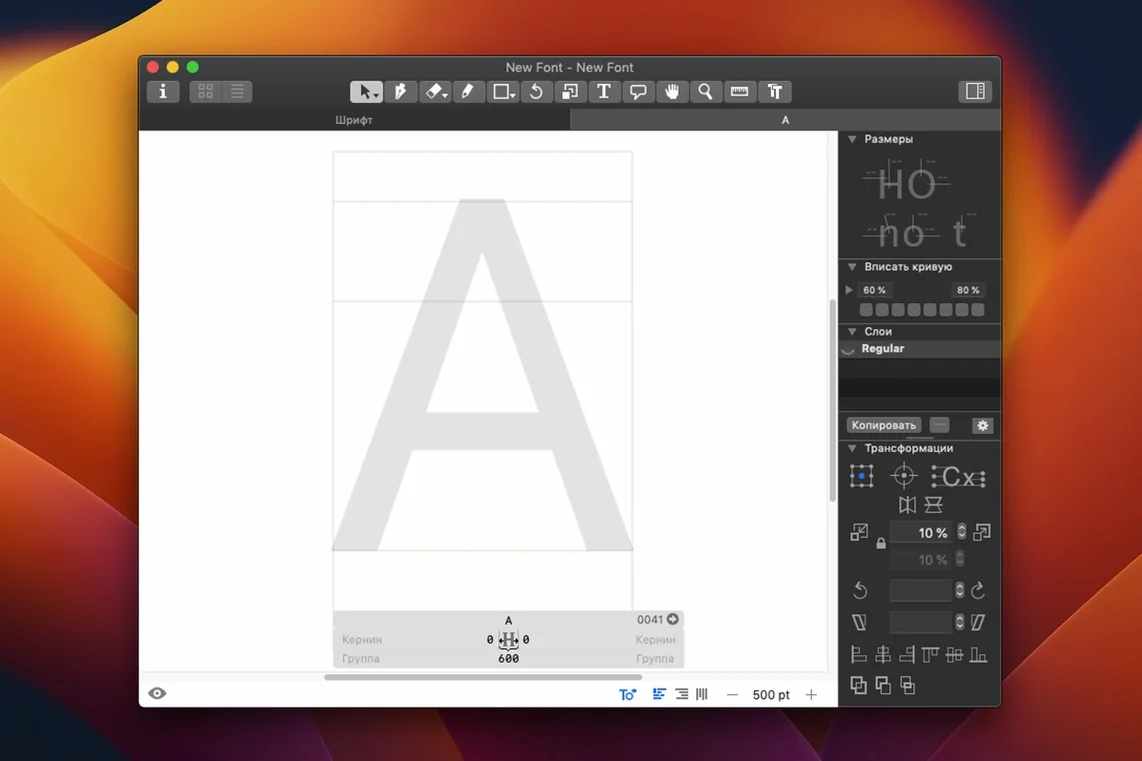
Every new font in Glyphs starts with a capital 'A'. It's a deliberate choice by the software — a blank canvas behind a single, well-structured character that shows you the skeleton of a typeface before you've drawn anything at all. If you're opening the app for the first time, that 'A' is the best place to begin understanding how the editor thinks.
Draw and adjust a single letterform
Double-click that 'A' to enter the Edit view. You'll see a set of nodes and handles defining the shape. The first skill worth developing is simply dragging those nodes and adjusting the bezier curves until the letter feels balanced. Switch between the Preview pane at the bottom and the main drawing area — the companion Glyphs Viewer app mirrors your work on a separate display, which is particularly useful once you start testing words and paragraphs. Don't overlook the built-in measurement tools either; consistent stem widths established early will save an enormous amount of work later.
Export your first test font
Even a font with only a handful of glyphs can be exported and installed. Head to File > Export and choose the OpenType format. Glyphs can also generate PNG, SVG, or PDF specimen sheets from the same dialogue, which is a thoughtful touch for sharing progress with a client. Once you've generated the .otf file, install it through Font Book to see your letters in a real text editor. The moment your shapes appear in a sentence typed on your own keyboard is, for most designers, the point where the software stops being a diagramming tool and starts feeling like a workshop.
Drawing with too many nodes balloons your font file
The most common misstep is treating Glyphs like a vector illustration app. A new designer will often draw a gorgeous letterform with dozens of extraneous nodes, then wonder why the exported font file balloons in size or renders unpredictably on screen. Font outlines need to be lean. Glyphs offers a semi-automatic tracing engine, but the real skill is learning to place on-curve and off-curve points deliberately and to use the Simplify Path command early in the process. Another classic error is ignoring the sidebearings until the very end — redrawing a complete alphabet only to discover every letter butts against the next in a test word is a deflating experience. A quick fix is to work with the live preview and a standard control word like 'Hamburgefontsiv' from the start, adjusting left and right metrics as you go.
Beginners also frequently skip the vertical metrics setup, leaving ascender and descender values at the defaults without considering how the font will sit on a line in a browser or a page-layout app. The result is a typeface that looks spaced correctly in the Glyphs Edit view but appears to float or collide in real-world use. And then there's the temptation to grab a Glyphs crack Mac version or search for Glyphs free download Mac—if you do, just be sure to manually check the custom parameters pane and confirm that your Python modules are loading, since those builds can carry their own quirks. Sticking with the genuine app means the drawing tools, the interpolation previews and the export pipeline all behave exactly as the learning resources describe.
How Glyphs fits with other apps and macOS features
Glyphs doesn't expect you to design in isolation. The app talks naturally to macOS through the Font Book integration mentioned earlier, but the connections run deeper. You can drag a glyph cell straight out of the Font View onto the desktop to get a PDF snapshot, or drop a layered Photoshop or Sketch document onto a glyph to use it as a drawing template. The plug-in architecture, accessed through the Window > Plugin Manager panel, lets a type designer build custom Python scripts that communicate with external tools — some studios have rigged Glyphs so a single keypress pushes a near-final build to a shared server where a project manager reviews it in a browser specimen page.
On the operating-system side, the app works with macOS's colour management and Retina rendering without any extra configuration. If you're designing an icon font or SFSymbols, the export module writes directly to a format that Xcode recognises. And because the file format is open and text-based, version-control systems like Git can track changes to a .glyphs file character by character — a workflow that feels surprisingly natural once you've set it up alongside a visual diff tool. Even the Quick Look feature in the Finder handles .glyphs files, showing a specimen sheet so you don't open the wrong iteration by mistake.
From wordmark in Illustrator to three-weight bespoke sans
Imagine a freelance designer who usually builds wordmarks in an illustration app but has landed a client who wants a bespoke condensed sans-serif for a packaging range. The brief includes three weights and a set of custom arrows. She starts by setting up a new Glyphs document with a weight axis and a width axis, then draws the Light and Bold extremes for the letters she needs — perhaps only thirty characters. The real work happens in the middle: she uses the interpolation preview to dial in the SemiBold weight, tweaks the 'g' where the counter closes up too much in the heavier style, and exports a specimen PDF to share with the client before committing to a full character set.
The day after the PDF is approved, the client emails over a new requirement — the arrows need to appear as a separate stylistic set so the in-house team can toggle them in Microsoft Word. The designer opens the glyphs 3 free download she tried when she was first researching the software doesn't compare; the current Glyphs File > Font Info > Features tab lets her write a short OpenType feature definition that maps the arrow glyphs to a Stylistic Set 01. She tests it in the Glyphs Preview panel, exports a single .otf, and drags it into Font Book. By lunchtime the client has installed the typeface on a Windows laptop and confirmed the stylistic set works. The entire project lives in one .glyphs file, and the designer hasn't opened a separate vector-editing app once.
The latest build rolls in a quiet set of stability tweaks and polish that make the editor feel even more composed.
- macOS 12 (Monterey) or later
- Runs natively on both Apple Silicon and 64-bit Intel Macs
Questions I keep hearing
Can Glyphs edit existing fonts I already have installed?
Yes, you can open and edit existing OpenType fonts, which makes it useful for updating or extending typefaces you've created elsewhere.
Does the app support colour fonts or icon export?
It does. Glyphs can export colour layers, and it also supports the SFSymbols format alongside standard vector and bitmap outputs.
What's the Glyphs Viewer companion app for?
Glyphs Viewer is a free companion that displays your font in real time on a second screen, so you can see a live preview of your work without switching windows.
Questions from the class 0
Sign in or join the class to ask a question.
Nobody has asked anything yet. If you have used it on a real job, say what the file did.
Also on the Mac Apps shelf
The whole Mac Apps shelf Ghost Buster Pro
Clears leftover files after you uninstall an app.
Ghost Buster Pro
Clears leftover files after you uninstall an app.
 Gemini
Finds and removes duplicate files that waste space.
Gemini
Finds and removes duplicate files that waste space.
 Garden Planner
Helps you lay out planting beds and garden features before digging.
Garden Planner
Helps you lay out planting beds and garden features before digging.
 FxFactory Pro
Adds a library of video effects to your editing software.
FxFactory Pro
Adds a library of video effects to your editing software.
 FotoMagico
Builds timed slideshows that feel more like short films.
FotoMagico
Builds timed slideshows that feel more like short films.
 ForkLift
Moves files between folders and servers in a dual-pane view.
ForkLift
Moves files between folders and servers in a dual-pane view.
 FontLab
Lets you design and refine your own typefaces.
FontLab
Lets you design and refine your own typefaces.
 Folder Preview Pro
Lets you peek inside folders without fully opening them.
Folder Preview Pro
Lets you peek inside folders without fully opening them.