 ASPNetWorld
You are half‑way through a tricky email in Apple Mail. The draft catches the facts but the tone feels blunt — too brisk for a client you have not spoken to in months. Highlight the paragraph, tap a shortcut, and a cleaner, warmer version slides back into place without a single cut‑and‑paste between windows.
Rewrite and adjust tone in any Mac app
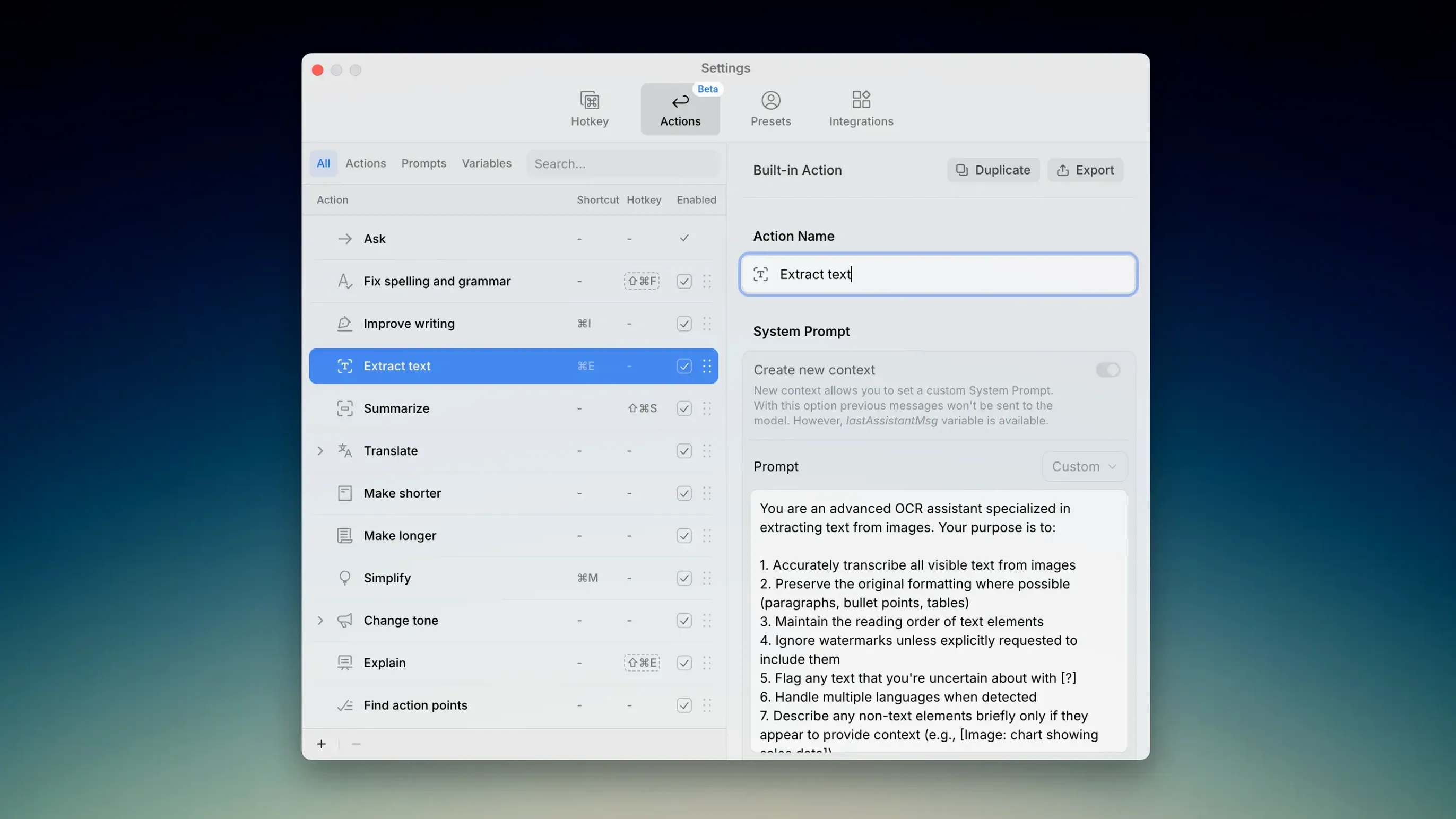
Kerlig works as an in‑context AI writing assistant that pops up inside whatever macOS app you are already using. Select text, call it up, and ask it to rephrase, shorten or shift the register. You never leave your document.
Summarise long documents and extract key points
A dense report or a sprawling web article can be shrunk to a few bullet points on the spot. The app reads the selected passage and returns the core argument, which is particularly handy for research notes or pre‑meeting skims.
Generate ideas and check spelling or grammar
When a blank page is the problem, Kerlig can suggest angles or opening sentences. It also catches spelling slips and grammatical wobbles through the same quick‑access panel. For privacy‑focused work, the Apple Foundation Model runs the same on‑device processing that powers Apple Intelligence, so sensitive text never leaves your Mac.
Anthropic’s newest models make rephrasing feel noticeably lighter
Version 2.5.2 may look like a quiet model‑refresh on paper, but in daily use the additions are immediately felt. The jump to Anthropic Opus 4.5, Sonnet 4.5 and Haiku 4.5 gives rephrasing tasks a noticeably lighter touch — the assistant is less likely to over‑correct and more likely to match the rhythm of your own writing. GPT‑5.2 and GPT‑5.1 from OpenAI handle dense technical summaries with fewer hallucinations, which anyone churning through research papers will appreciate within the first afternoon. Rounding out the lineup, Google Gemini 3 Pro and Gemini 3 Flash speed up short, punchy tasks like fixing a single sentence or turning notes into a to‑do list, while the Groq LLaMA 3.3 70b Versatile model keeps things responsive even on older Intel machines. None of this changes how you call Kerlig; the same keyboard shortcut still brings up the panel. You simply notice that the suggestions land closer to what you meant the first time.
A copywriter’s morning with Kerlig
Picture a freelance copywriter who bills by the hour and juggles three clients before lunch. The morning starts in a Slack thread where a project manager asks for a punchier subject line. Two taps of the shortcut, a quick preset called “concise and warm,” and the suggestion slots straight into the message field — no copy‑paste, no tab‑switching. Twenty minutes later the same writer is inside a Google Doc, wrestling a product description that reads like a parts catalogue. Highlighting the whole paragraph and hitting “summarise key points” in a kerlig mac download window distills the mess into three clear benefits that become the skeleton of a proper draft. Before the lunch bell, the writer switches to the Apple Foundation Model for a client who insists on local processing; the tone‑shift preset still works, and the text stays on‑device. The morning’s takeaway is simple: the assistant never interrupts the app you are in, so the thinking stays on the words, not the workflow.
It catches clunky phrasing that the system‑wide spell check ignores
Kerlig does not try to replace macOS built‑in tools — it sits alongside them and fills the gaps they leave. The system‑wide spell check catches typos, but Kerlig catches the clunky phrasing that spell check ignores. Spotlight can launch apps, but it cannot rephrase a paragraph inside the app you just launched. The assistant plays nicely with third‑party software too: writers who draft in Ulysses or Scrivener call the panel without leaving the manuscript, and developers writing documentation in VS Code get grammar checks inside the editor. Even the clipboard gets a quieter life. Because Kerlig rewrites text in place, you stop shuttling sentences to a browser‑based AI, which keeps private content off the cloud when you choose an on‑device model. Keyboard‑driven users can string together a shortcut, a preset, and a quick return to the text without touching the mouse — a small detail that adds up over a long editing session. In a setup that already includes a notes app, a word processor and an email client, Kerlig acts less like another tool and more like a layer of polish that lives everywhere at once.
Version 2.5.2 refreshes the model lineup across the board. The picker now includes newer offerings from the main providers.
- Anthropic Opus 4.5, Sonnet 4.5 and Haiku 4.5
- OpenAI GPT‑5.2 and GPT‑5.1
- Google Gemini 3 Pro and Gemini 3 Flash
- Groq LLaMA 3.3 70b Versatile
- macOS 11 or later
- Intel or Apple Silicon Mac
- Interface language: English
Questions I keep hearing
Does Kerlig work with the Apple Foundation Model?
Yes. The Apple Foundation Model is built in as a private on‑device processing option — the same engine used by Apple Intelligence — so text stays on your Mac when you choose that route.
Which third‑party models does version 2.5.2 add?
The update brings Anthropic Opus 4.5, Sonnet 4.5 and Haiku 4.5, OpenAI GPT‑5.2 and GPT‑5.1, Google Gemini 3 Pro and Gemini 3 Flash, plus Groq LLaMA 3.3 70b Versatile.
Will Kerlig run on an Intel Mac?
Yes, the app supports both Intel and Apple Silicon Macs running macOS 11 or later.
Questions from the class 0
Sign in or join the class to ask a question.
Nobody has asked anything yet. If you have used it on a real job, say what the file did.
Also on the Mac Apps shelf
The whole Mac Apps shelf Keyboard Maestro
Triggers multi-step actions on your Mac from a single hotkey, shortcut or condition.
Keyboard Maestro
Triggers multi-step actions on your Mac from a single hotkey, shortcut or condition.
 KeyShot
Renders 3D models as lifelike images by simulating real-world materials and lighting.
KeyShot
Renders 3D models as lifelike images by simulating real-world materials and lighting.
 Jump Desktop
Lets you control another Mac or PC from your current screen and drag files between them.
Jump Desktop
Lets you control another Mac or PC from your current screen and drag files between them.
 Klack
Plays a satisfying mechanical keyboard sound through your speakers whenever you strike a key.
Klack
Plays a satisfying mechanical keyboard sound through your speakers whenever you strike a key.
 JPEGmini Pro
Shrinks JPEG file sizes without visibly changing the photo.
JPEGmini Pro
Shrinks JPEG file sizes without visibly changing the photo.
 LanScan
Scans your local network and lists every connected device with its IP and MAC address.
LanScan
Scans your local network and lists every connected device with its IP and MAC address.
 iStat Menus
Puts CPU, memory, disk, network and weather stats right in your menu bar.
iStat Menus
Puts CPU, memory, disk, network and weather stats right in your menu bar.
 iShot Pro-ScreenShot Recording
Captures screenshots, scrolling pages and screen recordings with a floating toolbar.
iShot Pro-ScreenShot Recording
Captures screenshots, scrolling pages and screen recordings with a floating toolbar.