 ASPNetWorld

Version 17.3.8 landed as a quiet maintenance update, smoothing out a handful of rough edges that surfaced in the 17.3 cycle. Nothing showy — just the sort of polish that keeps a long database session feeling predictable rather than jumpy. If you have been holding off on the 17.3 upgrade, this is the nudge to move across.
One report, two very different databases
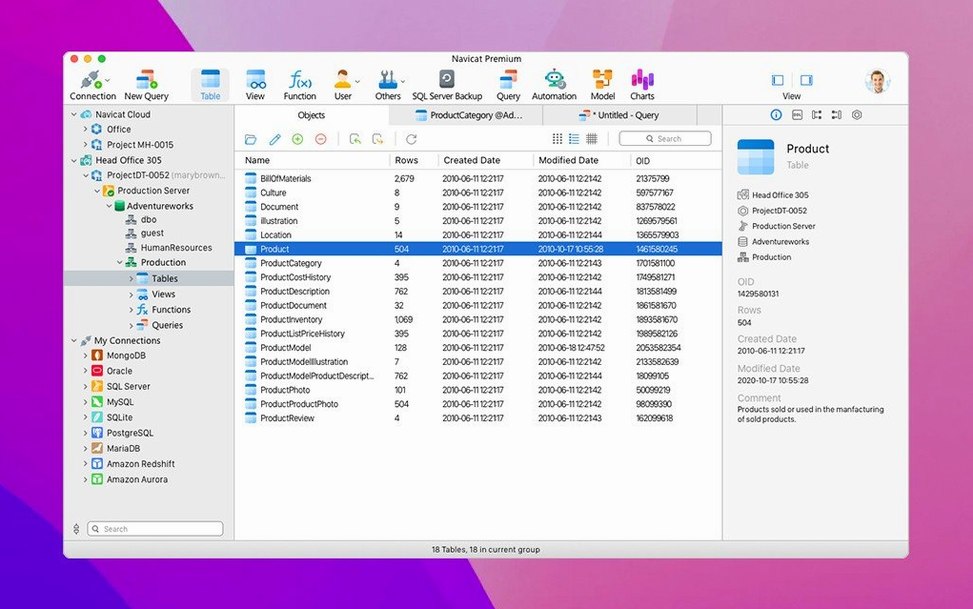
Here is a scenario I run into all the time when teaching evening classes: you have customer records sitting in a sturdy PostgreSQL instance, but the actual order history has been growing inside a MongoDB collection. Management wants a single report showing customer names alongside their lifetime order totals. In the old days that meant exporting from one, importing into the other, and hoping the CSV gods smiled on you. With Navicat Premium, you simply open connections to both database types from the same left-hand navigation tree. No driver juggling, no switching tools.
- Drag a PostgreSQL connection and a MongoDB connection into the workspace — they sit side by side as peers.
- Use the Query Builder to pull customer names from the relational side, then hop across to a MongoDB aggregation pipeline for the order sums.
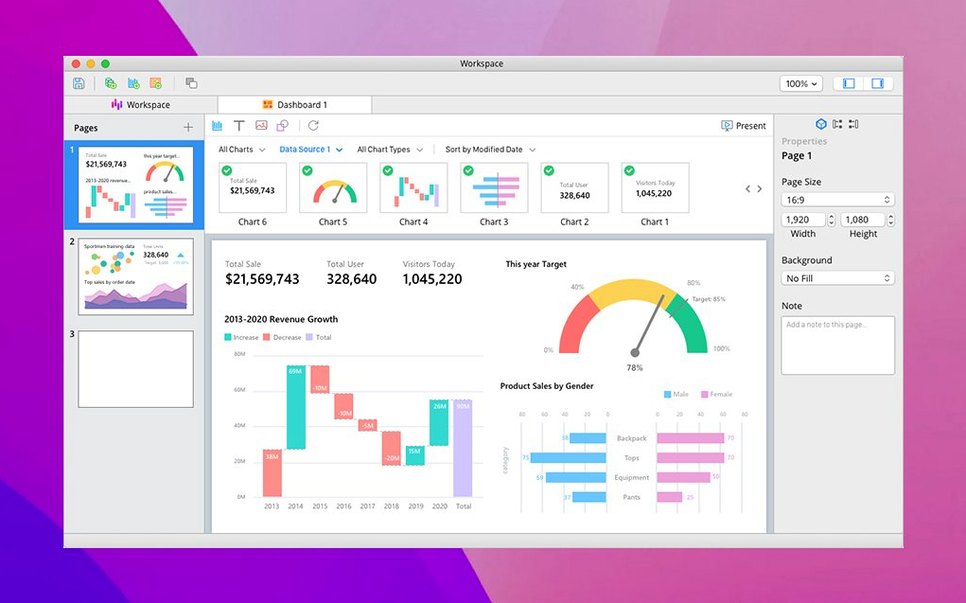
- Feed both result sets into the Report Wizard, which lets you lay out headers, group bands and summary fields visually.
- Schedule the finished report as a batch task so it regenerates every Monday morning without you touching anything.
Why the single-interface idea actually matters
Navicat Premium connects to MySQL, MariaDB, SQLite, Oracle, PostgreSQL, SQL Server, MongoDB, Redis and Snowflake — all from one application window. The real benefit is not just fewer icons in the Dock. It is that a data modelling exercise can span a Snowflake warehouse and a local SQLite scratchpad simultaneously. The Data Synchronisation tool compares schemas across engine types, the HTTP Tunnel option gets you through a firewall without a separate SSH client, and stored-procedure editing works consistently whether you are inside Oracle or PostgreSQL. For people who teach this stuff, or just have to think across multiple stores, that consistency saves more brain cycles than any single feature.
Navicat Premium sits surprisingly well inside macOS workflows once you lean into a few built-in conveniences. The app respects standard file-type associations, so double-clicking a .sql file in Finder can launch it straight into the SQL console of whichever connection you last used. Spotlight finds saved connection profiles quickly, which is handy when you maintain separate identities for staging, production and a local Docker sandbox. On Apple Silicon machines the native ARM build means a cold start is fast enough that I rarely bother leaving it running — I open it, run a scheduled sync, then quit, without the usual Java-tool lurch of a cross-platform port waking up.
Drag-and-drop works where you would expect it to: pull a CSV onto a table node in the connection tree and the Import Wizard pre-fills the target schema. Copy a query result set and paste it directly into Numbers or a Markdown report without intermediate files. The app also hooks into macOS Notification Centre, so a long-running data migration can tap you on the wrist when it finishes rather than forcing you to keep the window in view. None of these are headline features, but they are the things that make the tool feel like it was written by people who actually use a Mac, not just compile for one.
Running a MySQL query while a MongoDB collection is open
“Can it really handle MySQL and MongoDB in the same query?” Not in a single SQL statement, no — that would require a cross-engine query layer that does not exist here. What it does is let you run a MySQL query and a MongoDB aggregation side by side, then use the data modelling or report tools to correlate the results visually. For true cross-database joins you still need an ETL step or a federated engine, but for the day-to-day work of comparing, migrating and reporting across stores, the single interface cuts out the tool-switching entirely.
“Does it interfere with my existing local database installs?” Not at all. Navicat Premium is a client, not a server. It connects to whatever instances you point it at — local localhost sockets, remote IPs, cloud-hosted clusters — using each database’s native driver. If you already have PostgreSQL running via Homebrew and a MongoDB instance through Docker Compose, you just add connection strings and carry on. The app does not bundle its own database engine or touch your my.cnf files.
“Will it slow down if I keep ten connections open?” The connection pool is lazy; idle connections consume negligible resources beyond a tiny heartbeat packet if you enable keep-alive. The left-hand tree loads database objects on demand, so having a Redis instance listed alongside a Snowflake warehouse does not mean the app is cataloguing keys and columns until you expand the node. I have run workshops with half a dozen live connections — MySQL, two PostgreSQL versions, SQLite, MongoDB and Redis — on an M1 MacBook Air without the fan ever spinning up.
Tabbing between the SQL console and table designer feels less fragile
The 17.3 release cycle introduced native support for Snowflake and polished the Redis key viewer, but 17.3.8 itself is a bug-fix point release. In practice that means fewer oddities when tabbing between an open SQL console and the table designer — earlier builds could occasionally lose cursor position after a long query ran. SSH tunnel reconnection after sleep is now more predictable; macOS Sonoma’s aggressive network suspension used to drop tunnels silently, and the latest update handles that handshake more gracefully. The query profiler in the PostgreSQL module also received a quiet tweak to display execution plans more accurately when dealing with partitioned tables, something anyone running time-series data will appreciate the first time they debug a sluggish SELECT across monthly partitions.
If you have been using a navicat premium mac build from early in the 17.3 line and noticed the occasional beachball when switching between a MongoDB aggregation tab and a MySQL table view, that is precisely the sort of transient lock-up the bug fixes address. It is the kind of release you install, forget about, and only remember when you realise you have not restarted the app in three days and it still feels crisp.
Build 17.3.12 applies a collection of under-the-hood fixes and efficiency tweaks across all supported database connections.
- macOS 11 (Big Sur) or any later release
- Works natively on both Apple Silicon and Intel 64‑bit Macs
Questions I keep hearing
Can Navicat Premium really back up a MongoDB database the same way it backs up MySQL?
Yes — the backup and restore tools are aware of each database type's native dump format, so you get a proper MongoDB dump rather than a generic file copy, and the same scheduling engine can handle both.
Does the data modelling tool understand the difference between a SQL join and a MongoDB embedded document?
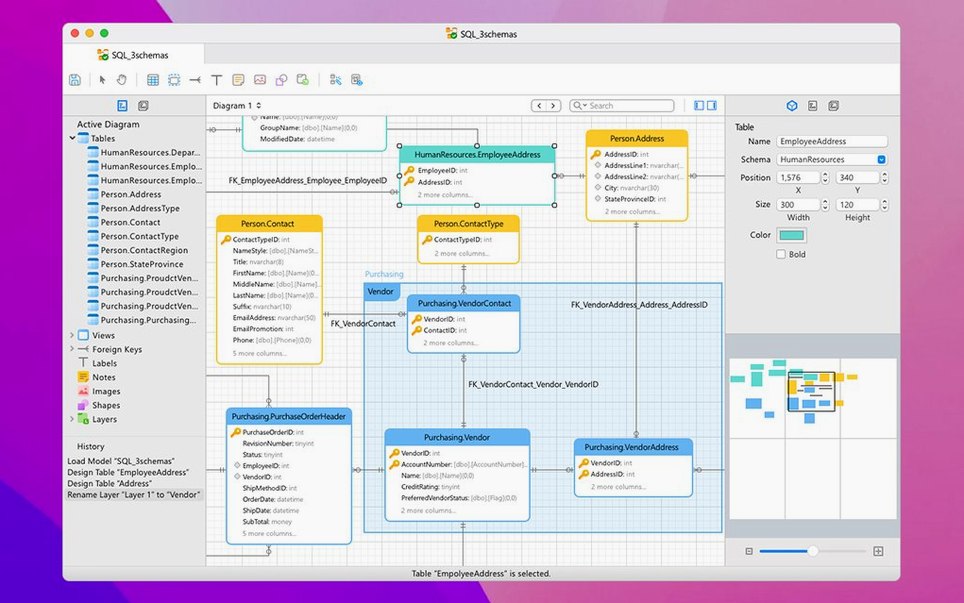
Yes, the modelling tools let you design relational schemas with foreign keys or draw embedded sub-document structures for MongoDB, all within the same visual canvas.
Questions from the class 0
Sign in or join the class to ask a question.
Nobody has asked anything yet. If you have used it on a real job, say what the file did.
Also on the Mac Apps shelf
The whole Mac Apps shelf MuMu Player Pro
Runs Android apps and mobile games on your Mac as if they were tiles in your dock.
MuMu Player Pro
Runs Android apps and mobile games on your Mac as if they were tiles in your dock.
 Multitouch
Lets you assign custom finger swipes and taps to control apps without touching the keyboard.
Multitouch
Lets you assign custom finger swipes and taps to control apps without touching the keyboard.
 m’s HalfTone
Brings hands-on, animatable dot-pattern effects into After Effects with motion and transparency control.
m’s HalfTone
Brings hands-on, animatable dot-pattern effects into After Effects with motion and transparency control.
 Mp3tag
Edits metadata across a whole music library in one fast batch, not track by track.
Mp3tag
Edits metadata across a whole music library in one fast batch, not track by track.
 Nik Collection
Adds film looks, black-and-white and detail filters to photos as plug-ins.
Nik Collection
Adds film looks, black-and-white and detail filters to photos as plug-ins.
 Movist Pro
Plays video files using either QuickTime or FFmpeg as the engine behind each codec.
Movist Pro
Plays video files using either QuickTime or FFmpeg as the engine behind each codec.
 Movavi Video Suite
Bundles video editing, file conversion, and screen recording into a single three-in-one tool.
Movavi Video Suite
Bundles video editing, file conversion, and screen recording into a single three-in-one tool.
 Movavi Video Editor
Turns raw clips into social videos, family montages, or short business promos in thirteen languages.
Movavi Video Editor
Turns raw clips into social videos, family montages, or short business promos in thirteen languages.