 ASPNetWorld

A quiet tidy-up after the big update
PopClip 2026.8.1 arrived on 7 September 2026 as a maintenance and cleanup release, smoothing off the corners left by the feature refresh in version 2026.7. No new buttons, no dramatic interface changes — just the kind of under-the-bonnet housekeeping that keeps a utility feeling crisp. If you already rely on it, this is the version that makes sure everything still hums.
How PopClip sits alongside your other tools
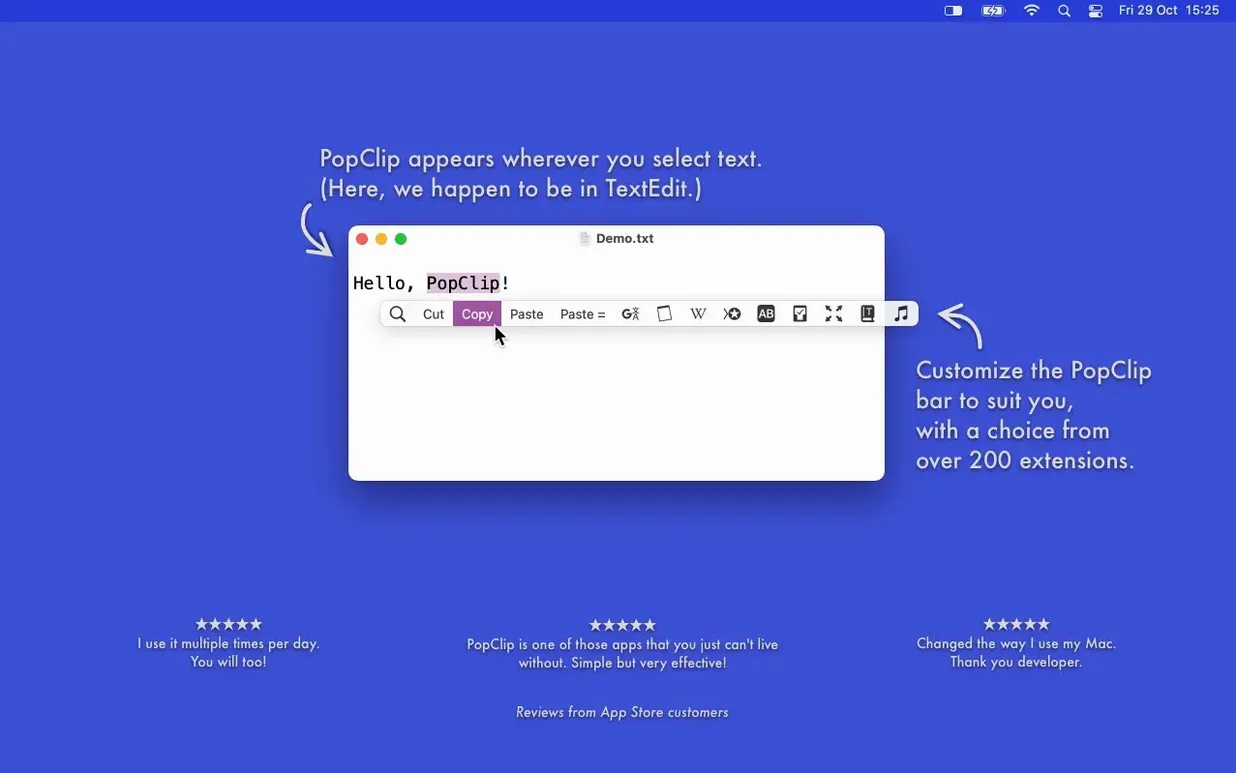
Think of PopClip as the small, attentive assistant who appears the moment you highlight a word or phrase with your mouse. It doesn't replace your existing apps; it threads them together. The popover that materialises above your selection is effectively a context-sensitive remote control for the rest of your Mac. Here's a typical workflow.
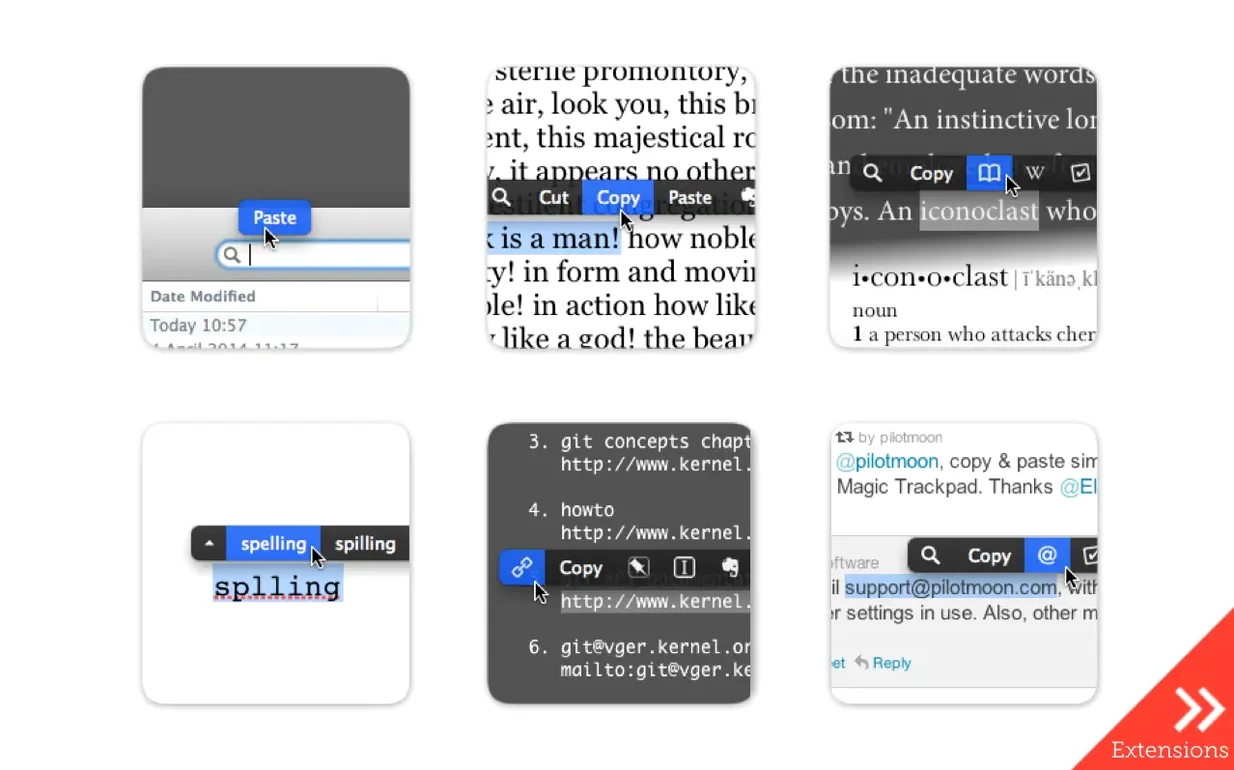
- Select a misspelled word in any text field. PopClip detects the error and offers spelling corrections right there, without you needing to right-click or switch to a dedicated writing app. It borrows this intelligence from macOS itself, so it feels native rather than bolted on.
- Highlight an address or a technical term you need to look up. Tap the search button and your default browser opens with the results. It's a single gesture where you'd normally copy, switch windows, paste and hit return. That's the kind of micro-efficiency that adds up if you research while you read.
- Send a snippet straight to Evernote. With the relevant extension enabled, three words of a fleeting idea or a paragraph you want to keep become a new note before you lose your train of thought. The action sits in the same row as copy, paste and search, so it feels like a natural extension of the clipboard rather than a separate app launch.
What makes this work is that PopClip doesn't demand you learn a new environment. It borrows the gestures you already use — selecting text — and adds a small layer of acceleration. It's comfortable next to your launcher, your clipboard manager and your writing tools because it never tries to be the centre of attention; it just shortens the distance between thought and action.
Mistakes even experienced users make
PopClip looks so simple that people often skip the preferences pane entirely and then wonder why it behaves oddly in certain apps. The most common frustration comes from accidental triggering. If you find the popover appearing when you're simply trying to drag text or resize a selection, you haven't discovered the excluded apps list. It lives in the main PopClip settings, and adding anything where you frequently click-drag — think image editors, terminal windows, or even Finder column views — makes the utility feel far less intrusive without disabling it globally.
A subtler mistake is treating PopClip as purely a mouse tool. It works beautifully with the keyboard too, if you let it. After selecting text with Shift and the arrow keys, a quick tap of the PopClip keyboard shortcut (which you can set to whatever you like) summons the popover at the insertion point. This turns it into a keyboard-driven launcher for text actions, and once muscle memory kicks in you stop reaching for the mouse at all for lookup, search or case conversion.
New users also tend to enable every extension they find interesting, then complain the popover feels cluttered. The fix is the action layout setting: you can reorder, hide or group actions so only the four or five you genuinely need appear by default. The rest stay a swipe or a click away behind the small disclosure arrow. It is the difference between a Swiss Army knife and a drawer full of loose blades.
Small conveniences hiding in plain sight
PopClip's extension library — over a hundred free ones — contains several quiet gems that don't advertise themselves. If you regularly paste text from web pages or styled documents and then waste seconds stripping the formatting, enable Paste and Match Style. It performs the equivalent of the Shift-Option-Command-V shortcut, but in a single click, and it works even in apps that don't honour the standard keyboard command reliably.
The word count extension is another one people overlook until they need it. Select a paragraph in any text field — a Mail draft, a Messages bubble, a web form — and PopClip shows you the count and character total right in the popover. No copying to a separate utility, no switching windows. It is startling how often you want that number once it is only a highlight away.
Case conversion is similarly invisible until it saves you retyping. Highlight text, choose from uppercase, lowercase, title case or sentence case, and the selection transforms in place. It is a small thing, but if you have ever retyped a heading because you accidentally left caps lock on, you will appreciate the shortcut.
Where PopClip fits in the wider macOS ecosystem
PopClip's sync behaviour is worth understanding because it changes how you think about setup. It uses iCloud to synchronise your installed extensions, action layout and preferences between Macs. Set it up once on your desktop, and your laptop inherits the exact same arrangement without any manual export or configuration files. This matters if you use a MacBook for meetings and an iMac for desk work — the tool feels consistent across both without effort.
It also plays nicely with macOS accessibility features. If you use VoiceOver, the popover actions are navigable, and the spelling suggestions integrate with the system's own proofreading engine. PopClip doesn't introduce its own dictionary; it surfaces what the Mac already knows, which means it respects any custom words you have added to the system spelling dictionary.
As for compatibility with other apps, the rule of thumb is that PopClip works wherever standard macOS text fields exist. It shines in Mail, Notes, Safari, Pages, Things, Bear and most writing tools. It stumbles in a few places — Electron apps sometimes confuse it because they draw their own text surfaces — but the excluded-apps list handles those edge cases cleanly once you identify them. People searching for popclip mac often assume it is a clipboard manager replacement; it is not. It complements one beautifully, sitting between your selection and the actions your clipboard manager can't perform, like instant web search, dictionary lookup or sending a snippet to a notes app before you copy anything at all.
PopClip 2026.8.1 is a maintenance and cleanup release that follows the feature update in version 2026.7. It tidies up loose ends and keeps everything running smoothly on both Apple Silicon and Intel Macs.
- General stability improvements and code cleanup after the 2026.7 release.
- Polished behaviour for existing extensions without adding new actions.
- macOS 13.5 Ventura or newer
- Apple Silicon or Intel 64-bit processor
Questions from the class 0
Sign in or join the class to ask a question.
Nobody has asked anything yet. If you have used it on a real job, say what the file did.
Also on the Mac Apps shelf
The whole Mac Apps shelf PowerPhotos
Splits your photo collection into separate libraries and finds duplicate images across them.
PowerPhotos
Splits your photo collection into separate libraries and finds duplicate images across them.
 Presentify
Draws annotations and highlights on top of any app or presentation with one menu-bar click.
Presentify
Draws annotations and highlights on top of any app or presentation with one menu-bar click.
 ProPresenter
Manages lyrics, slides and media for live events and worship.
ProPresenter
Manages lyrics, slides and media for live events and worship.
 PlistEdit Pro
Displays and rearranges the nested tags inside macOS preference and configuration files.
PlistEdit Pro
Displays and rearranges the nested tags inside macOS preference and configuration files.
 Plasticity
Builds watertight solid models for manufacture through direct, history-free editing.
Plasticity
Builds watertight solid models for manufacture through direct, history-free editing.
 PyCharm
Provides coding tools for Python development and debugging.
PyCharm
Provides coding tools for Python development and debugging.
 QuarkXPress
Designs precise layouts for print and digital publishing.
QuarkXPress
Designs precise layouts for print and digital publishing.
 Pixologic Zbrush
Sculpts digital clay into high-detail models using pixels that carry depth and material data.
Pixologic Zbrush
Sculpts digital clay into high-detail models using pixels that carry depth and material data.