 ASPNetWorld
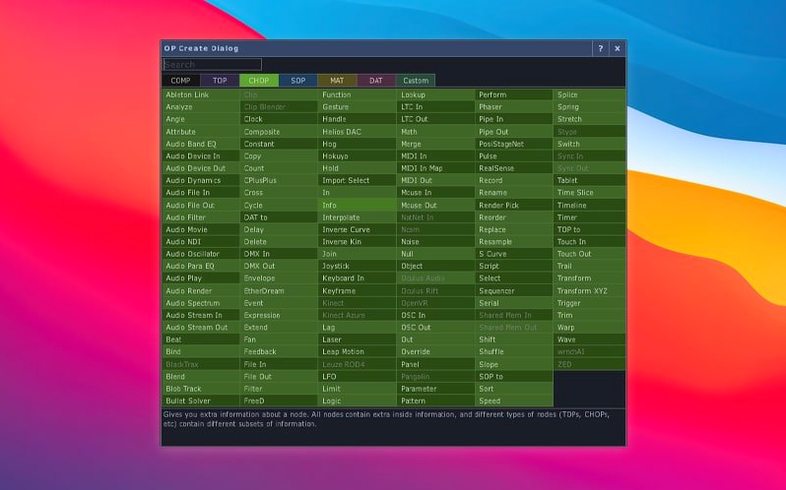
Derivative's 2025 build shifts attention towards geometry with the introduction of Point Operators, or POPs — a dedicated operator family for working directly with point data. At the same time, most Texture Operators now carry native support for 3D textures and 2D arrays, so you can pull volumetric data through the same chain without awkward workarounds. The Orbbec SDK was bumped to 1.10.16, which matters if depth sensors are part of your rig.
Build a reactive visual system
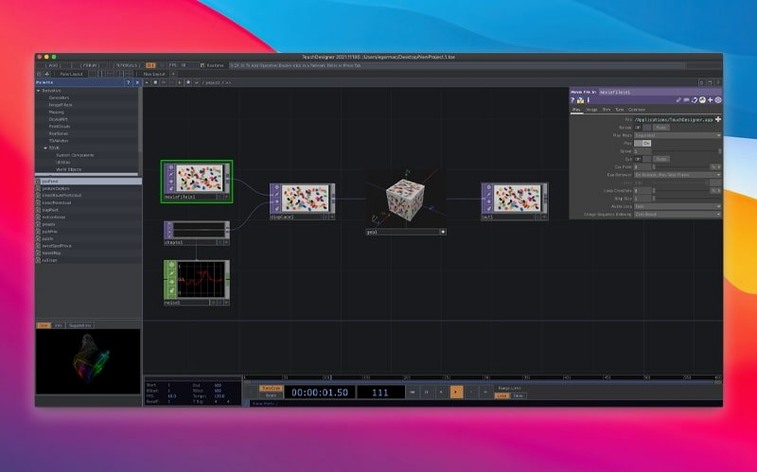
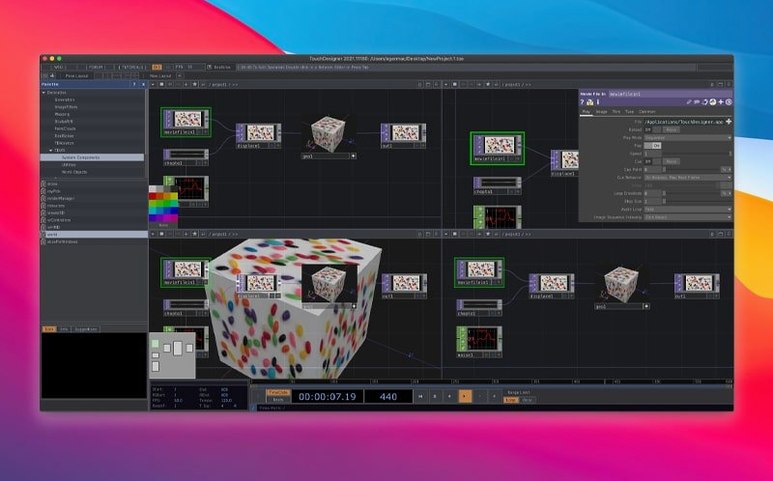
You wire together nodes called operators to process video, 3D geometry, audio and data streams in a single graph — logic and interface live side by side.
Send work to a projector or a headset
Real‑time 3D rendering, compositing and built‑in VR tools mean the same network can drive a building‑scale installation or a tracked head‑mounted display.
Talk to the outside world
MIDI, OSC, DMX and web protocols are all first‑class citizens; you can pull in sensor data, control lighting rigs or sync with other software without leaving the environment.
A first session, step by step
Put aside any expectation that you will build a masterpiece on day one. The goal of the first proper session is to feel the pulse of the software — to watch a signal travel from a source, through a few transformations, and out to the screen. Open TouchDesigner and you are greeted by a blank network editor. It looks sparse, almost underwhelming, until you press the Tab key and see the operator menu unfold.
Start with a Movie File In TOP. Double‑click it to pick a video clip from your drive — something with clear motion, like leaves rustling or traffic passing. You immediately get a thumbnail in the node, which is reassuring. Press H to home the view and see the image fill the backdrop. That single keystroke becomes muscle memory faster than you expect.
Now place a Blur TOP downstream. Wire the Movie File In output to the Blur input by dragging from the little square on the right of the first node to the left of the second. The connection line snaps into place. Click the Blur node and look at the parameter panel on the right — drag the Filter Size slider and watch the image soften in real time. Nothing rendered offline, no progress bar. You are already inside a reactive system.
Add a Noise TOP and a Composite TOP. Feed the blurred video into one Composite input and the noise into another. Set the Composite operation to Add and dial down the opacity. Suddenly the footage has a living grain, a subtle organic shimmer. The whole chain, from file playback to processed output, uses perhaps six nodes, and you built it in under five minutes. Export a still frame with a right‑click on the Composite TOP and choose Save Image. You have made something.
Close the session by pressing Ctrl-S and giving the file a meaningful name — perhaps with a date stamp. TouchDesigner saves the entire network, including all parameter tweaks, into a single .toe file. Tomorrow you can open it and carry on exactly where you left off.
A scenario: the VJ preparing for a club night
Imagine a VJ who has a residency at a basement venue with a modest LED wall and a fog‑heavy atmosphere. She needs a visual set that responds to the DJ’s mixer output and can be steered live without looking at a laptop screen for more than a second at a time. She turns to TouchDesigner because it lets her build a self‑contained reactive rig and run it from a single MacBook.
She creates three Scene Chains — fast cuts, slow blends, and strobing geometrics — and assigns each to a row of MIDI buttons on a compact controller. An Audio Device In CHOP listens to the venue’s stereo feed, extracts low‑frequency amplitude, and uses that value to drive the scale of a rotating 3D torus. When the kick drum hits, the torus pulses. When the bassline drops out, it shrinks to a delicate wireframe. The whole network stays under 40% GPU load, which leaves headroom for the unexpected.
During soundcheck she notices the LED wall processor expects a slightly non‑standard resolution. She drops a Resolution TOP into the output chain, types the pixel dimensions, and the image fits perfectly — no need to re‑render media. She saves the .toe file, quits, and opens it again at showtime. It starts in Perform Mode with a single keystroke, hiding the network editor so only the output fills the screen. The audience never sees a cursor.
Middle-click a node to see its viewer instantly
Every mature visual programming environment accumulates quiet shortcuts, and TouchDesigner has a collection that repays a morning spent browsing the menus. Here are a few that speed up daily work once you know they exist.
- Middle‑click a node to see its output fullscreen. This works on any TOP and lets you inspect a texture at full resolution without rerouting cables. Middle‑click again to dismiss it.
Shift‑Hhomes all selected nodes. WhileHhomes the whole network,Shift‑Hframes just what you have highlighted — useful when a project sprawls across several screens of graphs.- Drag a
.toefile into an open network. It becomes a Component, a self‑contained sub‑network you can reuse. This turns old projects into a personal library of building blocks. - Rename a node by selecting it and pressing
Ctrl‑R. A small thing, but clear names (like cam_feed instead of null1) make late‑night debugging far less painful. - Right‑click any parameter and choose Copy Parameter, then paste onto another node. This copies both value and expression bindings, which is handy when you want the same animation curve on several elements.
- Hold
Ctrlwhile dragging a wire to insert the new node in‑line. The connection splits automatically; you do not need to delete and rewire.
One more: the Help button on every operator panel opens a local page with example networks you can copy and paste straight into your project. It is not just documentation — it is a sketchpad of working snippets.
How TouchDesigner fits in with other apps and macOS
On a Mac, TouchDesigner sits alongside creative tools rather than trying to replace them. It reads .mov files encoded in ProRes or H.264, so you can prepare footage in DaVinci Resolve or After Effects and drop the renders straight into a Movie File In TOP. Audio stems exported from Logic or Ableton Live slot into an Audio File In CHOP. The workflow is a relay race: other apps handle offline authoring, TouchDesigner handles real‑time assembly and performance.
Spout and Syphon — the two main frameworks for sharing video frames between applications on macOS — are both supported. You can send a Syphon stream out of TouchDesigner and pick it up in MadMapper for projection mapping, or receive a Syphon feed from a Unity build that is handling physics simulation. That means you do not have to shoehorn every task into a single environment; you can use TouchDesigner as the central hub that connects several specialised tools.
macOS accessibility features coexist peacefully. Zoom, VoiceOver and custom display scaling do not interfere with Perform Mode. If you use a Wacom tablet or an iPad running Sidecar, the pen input maps to the network editor and parameter sliders, giving you a finer degree of control than a trackpad — especially useful when scrubbing through timeline values or drawing mask shapes.
For those who rely on the Terminal, TouchDesigner respects environment variables. Setting TOUCH_TEXT_CONSOLE before launch enables a text port that spits out diagnostic messages, which you can pipe to a log file or monitor with a custom script. It is a small concession to command‑line habits inside a predominantly graphical world.
Learn from the bundled Operator Snippets before you build your own
Start with the F1 help and the bundled tutorial networks. They are not glossy video courses; they are compact, commented graphs that show one concept at a time. Open the Operator Snippets section and drag a few into your own project. Take them apart — disconnect a wire, change a parameter to an extreme value, see what breaks. Repairing something you broke teaches you more than following a recipe.
Set your real‑time flag early. In the Dialogs menu, under Preferences, switch the timeline to Realtime. The default is frame‑based, which suits motion‑graphics timelines but confuses newcomers who expect a continuous flow. Realtime mode frees you from frame numbers and makes audio‑reactive work feel natural.
Watch the performance monitor. The small panel showing CPU and GPU load is not there to frighten you — it is a compass. If a TOP chain spikes the GPU, try lowering the resolution of intermediate textures with a Resolution TOP. If a CHOP network eats CPU, look for channels you are computing but never displaying. Prune early, and the graph stays nimble.
Make a “scratchpad” component and park it in the corner of every project. Fill it with experimental nodes, colour‑coded and messy. When you discover something useful, copy it out into the main graph. The scratchpad lowers the pressure of getting it right first time and becomes a personal library of techniques that actually worked on your hardware.
Finally, lean on the touchdesigner mac crack search if you are determined to test the waters before committing; the community forums and Derivative’s own example files offer a wealth of free learning material, and a crack can be a way to explore the full feature set on your own timeline. Plenty of artists run the official release on Intel Macs and find it stable enough for live shows, so a clean installation from the disk image is the straightest path to a reliable setup.
The 2025.31550 release introduces Point Operators (POPs), giving you a dedicated set of tools for manipulating point clouds and vertex data directly on the GPU. Most TOPs now handle 3D textures and 2D arrays natively, which makes volumetric workflows far neater. Under the hood, the Orbbec SDK was upgraded to 1.10.16 for tighter depth‑camera integration.
- macOS 10.14 or later
- Intel processor
- English interface
Questions I keep hearing
Can TouchDesigner handle both the interface and the underlying logic?
Yes — it is a visual programming environment where you build application logic and the custom user interface together in one project, without switching tools.
Questions from the class 0
Sign in or join the class to ask a question.
Nobody has asked anything yet. If you have used it on a real job, say what the file did.
Also on the Mac Apps shelf
The whole Mac Apps shelf Transmit
Moves files between your Mac and remote servers through a fast, dual-pane browser.
Transmit
Moves files between your Mac and remote servers through a fast, dual-pane browser.
 Trimma
Trims the start or end off a video without opening a library or creating a project.
Trimma
Trims the start or end off a video without opening a library or creating a project.
 Topaz Video AI
Reconstructs watchable detail from old, low-quality video footage frame by frame.
Topaz Video AI
Reconstructs watchable detail from old, low-quality video footage frame by frame.
 Topaz Photo AI
Analyses a photo and applies the exact sharpening and noise reduction it actually needs.
Topaz Photo AI
Analyses a photo and applies the exact sharpening and noise reduction it actually needs.
 TunesKit iPhone Unlocker
Removes a forgotten screen passcode or an Apple ID from a locked iPhone.
TunesKit iPhone Unlocker
Removes a forgotten screen passcode or an Apple ID from a locked iPhone.
 Topaz Gigapixel AI
Enlarges low-resolution images while keeping faces and textures crisp and natural.
Topaz Gigapixel AI
Enlarges low-resolution images while keeping faces and textures crisp and natural.
 Tuxera NTFS
Lets your Mac read and write Windows-formatted drives without a second thought.
Tuxera NTFS
Lets your Mac read and write Windows-formatted drives without a second thought.
 Typeface
Browses a visual grid of every installed font and compares them side by side.
Typeface
Browses a visual grid of every installed font and compares them side by side.