 ASPNetWorld


This version stands still at 2.7.0.16 while a V4.0 appears in the official release notes with entirely new modules like Password Manager and a camera-sound toggle. For an experienced user, that gap is interesting: it tells you that the installer you have is a snapshot of the tool before those features landed, focused purely on the core unlocking jobs. MDM lock, Screen Time restrictions, and the aftermath of a passcode disaster are what this build actually tackles.
MDM—Mobile Device Management—lingers on second-hand or company-cycled hardware as a remote profile that dictates what the device can do. TunesKit’s approach strips that profile out, which is the kind of operation you care about when a simple restore won’t shift it. The same goes for Screen Time; if you have inherited an iPad with a forgotten restrictions passcode, the app treats it as a dedicated removal task rather than a side effect of a full wipe.
Architecturally, the app is built for Intel x86 64-bit Macs and asks for OS X 10.11 El Capitan or newer. That puts it squarely in the zone of older Macs or deliberate Intel-only workflows. The install dance is a manual one: mount the image, run the “Open Gatekeeper friendly” script, and tap Enter in Terminal to sidestep the system’s code-signing checks before dragging the application into place. It is a blunt reminder that you are using a tool Apple would rather you didn’t.
At its heart, the software targets that moment after too many fumbled passcodes have bricked the interface, or when an Apple ID lock sits behind a device you physically own but digitally don’t. It does not do anything new in this build compared to the V4.0 that is listed elsewhere, but for the tasks it covers, the feature set is a straight, undiluted line from problem to solution.
Waking a 2022 drawer phone when Touch ID and passcode are both gone
Picture a first-generation iPhone SE that has been sitting in a drawer since 2022. The screen lights up, but Touch ID does nothing and the six-digit code evaporated from memory long ago. You connect it to a 2015 MacBook Pro still running El Capitan and launch TunesKit iPhone Unlocker. The interface presents a row of modules—Screen Time, MDM, Apple ID, Screen Lock—and you select the last one.
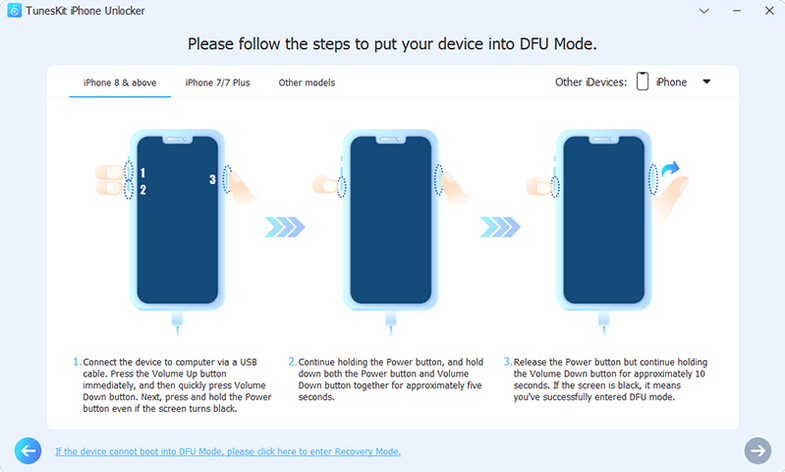
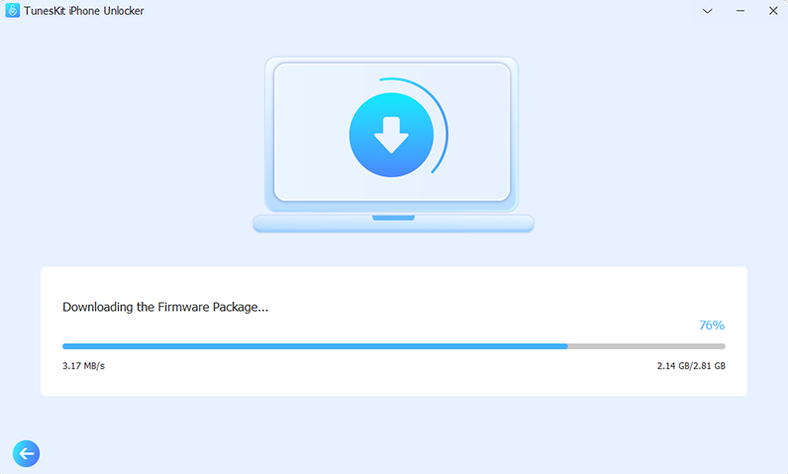
The app asks for confirmation that you are ready to download the matching firmware bundle. This is the step that catches people out: the download is not a suggestion. Without that IPSW file, the tool cannot rebuild the device into a usable state. A progress bar tracks the fetch from Apple’s servers, and five minutes later the Mac has a signed build ready to go. TunesKit then walks the iPhone through recovery mode, a state where the screen shows a cable pointing at a Mac icon. Getting the timing right can take two attempts—the SE needs a quick press of volume up, then volume down, then a hold of the side button—but the on-screen guide is explicit enough to repeat.
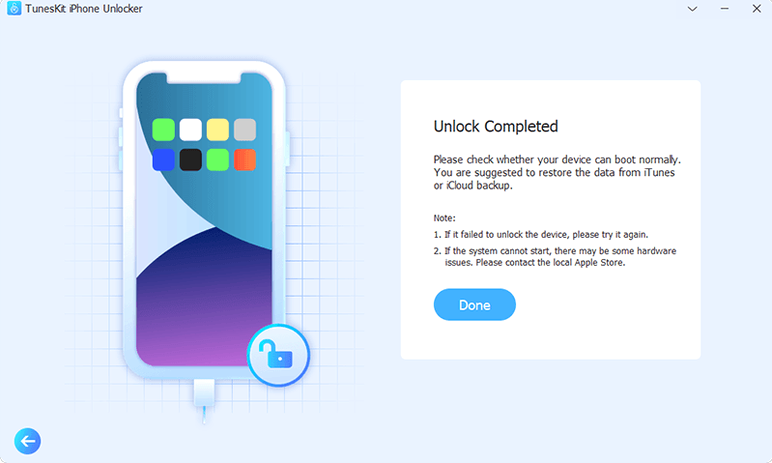
Once recovery mode is recognised, the software pushes the firmware, a process that runs for roughly twelve minutes on this hardware. The phone reboots, the progress bar on the Mac ticks to finished, and Setup Assistant appears on the glass. The passcode is gone, as is every scrap of data, which is the trade-off the app makes clear before you start. For this use case—reviving a device you physically own without the code—the session is a straight line, no jailbreak needed and no iTunes backup dependency.
Where TunesKit fits among other tools and macOS features
Apple gives you three legitimate routes for a forgotten passcode: a Mac running Finder or iTunes in recovery mode, iCloud’s “Erase iPhone” from another device, or a visit to the Genius Bar. TunesKit sits parallel to those, not beneath them. It uses the same DFU and recovery-mode handshakes that iTunes does, but it wraps them in a workflow optimised for a single intention. You are not hunting through Finder sidebar menus or wondering whether a backup exists; the app funnels you toward the unlock and removes the noise.
That focus is why the tuneskit iphone unlocker crack download variant tends to circulate among repair shops and second-hand resellers. They need a dedicated tool that does not get tangled in syncing libraries or media. At the same time, the app plays nicely with macOS’s own USB stack—if the Mac can see the device in System Information under the USB tree, TunesKit will likely detect it. The only friction point is the Gatekeeper bypass, which is a one-shot operation at install time rather than something you repeat each launch.
For activation lock removal, the app leans on a specific device window: iPhone 5s through iPhone X on iOS 12.0 to 16.7.15. That is a narrow band, and it matters because newer hardware uses different Secure Enclave protections that this build does not attempt to unpick. When a friend hands you an iPhone 8 that still thinks it belongs to an ex-employer’s iCloud account, you are inside that supported range, and the tool can talk to the relevant Apple services to detach the lock without touching the logic board.
Getting a stubborn iPhone 7 Plus into recovery mode on the first try
The most common stumble is the recovery-mode handshake. A device that refuses to enter recovery mode on the first attempt usually has a slightly different button sequence than the guide shows—an iPhone 7 Plus uses volume down plus side button, whereas an iPhone 8 demands a quick press of volume up, then volume down, then side hold. TunesKit’s on-screen instructions cover the broad models, but checking Apple’s own support page for your exact hardware generation saves two or three reboots.
Another snag crops up when the Mac reports “device not detected” even though the cable is plugged in. The culprit is nearly always the USB port. Older Intel Macs, especially the pre-2018 models, deliver inconsistent current on the left-side ports versus the right-side ones. Swapping ports, avoiding a hub entirely, and using a genuine Apple Lightning cable—or at least an MFi-certified one—resolves the recognition issue in most cases. If the device still does not appear, a quick SMC reset on the Mac itself flushes the USB controller state and often clears the problem.
Firmware download failures happen when Apple's servers are under load, usually within the first forty-eight hours after a new iOS point release. The app will show a stalled progress bar. Pausing, waiting ten minutes, and retrying almost always works, because the request hits a different CDN node. If you are working with a tuneskit torrent of the application, you may find the built-in firmware fetch needs a little extra care; ensuring the Mac has a direct network connection instead of a VPN or proxy gives the download the cleanest path.
A subtler issue is the activation lock removal refusing to start because Find My is still technically enabled on a device that appears otherwise unlocked. The fix is to sign into iCloud.com on a browser, locate the device in Find My, and remove it from the account before running TunesKit’s activation module. This clears the token that the tool needs to bypass, and the removal proceeds without the “device still linked” error. People who discover the tuneskit iphone unlocker full version free download often skip this browser step and then wonder why the unlock stalls.
- OS X 10.11 (El Capitan) or later
- Intel x86 64-bit processor
- English interface
Questions I keep hearing
What does the MDM lock removal actually do?
It removes the remote management profile that a company or institution placed on the device, returning local control to you without requiring the original administrator’s credentials.
Why does the installer need Terminal to bypass Gatekeeper?
Because the software is not notarised by Apple, so macOS refuses to run it until you manually override that security check via the provided script.
Questions from the class 0
Sign in or join the class to ask a question.
Nobody has asked anything yet. If you have used it on a real job, say what the file did.
Also on the Mac Apps shelf
The whole Mac Apps shelf Tuxera NTFS
Lets your Mac read and write Windows-formatted drives without a second thought.
Tuxera NTFS
Lets your Mac read and write Windows-formatted drives without a second thought.
 Trimma
Trims the start or end off a video without opening a library or creating a project.
Trimma
Trims the start or end off a video without opening a library or creating a project.
 Transmit
Moves files between your Mac and remote servers through a fast, dual-pane browser.
Transmit
Moves files between your Mac and remote servers through a fast, dual-pane browser.
 Typeface
Browses a visual grid of every installed font and compares them side by side.
Typeface
Browses a visual grid of every installed font and compares them side by side.
 TouchDesigner
Assembles real-time visuals by wiring together operators for points, textures and geometry.
TouchDesigner
Assembles real-time visuals by wiring together operators for points, textures and geometry.
 Unclutter
Collects your clipboard history, recent files, and quick notes in one swipe-down panel.
Unclutter
Collects your clipboard history, recent files, and quick notes in one swipe-down panel.
 Topaz Video AI
Reconstructs watchable detail from old, low-quality video footage frame by frame.
Topaz Video AI
Reconstructs watchable detail from old, low-quality video footage frame by frame.
 Topaz Photo AI
Analyses a photo and applies the exact sharpening and noise reduction it actually needs.
Topaz Photo AI
Analyses a photo and applies the exact sharpening and noise reduction it actually needs.