 ASPNetWorld

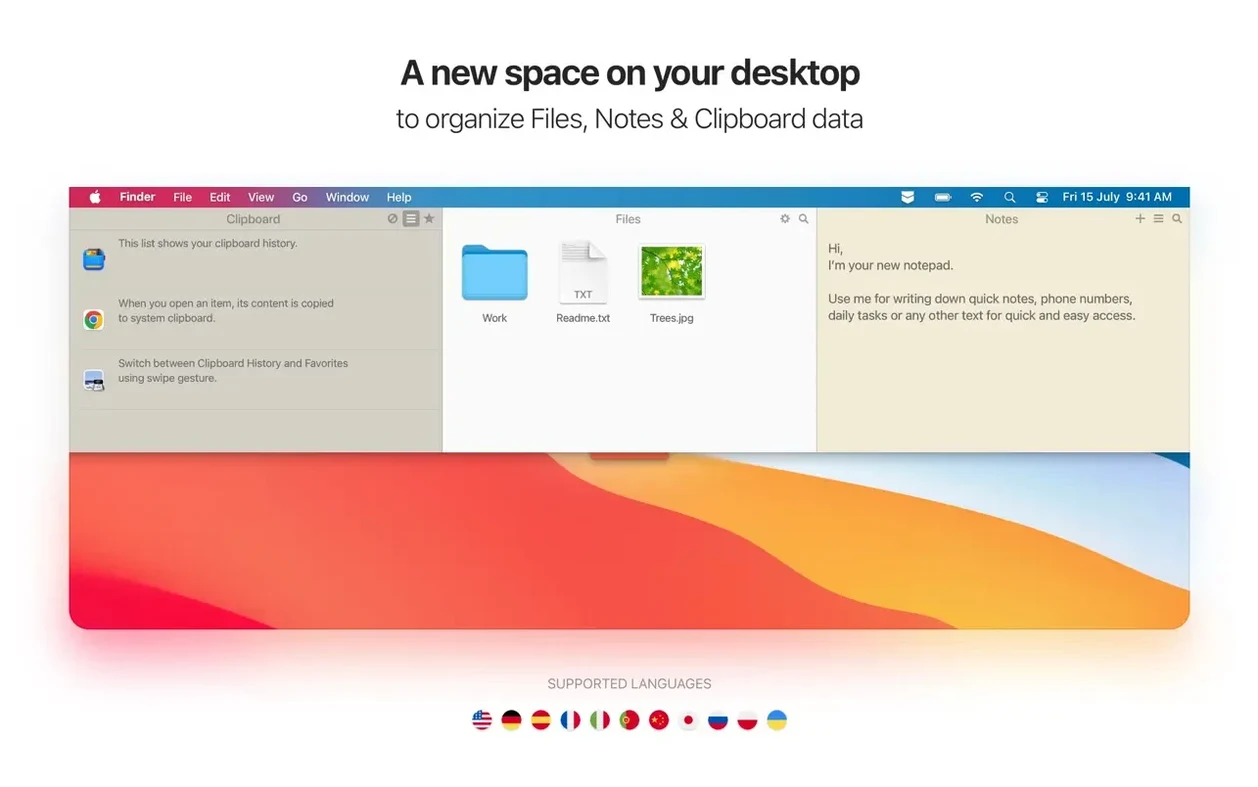
The modern Mac desktop is a paradox: you tidy it on Tuesday and by Thursday it's a snowdrift of screenshots, text clippings and half-written reminders you swore you'd need later.
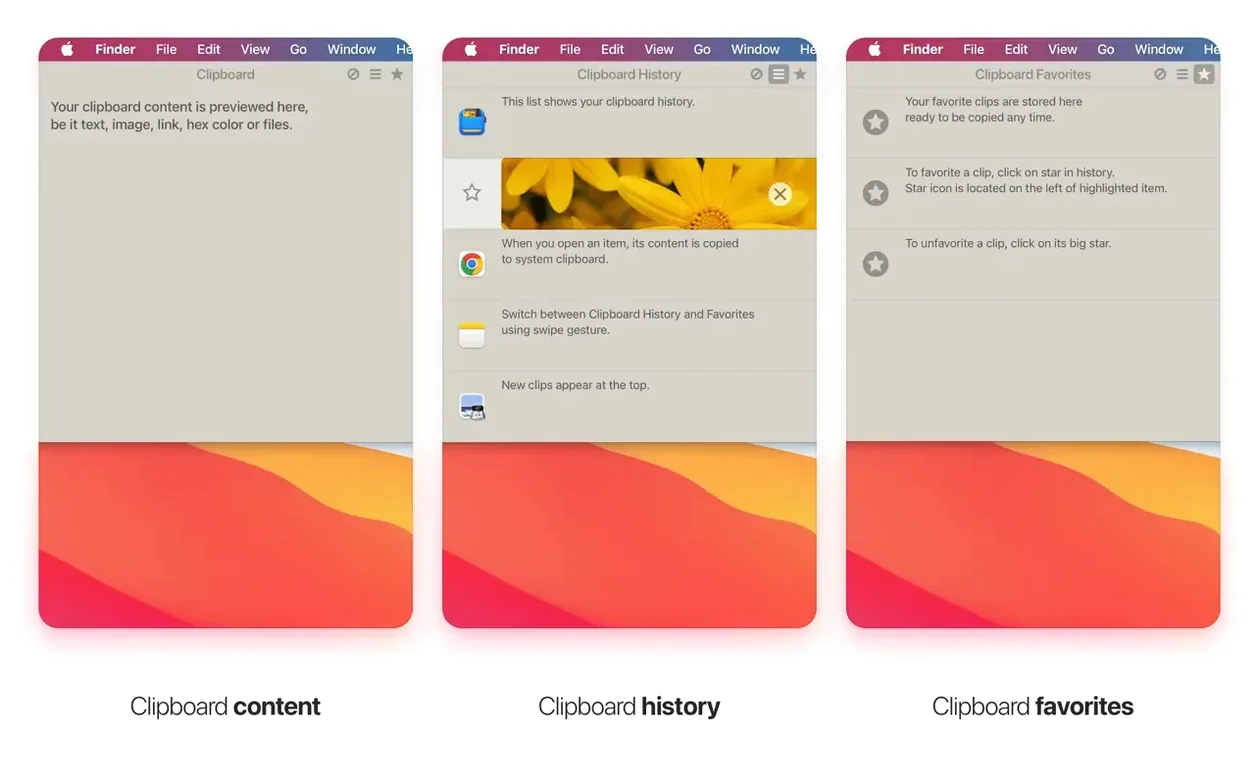
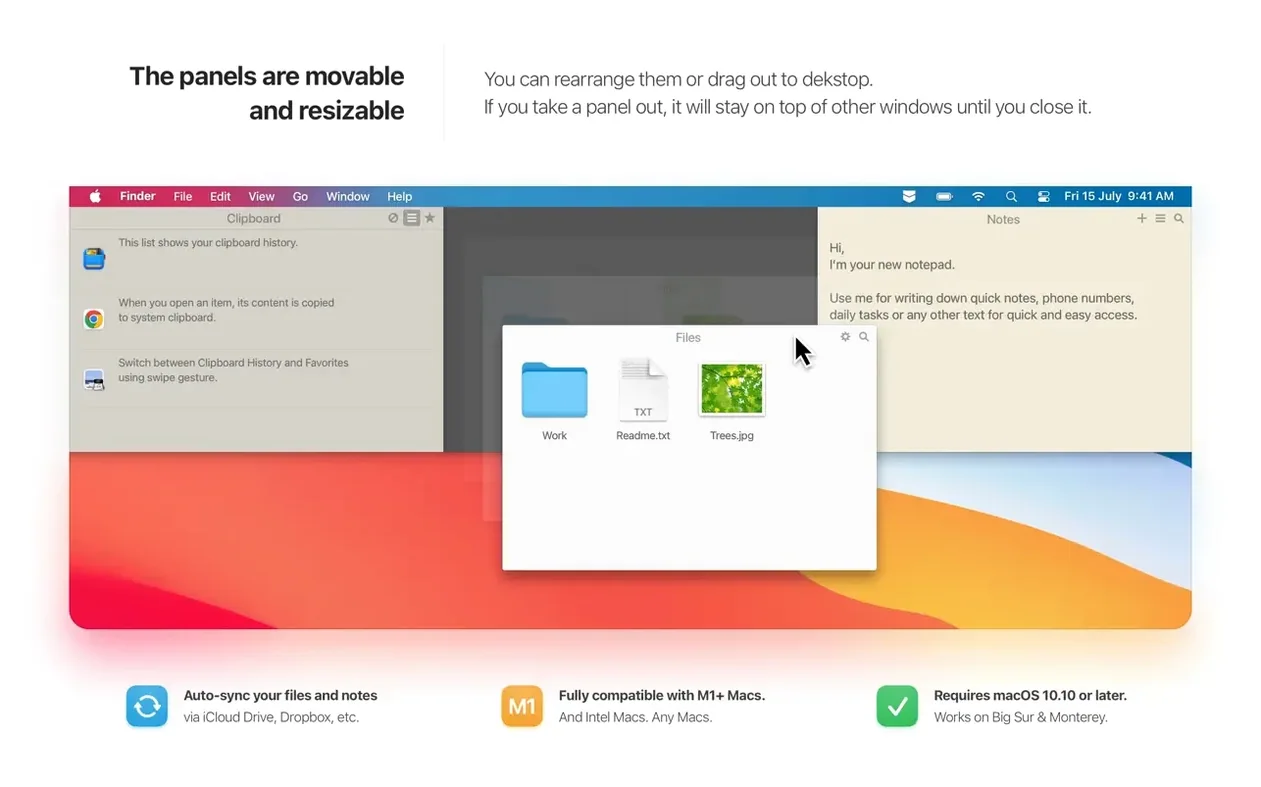
Clipboard history — a scrollable timeline of everything you've cut or copied, preserved even after a restart.
Sticky notes — plain-text cards that sit inside the app's fold-down panel, fully searchable without opening the Notes app.
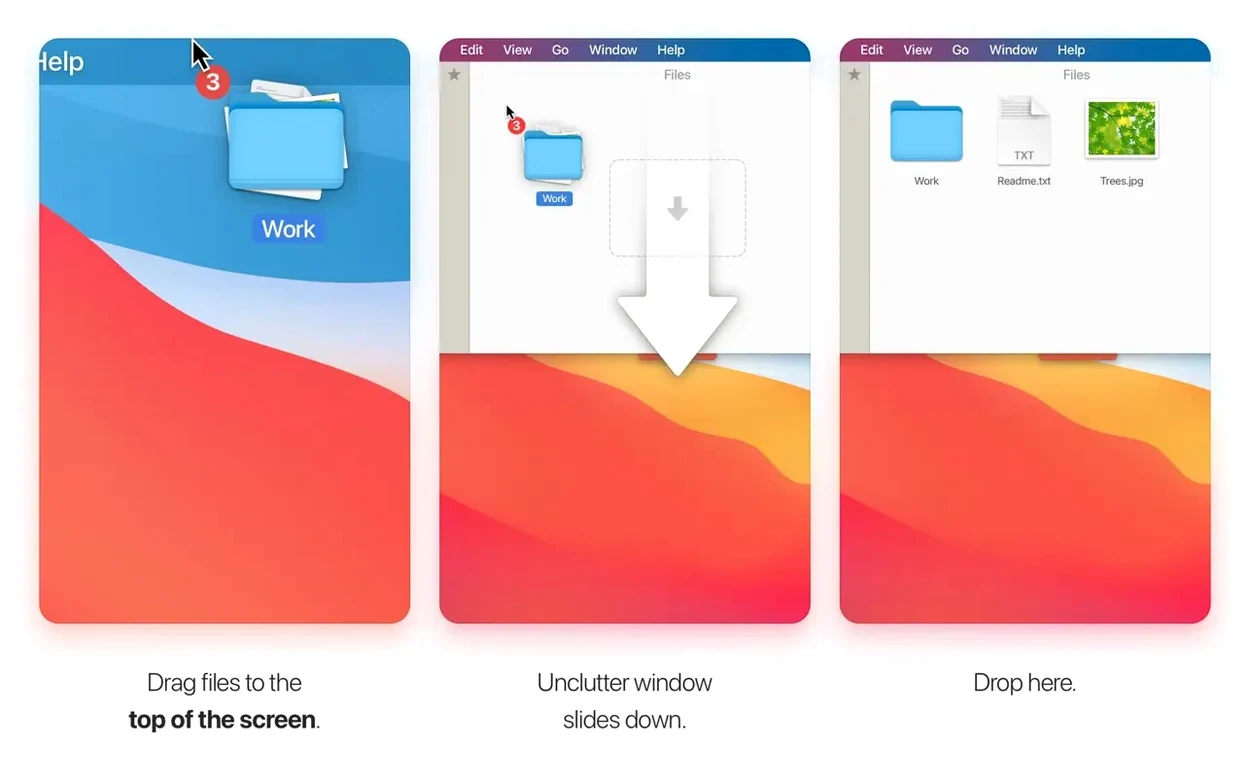
File shelf — a temporary holding area where you can drag documents, images or folders for quick access, without committing them to a permanent folder.
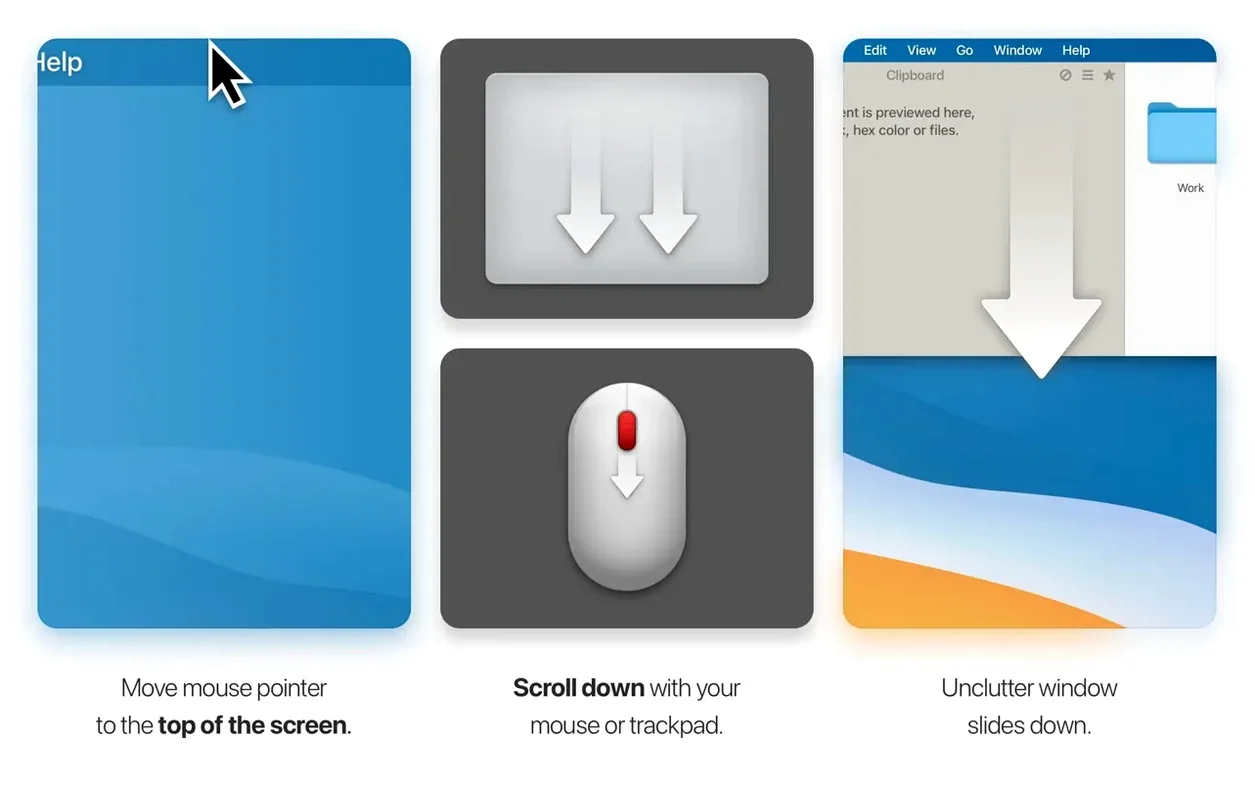
Picture this: you're pulling together a client presentation. First, you copy three paragraphs from a PDF brief, a hex colour code from a Slack message, and a quote from a browser tab. Each lands silently in Unclutter's clipboard history. You swipe down from the menu bar, scroll to the exact snippet you need, and paste it — no re-copying, no reopened files. Halfway through, the doorbell rings and you scribble a reminder to check the licensing terms for an image. You type it straight into a sticky note at the top of the same panel. Before you shut down for the evening, you drag the half-finished Keynote file onto the file shelf so it's the first thing you see tomorrow. One gesture, one panel, three different kinds of clutter — handled.
The clipboard history, incidentally, survives a full system reboot. A separate list holds permanently saved clips, so your frequently used boilerplate doesn't get pushed out by the morning's copy-paste frenzy. Full-text search runs across your sticky notes, and if you work across a desk and a laptop, Dropbox sync keeps everything aligned.
How Unclutter Compares With Similar Mac Apps
Put Unclutter next to a dedicated clipboard manager like Maccy and the difference is philosophical rather than technical. Maccy does one thing — clipboard history — with a lightweight, searchable popover that vanishes the moment you paste. It's brilliant minimalism. Unclutter trades that single-mindedness for breadth: clipboard history lives alongside notes and a file shelf, all inside one swipe-down panel. You gain a workspace; you lose the blink-and-it's-gone simplicity. If your day involves juggling reference material, temporary files and repeated snippets, Unclutter feels less like a utility and more like a quiet assistant who's been holding your things while you worked.
Then there's Yoink, which popularised the idea of a temporary shelf for dragged files. Yoink excels at smoothing out drag-and-drop between windows and full-screen spaces; its shelf slides out when you drag a file near the screen edge and tucks away when you drop. Unclutter's file shelf is less frictionless in that moment — you summon the panel manually — but it stores more than files. A screenshot, a clipped paragraph and a meeting note can sit next to each other, and they'll still be there after you restart the Mac. Yoink empties itself when you quit. Both approaches are deliberate: Yoink is a conveyor belt, Unclutter is a pigeonhole desk.
Compared with Apple's own Stickies, Unclutter's notes panel hides on demand, syncs across machines through Dropbox, and shares its home with your clipboard. Stickies are permanently visible unless you minimise them one by one; Unclutter's notes appear only when you want the whole panel. For people who like a spotless desktop but still think in sticky notes, that distinction matters more than it sounds.
Accessibility permission resets block the panel after macOS updates
The panel won't slide down from the menu bar. Nine times out of ten, it's because Unclutter's accessibility permissions have been bumped during a macOS update. Head to System Settings > Privacy & Security > Accessibility, look for Unclutter in the list, and toggle it off then on again. If the app was running during the update, a quick quit-and-relaunch after the toggle often kicks the panel back into life.
Files dragged onto the shelf sometimes freeze or refuse to open, especially when the storage folder sits inside iCloud Drive. The 2.2.16d build patched the worst of this, but cloud-synced folders can still introduce a lag if the Mac is mid-sync. A reliable workaround is to point Unclutter's storage to a local folder — ~/Documents/Unclutter works well — and let Dropbox sync handle the cross-machine part separately. That way the file shelf is always reading from a local path, and iCloud's file-priority system can't tie a knot in the plumbing.
Clipboard history missing after an unclutter mac download and fresh install is usually a case of the old database not being carried across. The app stores its history locally; if you're setting up on a new Mac without Dropbox sync enabled, the history starts clean. Before wiping an old Mac, enable sync once so the history travels with you, or manually copy the database from the Library folder.
Your passwords end up in the clipboard history by default
Does the clipboard history store passwords? By default it stores everything you copy, which means if you copy a password from a password manager, it lands in the history. You can exclude specific apps from the clipboard capture in Unclutter's preferences — adding 1Password, Keychain Access or your browser's password manager is a sensible five-second job after the first launch. The history is stored locally unless you opt into Dropbox sync.
Will the menu bar panel interfere with full-screen apps? The panel slides down from the top of the screen, so in a full-screen space it behaves exactly as it does on the desktop: it pushes the workspace down slightly while open. You can adjust the trigger zone's width and position in the settings so it doesn't compete with a full-screen app's menu bar hotspot. Some people set the trigger to the right-hand third of the screen and leave the left side free for notification centre.
What happens to my sticky notes if I uninstall the app? The notes live as plain-text files inside Unclutter's storage folder, so even if you remove the application without exporting, you can still retrieve them from ~/Library/Application Support/Unclutter. They won't vanish just because the app disappears.
Version 2.2.18 ships a single, satisfying fix: the Settings window no longer appears out of the blue when you haven't asked for it.
- macOS: 10.13 or later
- Architecture: Intel 64-bit
Questions I keep hearing
Does Unclutter lose my clipboard history when I restart my Mac?
No — clipboard history is preserved across app restarts and full system reboots, so your copied items stay available until you clear them.
Questions from the class 0
Sign in or join the class to ask a question.
Nobody has asked anything yet. If you have used it on a real job, say what the file did.
Also on the Mac Apps shelf
The whole Mac Apps shelf Typeface
Browses a visual grid of every installed font and compares them side by side.
Typeface
Browses a visual grid of every installed font and compares them side by side.
 Vector Magic
Converts bitmap images into clean vector graphics you can scale forever.
Vector Magic
Converts bitmap images into clean vector graphics you can scale forever.
 Tuxera NTFS
Lets your Mac read and write Windows-formatted drives without a second thought.
Tuxera NTFS
Lets your Mac read and write Windows-formatted drives without a second thought.
 TunesKit iPhone Unlocker
Removes a forgotten screen passcode or an Apple ID from a locked iPhone.
TunesKit iPhone Unlocker
Removes a forgotten screen passcode or an Apple ID from a locked iPhone.
 VideoByte BD-DVD Ripper
Copies your discs into watchable files for phones, tablets, and media servers.
VideoByte BD-DVD Ripper
Copies your discs into watchable files for phones, tablets, and media servers.
 Trimma
Trims the start or end off a video without opening a library or creating a project.
Trimma
Trims the start or end off a video without opening a library or creating a project.
 VideoProc Converter AI
Bundles video conversion, AI upscaling, compression, and downloading into one toolkit.
VideoProc Converter AI
Bundles video conversion, AI upscaling, compression, and downloading into one toolkit.
 Transmit
Moves files between your Mac and remote servers through a fast, dual-pane browser.
Transmit
Moves files between your Mac and remote servers through a fast, dual-pane browser.