 ASPNetWorld

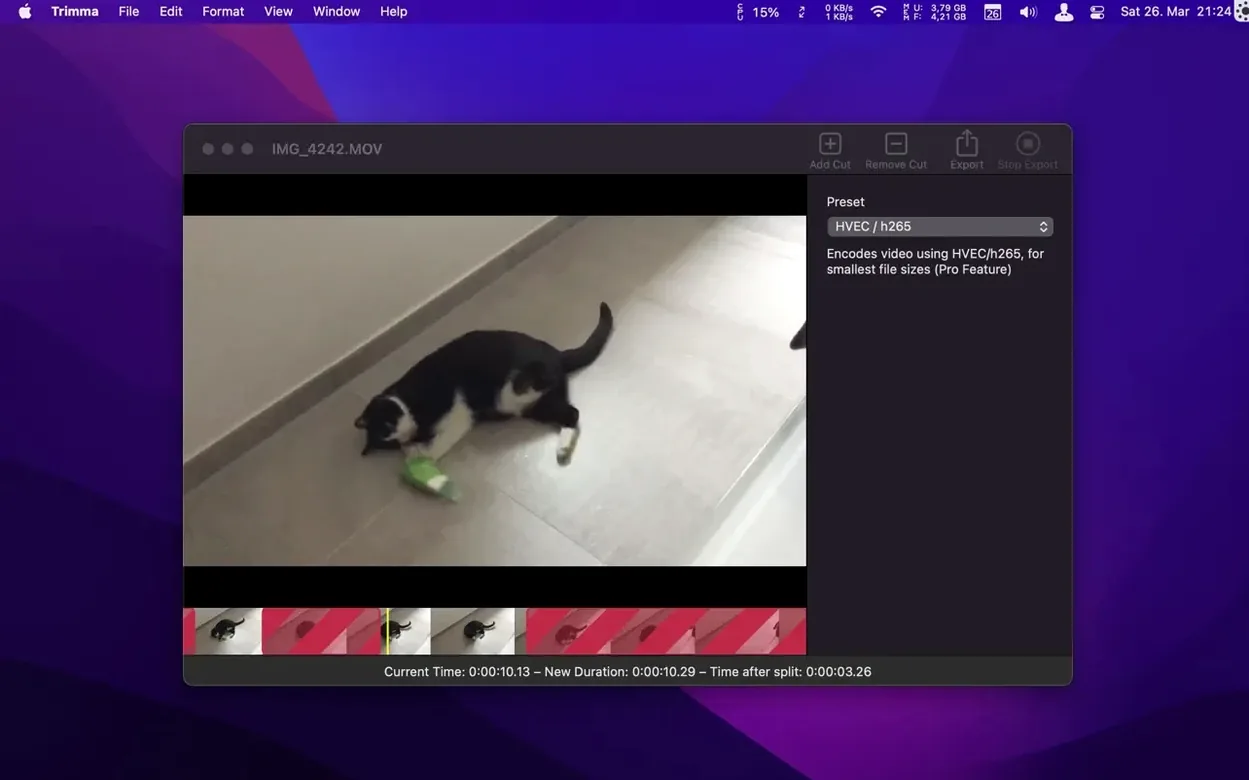
If you've ever opened iMovie just to trim the first ten seconds off a clip, you'll know the feeling. You wait for the library to load, create a new project, import the file, and by the time you've made a single cut, you've spent longer managing the tool than doing the work. Trimma takes the opposite approach. It opens a video file directly, lets you set new start and end points, and saves the result without ever asking you to name a project or choose a library location.
Trimming a clip from start to finish
Once you drop a video into the window, the whole timeline appears as a single strip. You drag the orange handles to roughly where you want the cut, then refine the position with the left and right cursor keys. Each tap nudges the playhead by a single frame — a detail that matters when you're trying to land exactly on a beat or a scene change. The new frame counter in the details panel, added in the current version, tells you precisely which frame you're on while you scrub, so you're never guessing.
When you're happy with the selection, you choose how to export. The passthrough option copies the original video and audio streams without re-encoding, which keeps the quality identical and finishes in seconds. If you need a smaller file, the HEVC export uses H.265 encoding to compress efficiently, though that route takes longer because the whole stream gets reprocessed.
What sits behind the simple window
Underneath, Trimma is built for Intel Macs running macOS 10.14.6 or later. The developer states it collects no data, and the latest build fixes a compatibility hiccup where exported MP4 files wouldn't play nicely in QuickTime Player. It's a focused tool — no timeline tracks, no transitions, no colour grading — just a clean way to trim a video and carry on with your day.
When you open a large file — say an hour of 4K footage from a screen recording or a camera — the timeline appears almost instantly because the app doesn't transcode anything in the background. On an Intel MacBook Pro with 16 GB of RAM, scrubbing through that clip stays fluid, and the passthrough export for a cut-down segment finishes before the Finder has finished copying a similarly sized file. You feel the absence of a project engine: there's no background render, no waveform analysis that pins the CPU, and the window stays responsive even when QuickTime Player would still be buffering the same file.
Encoding with HEVC is a different story — that puts the processor to work — but the progress bar moves steadily and the app doesn't lock up while it churns. Memory use stays modest, typically hovering under 300 MB even with an hour-long clip open, which means you can leave Trimma running alongside a heavier editor without the system swapping.
Editors leaning on it as the fast scissors before Resolve or Final Cut
Editors who work with trimma mac download tend to fall into two camps. The first are people who do their serious assembly in DaVinci Resolve or Final Cut Pro but don't want to launch a full suite just to snip a clip for a client preview. The second are screen-casters and tutorial makers who record long takes and need to chop dead air from the start and end before uploading — a job that's over in three keystrokes here. It also clicks with anyone who handles drone or action-camera rushes, where each file holds a single continuous shot and the only edit is trimming.
If you're building a sequence with multiple clips, titles or audio layers, this isn't your tool — and the developer doesn't pretend otherwise. But for the narrow task of removing unwanted sections without touching the encoding quality, the speed gain over a conventional editor is hard to overstate. A video file lands on your desktop, you open it, you set your cuts, you export, and the whole operation takes less time than the coffee you'd have poured while waiting for a timeline-based app to initialise.
Version 2.2.2064 tightens up trimming precision and squashes a playback quirk. Here's what changed:
- A frame counter now appears in the details panel while you scrub or edit, so you know exactly where the playhead sits.
- Exported MP4 files were not fully compatible with QuickTime Player — that's been sorted out.
- macOS 10.14.6 or newer
- Intel 64-bit processor
Questions I keep hearing
Does Trimma re-encode the video when I export?
Not if you use the passthrough export mode, which copies the original encoding; the HEVC option will re-encode using H.265 compression.
Questions from the class 0
Sign in or join the class to ask a question.
Nobody has asked anything yet. If you have used it on a real job, say what the file did.
Also on the Mac Apps shelf
The whole Mac Apps shelf Transmit
Moves files between your Mac and remote servers through a fast, dual-pane browser.
Transmit
Moves files between your Mac and remote servers through a fast, dual-pane browser.
 TunesKit iPhone Unlocker
Removes a forgotten screen passcode or an Apple ID from a locked iPhone.
TunesKit iPhone Unlocker
Removes a forgotten screen passcode or an Apple ID from a locked iPhone.
 Tuxera NTFS
Lets your Mac read and write Windows-formatted drives without a second thought.
Tuxera NTFS
Lets your Mac read and write Windows-formatted drives without a second thought.
 TouchDesigner
Assembles real-time visuals by wiring together operators for points, textures and geometry.
TouchDesigner
Assembles real-time visuals by wiring together operators for points, textures and geometry.
 Typeface
Browses a visual grid of every installed font and compares them side by side.
Typeface
Browses a visual grid of every installed font and compares them side by side.
 Topaz Video AI
Reconstructs watchable detail from old, low-quality video footage frame by frame.
Topaz Video AI
Reconstructs watchable detail from old, low-quality video footage frame by frame.
 Topaz Photo AI
Analyses a photo and applies the exact sharpening and noise reduction it actually needs.
Topaz Photo AI
Analyses a photo and applies the exact sharpening and noise reduction it actually needs.
 Topaz Gigapixel AI
Enlarges low-resolution images while keeping faces and textures crisp and natural.
Topaz Gigapixel AI
Enlarges low-resolution images while keeping faces and textures crisp and natural.