 ASPNetWorld

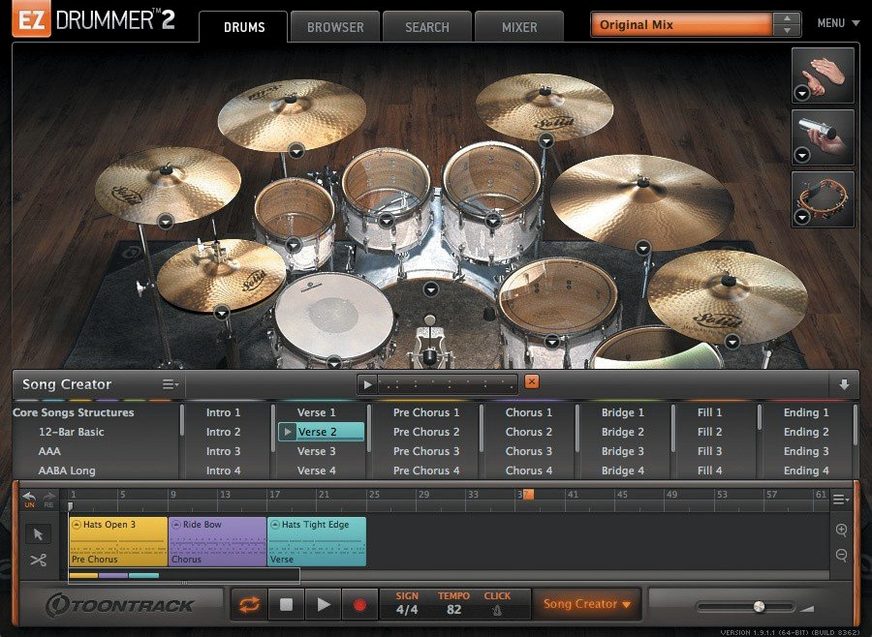
Writing a song when you don't have a drummer on tap often means staring at an empty track, tapping out a beat on your desk, and wondering how to turn a vague rhythm in your head into something with real weight. EZdrummer 3 is built specifically for that moment — it's the songwriter-focused end of Toontrack's drum software family, designed to get you from a rough idea to a finished, human-sounding drum track without ever needing to leave your project or touch a manual.
Song Creator builds full arrangements from a single loop
- Songwriters who need a full drum arrangement from a simple idea. The Song Creator can take a single MIDI or audio loop and build an intro, verse, chorus and bridge around it, while Bandmate listens to any audio or MIDI you drag in and suggests matching grooves — a bit like a drummer who actually plays what you were imagining.
- Shaping a performance after the fact. Edit Play Style lets you nudge a groove's feel in real time — shifting from brushes to a heavy backbeat, for instance — without digging through menus.
- Finding beats intuitively. Tap2Find lets you tap a rhythm on your keyboard or a pad, then searches the library for grooves that match, saving you from scrolling through endless names like "Funky Rock 07."
Manual note-by-note programming takes a back seat to grooves
- The workflow is centred on provided groove libraries and algorithmic generation; the built-in Grid Editor is there for writing patterns from scratch, but if you want deep, note-by-note programming as your primary method, you might find the toolset nudges you toward its ready-made content first.
- While you can star favourites and drag grooves straight to the song track for cutting, copying and rearranging, building an entirely bespoke track from a blank canvas still takes a bit of commitment.
How EZdrummer 3 fits into a Mac-based setup
EZdrummer 3 is happy running as a standalone application, but it really earns its keep when it slots into a host like Logic Pro, Ableton Live, Cubase or Studio One. In AU, VST3 and AAX formats, it shows up as a stereo instrument track, and you can route each drum mic — kick, snare top, overheads, room and so on — to separate auxiliary channels in your DAW. That matters the moment you want to treat the snare with a different reverb to the toms, or squeeze the room mics with a compressor while leaving the close mics untouched. The DAW's own mixer effectively becomes an extension of EZdrummer's internal mixer, so you are not locked into the onboard effects if you have favourite third‑party plug‑ins you already trust.
On the macOS side, the software plays neatly with Core Audio and Core MIDI. If you plug in an electronic kit or a pad controller, it appears in EZdrummer's MIDI settings without any driver wrestling — the class‑compliant magic of macOS does the heavy lifting. You can also drag a stereo drum mix straight from EZdrummer's interface onto a Finder folder or a desktop, which generates a bounced audio file in one move. Less obvious but surprisingly useful: the Tap2Find window accepts input from the MacBook's built‑in microphone if you literally tap a rhythm on the desk, though a pad or a key gives cleaner results.
Tame the default velocity curve before you lay down a beat
Out of the box, EZdrummer 3 is tuned for instant gratification — load a kit, pick a groove, press play. But a handful of tweaks tucked into the preferences and the mixer pay off quickly.
Velocity curve. The default response is designed for general‑purpose MIDI controllers, so if you are playing parts from a weighted keyboard or a mesh‑head electronic kit, your soft hits may barely register while hard hits slam at maximum velocity. Open the Settings pane, find the velocity curve graph, and play a few ghost notes and accents while watching the input meter. A gentle S‑curve often brings the quiet articulations into earshot without making accents sound like gunshots.
Sample rate and buffer. In standalone mode, EZdrummer 3 defaults to whatever the system suggests, but if you are tracking live MIDI drum parts alongside it, set the buffer to 128 samples or lower; the direct feel beats any subtle sound‑quality gain from a high buffer. When mixing, push it back up to 512 or 1024 to give the Mac breathing room.
Mixer routing preset. Before you start a serious project, save a mixer preset with your preferred multichannel routing — kick on output 1‑2, snare on 3‑4, hi‑hat and overheads on 5‑6 and so on. Every future song then inherits a routing that your DAW template already recognises, which spares you from reassigning a dozen aux tracks every time inspiration strikes.
Library paths for expansions. If you have EZX or SDX libraries on an external SSD, point EZdrummer to that location in the Settings > Libraries tab. The application indexes the grooves and samples on launch, and a fast Thunderbolt drive trims the load time noticeably compared with a spinning disk.
First‑week practical tips
The first few days with EZdrummer 3 tend to feel like standing in a well‑stocked drum shop — you know the sounds are good, but the sheer volume of grooves can be paralysing. A handful of habits make the tool settle into your workflow faster.
Start with Bandmate, not the browser. Drag a rough guitar or piano part straight onto the Bandmate window before you open the groove library. Bandmate analyses the transient timing and suggests a short list of patterns that actually fit the feel of your take. That list is far smaller than the full library, which stops you disappearing down a rabbit hole of auditioning 200 shuffles that are fundamentally wrong for the song.
Star aggressively. The groove browser lets you mark any pattern with a star, and a smart first‑week habit is to create a shortlist — twenty or thirty grooves across different styles — that you can filter with one click. Later, when you are shaping a bridge section and need a half‑time feel fast, you scroll through your starred collection rather than the entire factory set.
Use the Song Creator as a sketchpad, not a verdict. Feed the Song Creator a one‑bar MIDI idea or an audio snippet early, even if you suspect the result will be too busy or too sparse. The generated arrangement populates the song track with labelled sections — intro, verse, chorus — that you can cut up, move and replace. It is quicker to edit a rough draft than to build every section from empty blocks.
Lock the kit when switching grooves. By default, browsing a groove from a different library can swap the drum kit to match it. In the Browser menu, tick Lock Kit if you want to hear everything through the same seven‑kit palette you started with. It keeps the sonic character consistent while you hunt for the right pattern.
Touch the Edit Play Style faders early. Many people treat the Play Style controls — complexity, velocity spread, amount of ghost notes — as polishing tools for a finished track. They are actually more useful while you are still hunting for the right vibe. Pull the complexity slider down to hear the skeleton of a groove; push it up to see if more elaborate fills spark a new section idea. It is a low‑effort way to audition variations without opening the Grid Editor at all.
How EZdrummer 3 compares with similar Mac drum software
EZdrummer 3 sits in a part of the market where several capable drum instruments compete for the same songwriter's attention. Three names come up repeatedly: Addictive Drums 2 from XLN Audio, BFD Player (the free‑form cousin of BFD3), and Native Instruments Studio Drummer. None are direct clones, and each pulls in a slightly different direction.
Addictive Drums 2 excels at mix‑ready, processed drum sounds that sit in a pop or rock track with minimal tweaking. Its kit‑piece swapping system — "snap" a different snare into place — feels tactile, and the effects rack is deeper than EZdrummer's onboard mixer. What it does not offer is a Bandmate‑style listening tool or a Song Creator; Addictive Drums expects you to browse MIDI packs or write your own parts from bar one. For a songwriter who wants the software to make the first move, EZdrummer 3 is a more generous collaborator. For a mixer who wants fine control over every drum channel's saturation and compression inside the instrument itself, Addictive Drums has the edge.
BFD Player is a streamlined entry into the famously deep BFD ecosystem and ships with a generous free library. Its biggest strength is acoustic realism — the room mics, the bleed between drums, the velocity layers all tip toward a studio‑recording mindset. BFD Player's groove library is serviceable but not as browsable or as "suggestive" as EZdrummer's, and there is no equivalent of Tap2Find. It also lacks the structural tools like Song Creator and Bandmate. Think of BFD Player as a beautifully recorded drum kit waiting for a skilled programmer; EZdrummer 3 is that same kit, but with a drummer who listens to your demo and starts playing along before you have finished humming the melody.
Studio Drummer (part of Native Instruments Komplete) brings three meticulously sampled acoustic kits — Session, Stadium and Garage — plus a deep mixer with tape saturation, transient shaping and convolution reverb. The sound is superb, particularly for rock and indie. However, its groove library and browsing experience feel like a Kontakt instrument from an earlier era: functional but not playful. There is no audio‑input analysis, no algorithmic song creation and no tap‑to‑search. Studio Drummer suits someone who already owns Komplete and is comfortable building patterns in their DAW's piano roll. EZdrummer 3 suits someone who wants the drums to come together while the songwriting momentum is still hot.
Native Apple silicon keeps RAM around 1.5 GB with a full kit
EZdrummer 3 loads as a native Apple‑silicon binary, and on an M‑series Mac the difference is tangible. A full seven‑kit library with three room faders active settles into about 1.2–1.8 GB of RAM, which is modest by modern sample‑library standards. The initial load of a new kit takes roughly 4–6 seconds from an internal SSD; from an external Thunderbolt drive, it edges closer to 8–10 seconds as the application verifies the library path. Once the samples are in memory, switching between presets within the same kit is instantaneous.
In daily use, the application behaves well inside Logic Pro and Ableton Live. CPU load from the onboard effects — a modest channel strip per mic plus two send effects — barely registers on an M1 or M2 chip even at a 64‑sample buffer. The heavier lifting happens when you add third‑party plug‑ins on the routed outputs, but that is your DAW's business, not EZdrummer's. The standalone application is similarly frugal; it idles at around 3–5% CPU on an M1 MacBook Air and stays there during playback of a moderate‑density groove.
Stability across version 3.1.2 has been solid. The fixes in this update addressed two specific gremlins: hi‑hat pedal CC data that could drop out during song‑track recording, and a mixer quirk where toggling Solo or Mute would occasionally forget the opposite recall state. Neither issue was catastrophic, but both could interrupt a flow state when you were deep in an arrangement. In the current build, the song‑track recording captures continuous controller data reliably, and the mixer's Solo and Mute buttons behave in the predictable "last‑clicked wins" fashion you expect from any console.
One practical observation: if you use a large collection of third‑party EZX expansions, the first launch after installing them takes noticeably longer while the database indexes. Subsequent launches are quick. Keeping expansions on a fast external drive rather than the internal disk does not hurt performance once the samples are loaded, but it adds a few seconds to kit‑switching. For songwriters who move between a desktop Mac and a MacBook, leaving the core library on the internal drive and expansions on a portable SSD is a workable compromise — EZdrummer 3 handles split library locations without complaint.
Memory‑wise, the software releases RAM cleanly when you close a project or quit the standalone app, which was not always true of earlier generations of Toontrack instruments. On macOS 10.15 and later, it respects the system's memory‑pressure signals; if the OS needs resources for another application, EZdrummer 3 trims its sample cache rather than clinging to gigabytes of unused audio.
Version 3.1.2 is a housekeeping update that also brings the software's icons in line with the macOS Tahoe look, adds behind-the-scenes support for the Infinity Grid EZX expansion, and sorts a couple of workflow gremlins — MIDI CC recording on the song track now behaves itself, and toggling Solo or Mute in the mixer no longer risks wiping the opposite recall state.
- macOS 10.15 or later
- Runs natively on both Intel and Apple Silicon Macs
- Compatible with VST, AU and AAX hosts
Questions I keep hearing
Can EZdrummer 3 generate a full drum track on its own?
Yes — the Song Creator can take a single groove or audio idea and turn it into a complete song structure, and Bandmate suggests parts from anything you feed it.
Does the Grid Editor let you write your own patterns?
It does; you have a built-in editor for placing hits manually, so you're not limited to the supplied MIDI grooves.
How does Tap2Find work?
You tap a rhythm on a controller key or pad, and EZdrummer 3 searches its library for grooves with a matching feel, which is a quick way to find a beat you can hear but can't name.
Questions from the class 0
Sign in or join the class to ask a question.
Nobody has asked anything yet. If you have used it on a real job, say what the file did.
Also on the VST Plugins shelf
The whole VST Plugins shelf EZbass
Turns your chords into realistic basslines with fingerstyle detail and ghost notes.
EZbass
Turns your chords into realistic basslines with fingerstyle detail and ghost notes.
 FabFilter Total Bundle
Brings together a suite of tools to shape and polish your mixes.
FabFilter Total Bundle
Brings together a suite of tools to shape and polish your mixes.
 elastiquePitch
Shifts the pitch and formant of a recording independently without changing its length.
elastiquePitch
Shifts the pitch and formant of a recording independently without changing its length.
 Effectrix
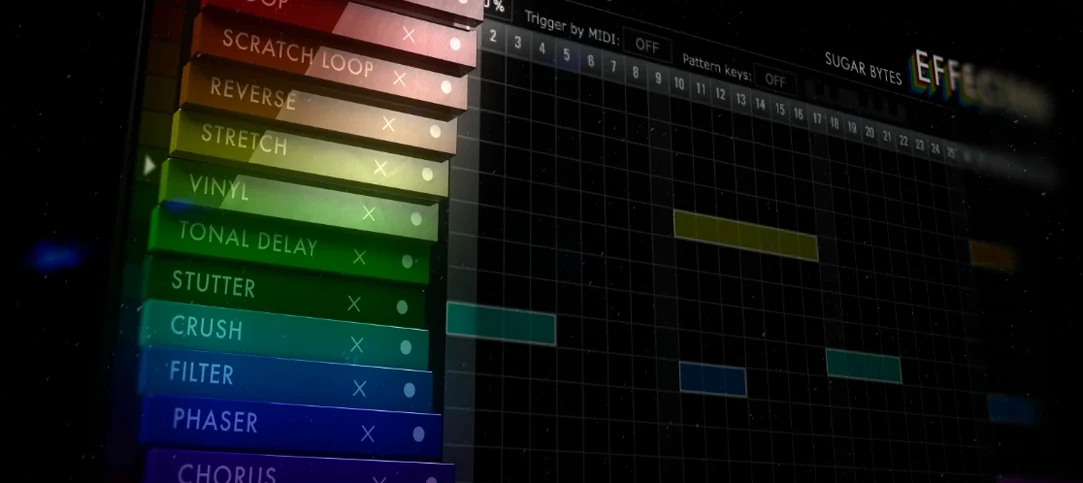
Paints sequenced audio effects across a step grid to transform a loop over time.
Effectrix
Paints sequenced audio effects across a step grid to transform a loop over time.
 Devious Machines Infiltrator
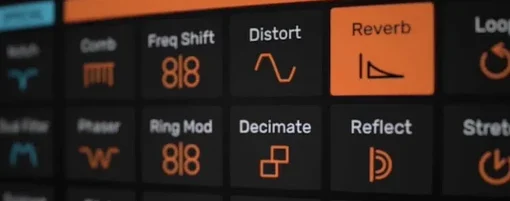
Sequences a chain of audio effects step by step from a single MIDI note.
Devious Machines Infiltrator
Sequences a chain of audio effects step by step from a single MIDI note.
 Cymatics VOXITY
Puts a lead vocal's EQ, compression and spatial sweetening inside a single plug-in.
Cymatics VOXITY
Puts a lead vocal's EQ, compression and spatial sweetening inside a single plug-in.
 Cymatics QUAKE
Synthesises weighty 808 bass sounds from scratch with built-in saturation circuits.
Cymatics QUAKE
Synthesises weighty 808 bass sounds from scratch with built-in saturation circuits.
 iZotope Insight
Displays detailed visual readings of loudness, spectrum and stereo spread while you mix.
iZotope Insight
Displays detailed visual readings of loudness, spectrum and stereo spread while you mix.